Choosing the wrong photo size is one of those mistakes that only reveals itself at the worst possible moment — when you’re holding a blurry, over-cropped print at the pharmacy counter, or when your product images get rejected during a marketplace listing upload. The size of a photo determines far more than its physical dimensions. It controls the aspect ratio, the minimum resolution required for sharp output, the framing options available to you, and whether the image looks crisp on a high-resolution screen or fuzzy and stretched.
This guide covers every standard photo size you’ll realistically need — from classic print dimensions and passport specifications to social media image sizes, e-commerce platform requirements, and the pixel math behind print resolution. Whether you’re printing family portraits, building a product catalog, or optimizing images for an Instagram campaign, this is the reference guide you’ll come back to.
Why Standard Photo Sizes Actually Matter
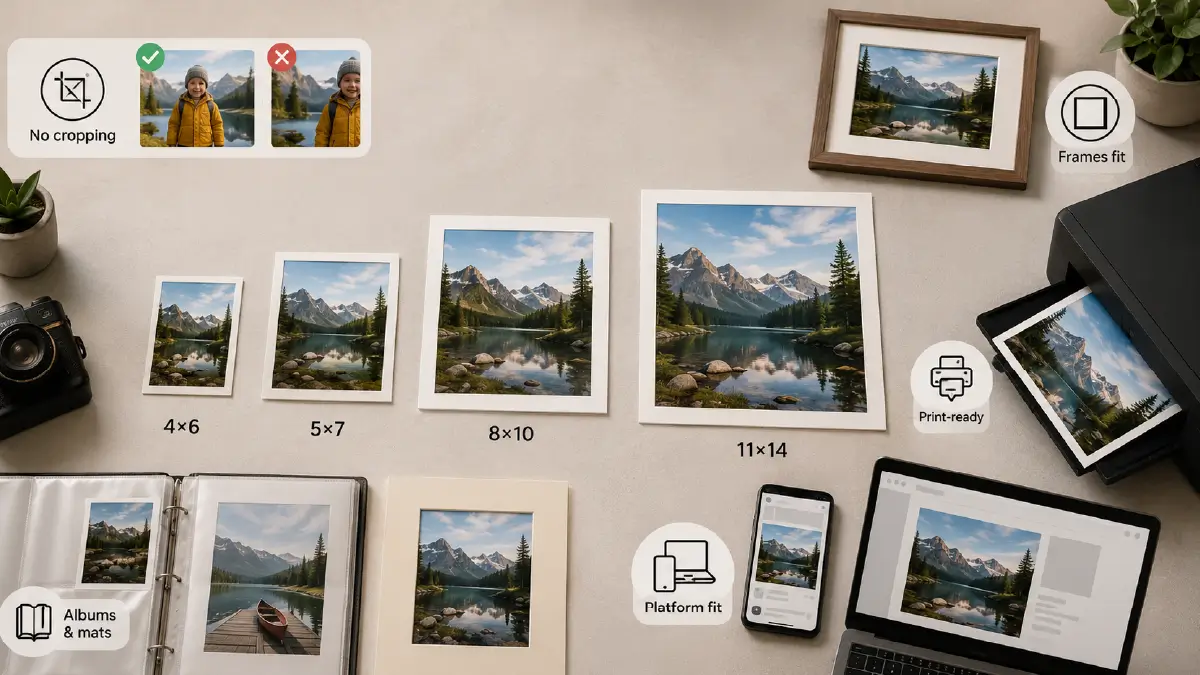
The word “standard” here is doing real work. Standard photo sizes are the dimensions that photographers, print labs, frame manufacturers, album makers, and digital platforms have all aligned around — which means equipment, materials, and workflows are all built to accommodate them efficiently.
When you work within standard sizes, you get predictable results. Frames fit without custom cutting. Print labs process orders faster with less back-and-forth. Album inserts and photo mats are available off the shelf. And you avoid the most common sizing mistake: choosing a dimension that forces your image into a different aspect ratio, cropping out critical parts of the composition that you didn’t intend to lose.
Beyond convenience, standard sizes also ensure:
-
No unintended cropping — your composition stays intact from screen to print
-
Consistent framing — standard frames, mats, and album sleeves are built for these exact dimensions
-
Sharp, print-ready output — when you know the final size upfront, you can ensure your source file has the right resolution from the start
-
Platform compatibility — digital platforms have specific size requirements, and using standard dimensions keeps you inside those specs automatically
Standard Photo Print Sizes — Full Reference
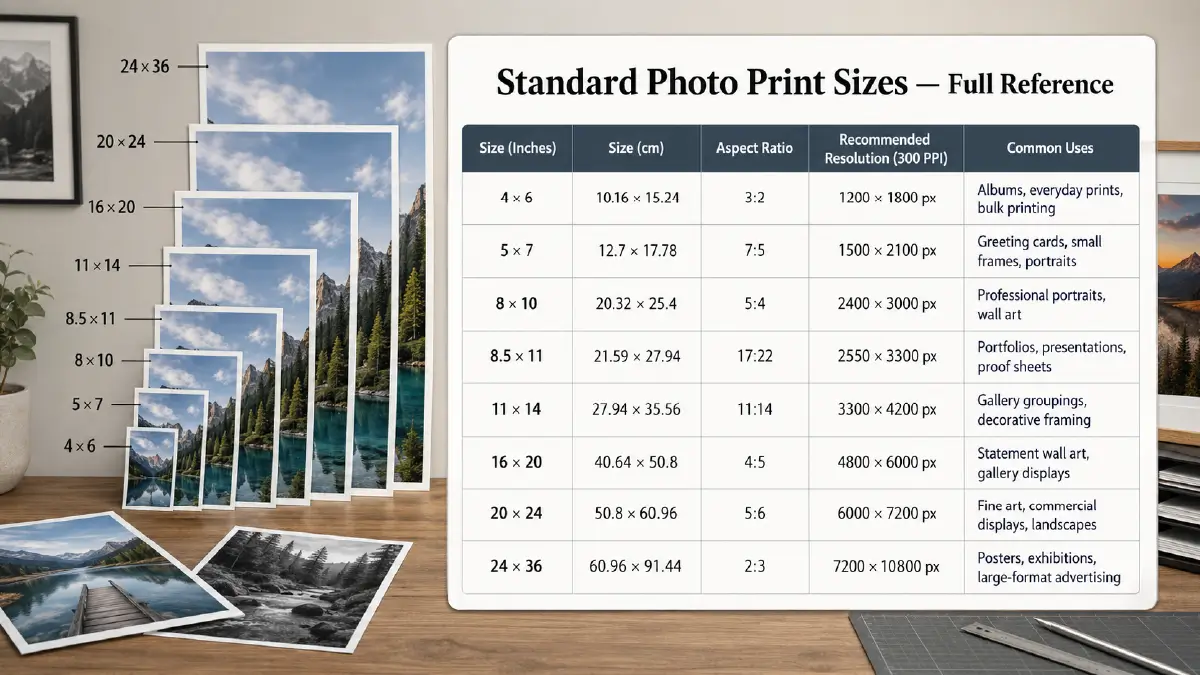
These are the universally recognized print dimensions used by photographers, print labs, studios, and frame manufacturers worldwide. Each size has its own aspect ratio, typical use case, and recommended resolution.
| Size (Inches) | Size (cm) | Aspect Ratio | Recommended Resolution (300 PPI) | Common Uses |
|---|---|---|---|---|
| 4 × 6 | 10.16 × 15.24 | 3:2 | 1200 × 1800 px | Albums, everyday prints, bulk printing |
| 5 × 7 | 12.7 × 17.78 | 7:5 | 1500 × 2100 px | Greeting cards, small frames, portraits |
| 8 × 10 | 20.32 × 25.4 | 5:4 | 2400 × 3000 px | Professional portraits, wall art |
| 8.5 × 11 | 21.59 × 27.94 | 17:22 | 2550 × 3300 px | Portfolios, presentations, proof sheets |
| 11 × 14 | 27.94 × 35.56 | 11:14 | 3300 × 4200 px | Gallery groupings, decorative framing |
| 16 × 20 | 40.64 × 50.8 | 4:5 | 4800 × 6000 px | Statement wall art, gallery displays |
| 20 × 24 | 50.8 × 60.96 | 5:6 | 6000 × 7200 px | Fine art, commercial displays, landscapes |
| 24 × 36 | 60.96 × 91.44 | 2:3 | 7200 × 10800 px | Posters, exhibitions, large-format advertising |
Notes on Individual Sizes
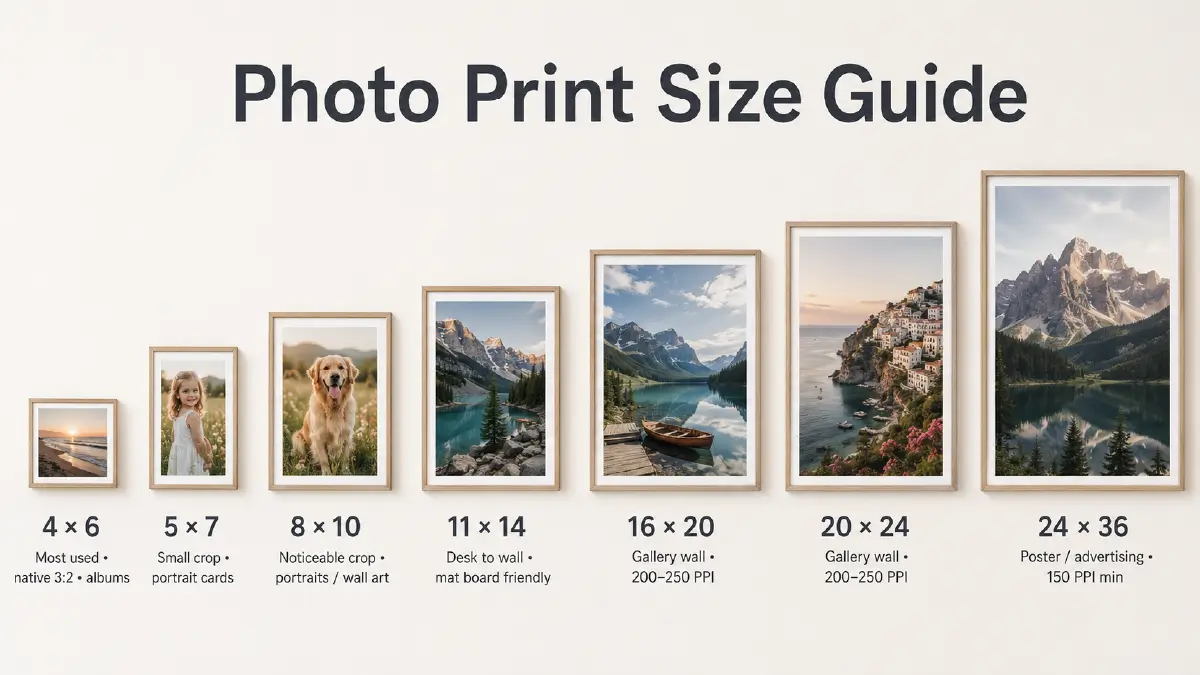
4 × 6 inches is the most widely used print size globally — and for good reason. It matches the native 3:2 aspect ratio of most DSLR and mirrorless cameras, which means minimal to no cropping is required. It’s affordable for bulk printing, fits standard album sleeves, and is compatible with nearly every home and lab printer.
5 × 7 inches requires a small amount of cropping from a native 3:2 camera image. It works beautifully for portrait cards, gift prints, and small decorative frames — the slightly taller proportions give portraits a more elegant, formal feel than a 4×6.
8 × 10 inches is the go-to size for professional portraits and framed wall art. Its 5:4 aspect ratio requires noticeable cropping from standard camera files, so it’s worth previewing the crop before ordering — particularly for portraits where head placement matters.
11 × 14 inches is the smallest size that transitions comfortably from a desk frame to a wall display. It works well with standard mat boards that reduce the visible image area while adding visual presence to the overall piece.
16 × 20 and 20 × 24 inches are the standard choices for gallery-style wall installations. These sizes are typically viewed from a distance of several feet, which means the effective resolution requirement is slightly lower — 200–250 PPI is often sufficient rather than the full 300 PPI needed for close-up viewing.
24 × 36 inches is the standard large-format print size for posters, trade show graphics, and commercial advertising displays. Images at this size are almost always viewed from a distance, making 150 PPI the practical minimum for acceptable print sharpness.
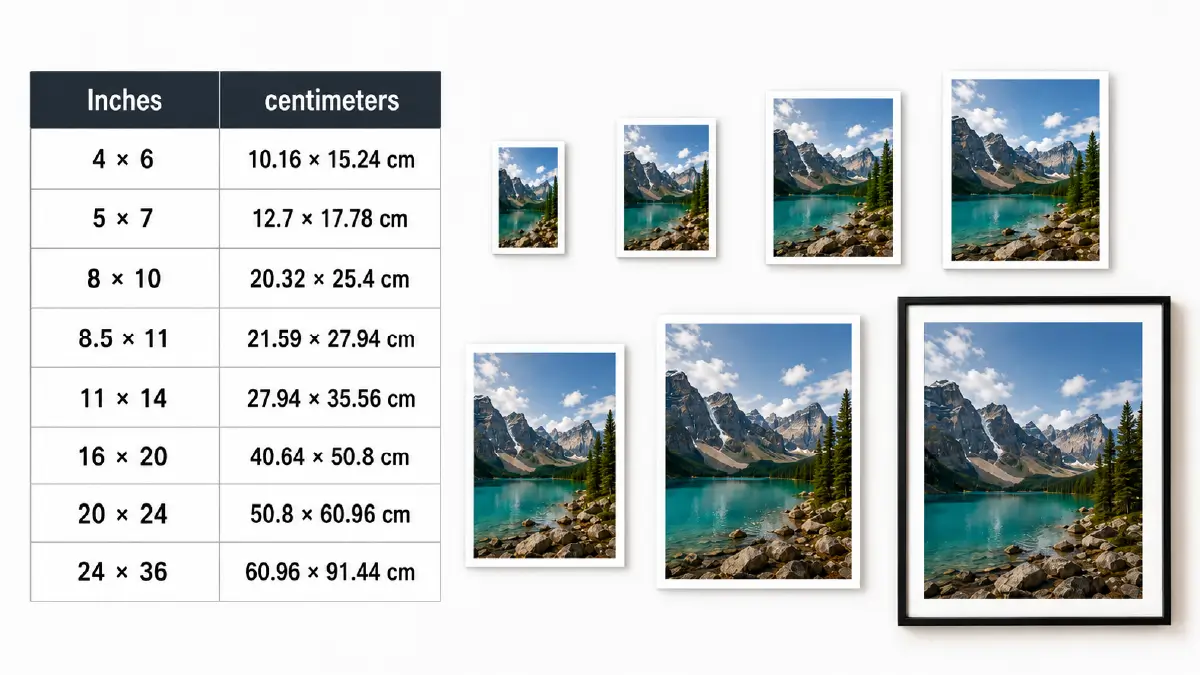
Metric Conversion of Standard Photo Sizes: Have a Quick Glance
| Inches | centimeters |
| 4 × 6 | 10.16 × 15.24 cm |
| 5 × 7 | 12.7 × 17.78 cm |
| 8 × 10 | 20.32 × 25.4 cm |
| 8.5 × 11 | 21.59 × 27.94 cm |
| 11 × 14 | 27.94 × 35.56 cm |
| 16 × 20 | 40.64 × 50.8 cm |
| 20 × 24 | 50.8 × 60.96 cm |
| 24 × 36 | 60.96 × 91.44 cm |
Aspect Ratios — Why They Matter More Than the Size Itself
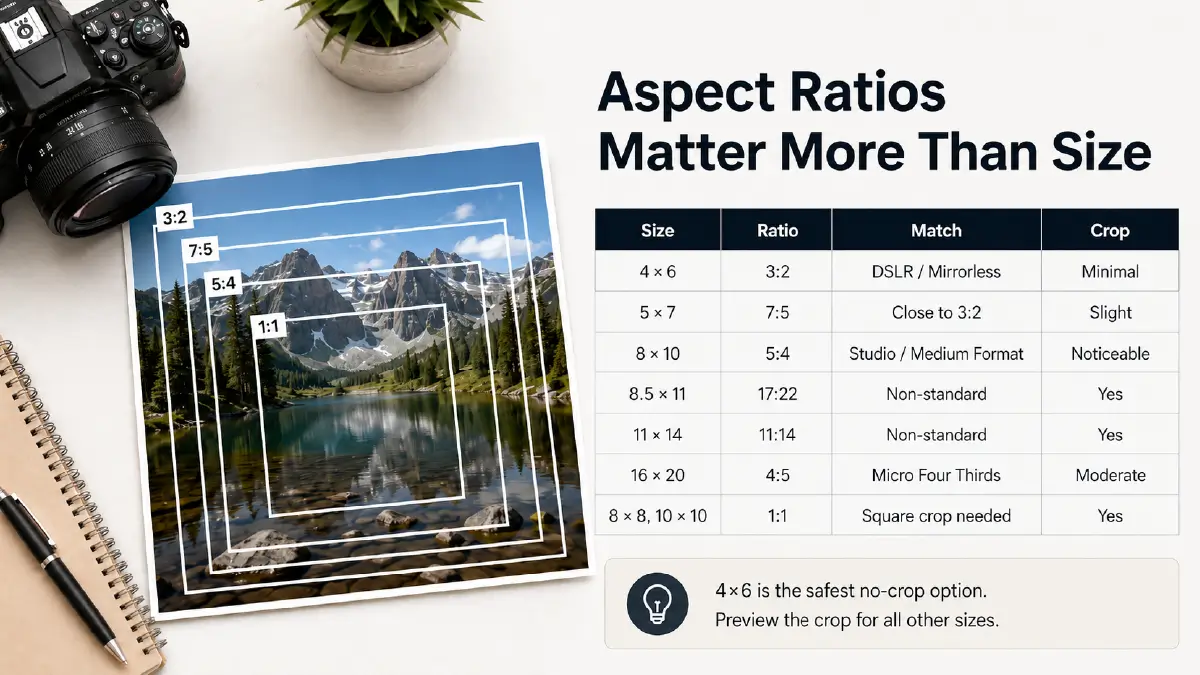
The aspect ratio is the proportional relationship between a photo’s width and height. It’s the number that determines how much cropping happens when you move from one size to another. Many people choose a print size without checking whether it matches their camera’s native output — then are surprised when the print lab crops off the top of a subject’s head or cuts the edges of a landscape shot.
Here’s how the most common print sizes relate to each other in aspect ratio terms:
| Print Size | Aspect Ratio | Camera Match | Cropping Required? |
|---|---|---|---|
| 4 × 6 | 3:2 | DSLR / Mirrorless | Minimal |
| 5 × 7 | 7:5 | Close to 3:2 | Slight |
| 8 × 10 | 5:4 | Studio / Medium Format | Noticeable |
| 8.5 × 11 | 17:22 | Non-standard | Yes |
| 11 × 14 | 11:14 | Non-standard | Yes |
| 16 × 20 | 4:5 | Micro Four Thirds | Moderate |
| 8 × 8, 10 × 10 | 1:1 | Square crop needed | Yes |
The practical takeaway: if you’re printing from a DSLR or mirrorless camera and want zero cropping, 4×6 is your safest option. For any other size, preview the crop in your editing software before ordering — and if a subject’s positioning is tight to the frame edge, leave intentional breathing room when shooting.
Resolution and PPI — Getting the Math Right
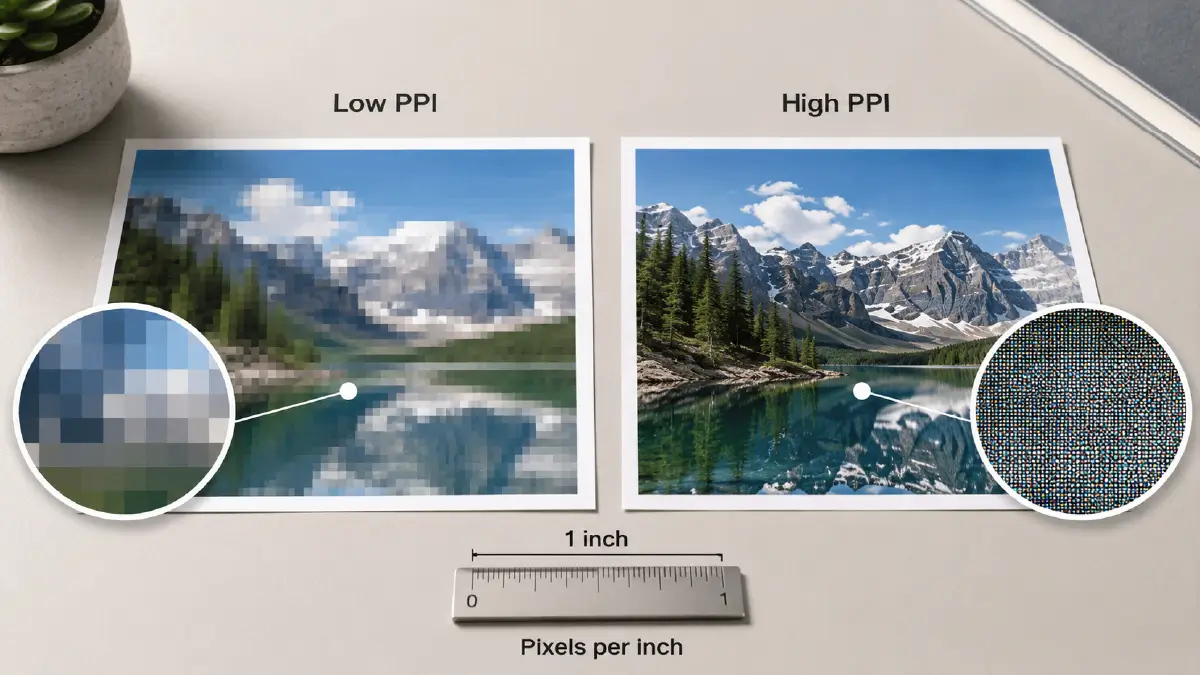
Resolution is what separates a sharp, professional-looking print from a blurry, pixelated one. The unit that governs print resolution is PPI (pixels per inch) — sometimes referred to as DPI (dots per inch) in the context of printing. The higher the PPI, the more detail is packed into each inch of the printed image.
Resolution Standards by Use Case
| Use Case | Recommended PPI | Notes |
|---|---|---|
| Web and screen display | 72–96 PPI | Screen resolution is fixed; pixel dimensions matter more than PPI here |
| Standard quality print | 150–200 PPI | Acceptable for large-format prints viewed from a distance |
| Professional quality print | 300 PPI | The gold standard for portraits, product photos, and fine art prints |
| High-end fine art print | 360–400 PPI | Used for exhibition-quality large-format prints |
Calculating the Pixel Dimensions You Need
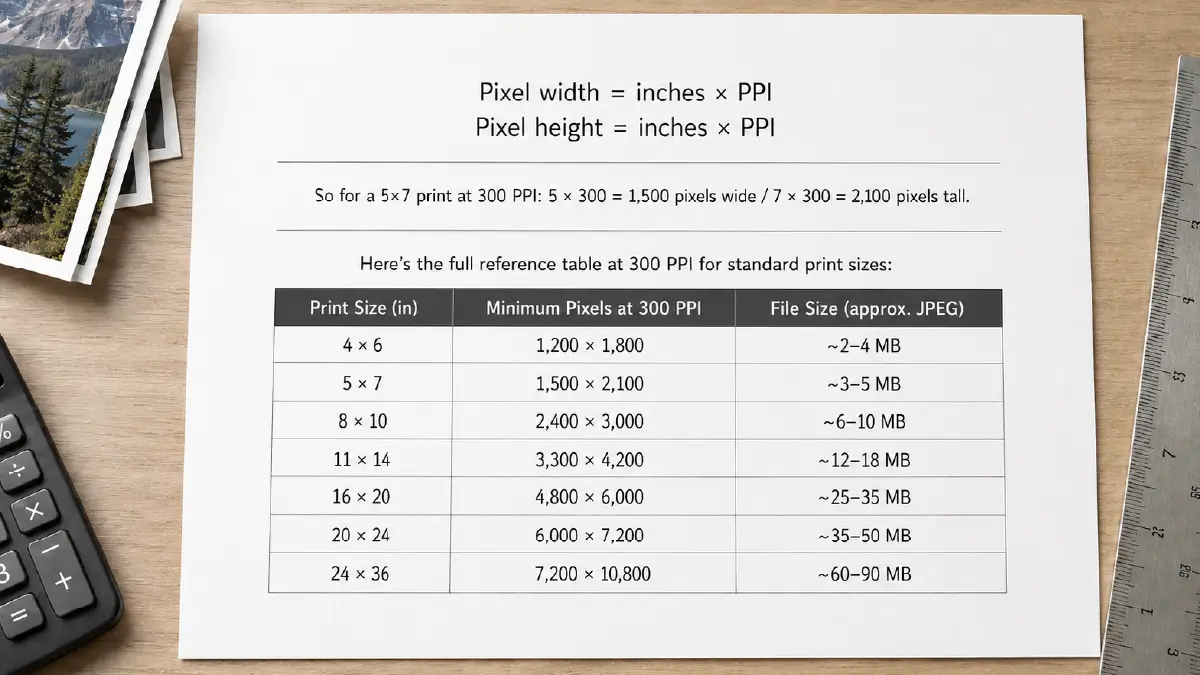
The formula is straightforward:
Pixel width = inches × PPI
Pixel height = inches × PPI
So for a 5×7 print at 300 PPI: 5 × 300 = 1,500 pixels wide / 7 × 300 = 2,100 pixels tall.
Here’s the full reference table at 300 PPI for standard print sizes:
| Print Size (in) | Minimum Pixels at 300 PPI | File Size (approx. JPEG) |
|---|---|---|
| 4 × 6 | 1,200 × 1,800 | ~2–4 MB |
| 5 × 7 | 1,500 × 2,100 | ~3–5 MB |
| 8 × 10 | 2,400 × 3,000 | ~6–10 MB |
| 11 × 14 | 3,300 × 4,200 | ~12–18 MB |
| 16 × 20 | 4,800 × 6,000 | ~25–35 MB |
| 20 × 24 | 6,000 × 7,200 | ~35–50 MB |
| 24 × 36 | 7,200 × 10,800 | ~60–90 MB |
A note on upscaling: If your source image doesn’t have enough pixels for the print size you want, upscaling it in Photoshop adds pixels by interpolation — essentially guessing what the missing detail should look like. The result is nearly always a loss of sharpness and fine detail. The safest approach is to always shoot at the highest resolution your camera supports and avoid cropping down to a small region of the frame if you know you’ll need a large print.
Passport and ID Photo Sizes by Country
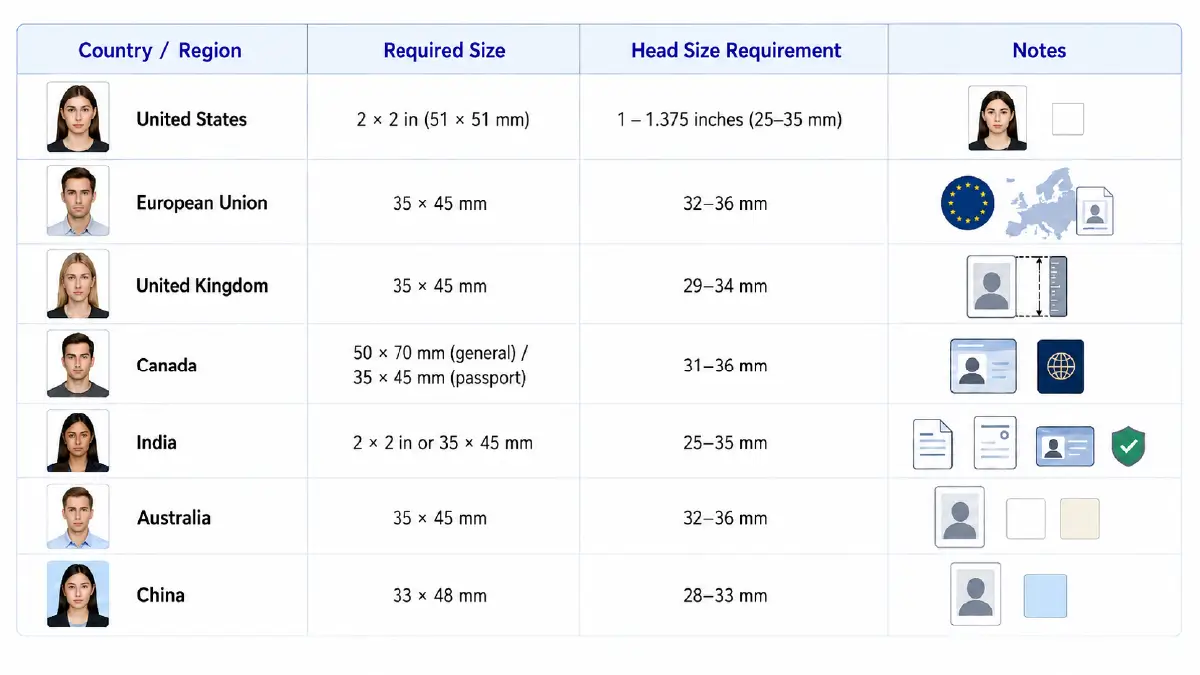
Passport and ID photo specifications are set by government agencies and vary significantly from country to country. Using the wrong size — even by a few millimeters — can result in document rejection. Here are the most common standards:
| Country / Region | Required Size | Head Size Requirement | Notes |
|---|---|---|---|
| United States | 2 × 2 in (51 × 51 mm) | 1 – 1.375 inches (25–35 mm) | Full face, neutral expression, white background |
| European Union | 35 × 45 mm | 32–36 mm | Used across most EU member states |
| United Kingdom | 35 × 45 mm | 29–34 mm | Same dimensions as EU, slightly different head range |
| Canada | 50 × 70 mm (general) / 35 × 45 mm (passport) | 31–36 mm | Two different specs depending on document type |
| India | 2 × 2 in or 35 × 45 mm | 25–35 mm | Varies by application type — always confirm with the issuing authority |
| Australia | 35 × 45 mm | 32–36 mm | White or off-white background required |
| China | 33 × 48 mm | 28–33 mm | Light blue background required for most documents |
Important: Always verify the current requirements with the official government source before submitting passport or visa photos. Specifications change periodically and requirements for visa applications often differ from passport applications within the same country.
Which Photo Size Should You Use? — Decision Guide
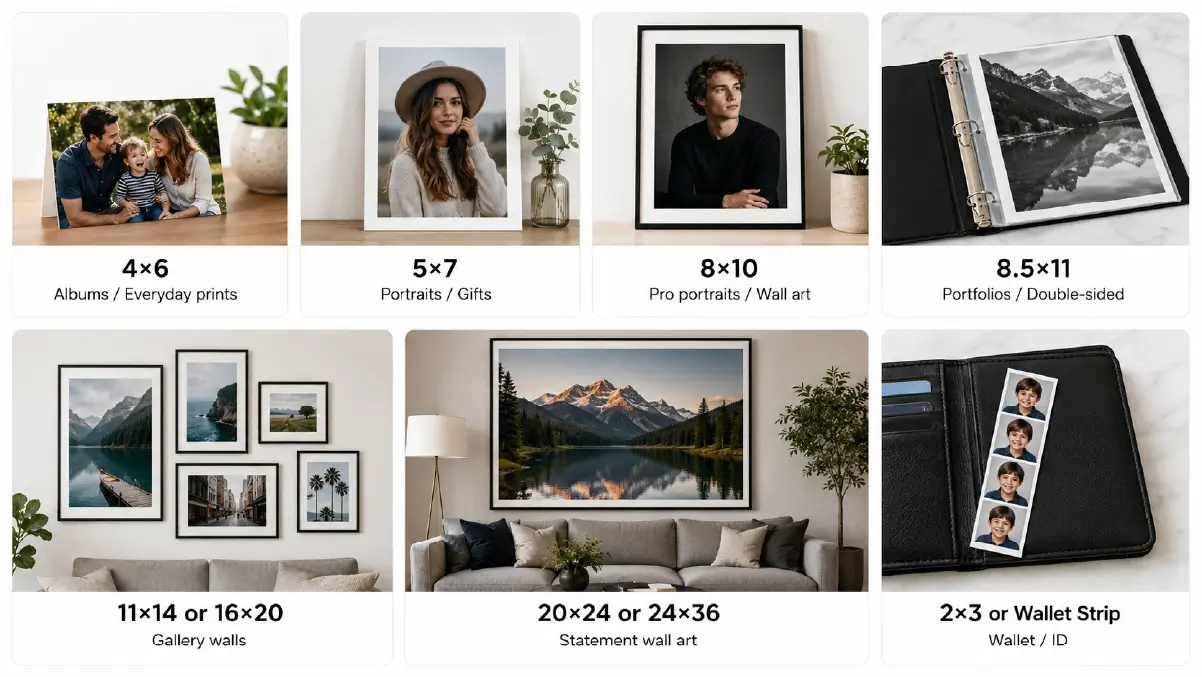
The right answer depends entirely on how the photo will be used. Here’s a practical decision framework:
For personal photo albums and everyday prints → Use 4×6. It’s the most economical option for printing in volume, matches your camera’s native aspect ratio, and fits standard albums without custom trimming.
For portrait prints, gifts, and small framed display → Use 5×7. The slightly larger format gives portraits more visual presence than a 4×6 without the wall-art commitment of an 8×10.
For professional portraits and classic framed wall art → Use 8×10. This is the industry standard for portrait photography — most professional portrait photographers deliver client images in this format as their primary print size.
For portfolios and double-sided printed materials → Use 8.5×11. This matches standard letter-size paper, making it compatible with office printers and standard binders.
For gallery-style wall groupings and decorative framing → Use 11×14 or 16×20. Both sizes work well with standard mat boards and give a gallery-quality look at a reasonable print cost.
For statement wall art and large-format display → Use 20×24 or 24×36. These sizes are designed to anchor a room — they’re most effective in spaces where they have visual breathing room and are viewed from several feet away.
For wallet prints and ID reference copies → Use 2×3 or a standard wallet strip format (four 2.5×3.5 prints on a single 4×6 sheet).
Social Media Image Sizes — 2026 Platform Guide
Every social media platform has its own image specifications, and they’re not interchangeable. An image optimized for an Instagram feed post looks compressed and off-center when posted on Pinterest. A Facebook cover photo at the wrong dimensions gets auto-cropped in unpredictable ways. Use this complete reference to get it right across every platform.
| Image Type | Recommended Size | Aspect Ratio | Notes |
|---|---|---|---|
| Feed Post | 1200 × 630 px | 1.91:1 | Landscape; works for both desktop and mobile feeds |
| Story | 1080 × 1920 px | 9:16 | Full-screen vertical; keep key content away from edges |
| Cover Photo | 820 × 312 px | 2.63:1 | Displays differently on desktop vs. mobile — keep key content centered |
| Event Cover | 1920 × 1005 px | 1.91:1 | High-visibility format for promoted events |
| Group Cover | 1640 × 856 px | 1.91:1 | Displayed as a banner at the top of group pages |
| Image Type | Recommended Size | Aspect Ratio | Notes |
|---|---|---|---|
| Square Post | 1080 × 1080 px | 1:1 | The safest format for feed consistency |
| Portrait Post | 1080 × 1350 px | 4:5 | Takes up the most feed real estate — maximizes visibility |
| Landscape Post | 1080 × 566 px | 1.91:1 | Used for widescreen product or landscape images |
| Story | 1080 × 1920 px | 9:16 | Full-screen vertical; 250 px safe zone at top and bottom |
| Reel | 1080 × 1920 px | 9:16 | Same as Story dimensions; cover image crops to 1:1 in feed |
| Profile Photo | 320 × 320 px | 1:1 | Displayed as a circle; keep subject well centered |
Twitter / X
| Image Type | Recommended Size | Aspect Ratio | Notes |
|---|---|---|---|
| Single Image Post | 1200 × 675 px | 16:9 | Landscape; fills the feed preview without cropping |
| Two-Image Post | 700 × 800 px each | 7:8 | Each image shares equal horizontal space |
| Three/Four-Image Post | 1200 × 686 px | Varies | Grid layout; preview behavior varies — test before publishing |
| Header / Cover | 1500 × 500 px | 3:1 | Profile banner; subject should be centered to survive mobile cropping |
| Profile Photo | 400 × 400 px | 1:1 | Displayed as a circle on profile; square on mobile browser |
| Image Type | Recommended Size | Aspect Ratio | Notes |
|---|---|---|---|
| Post Image | 1200 × 627 px | 1.91:1 | Standard landscape for company and personal posts |
| Cover Photo | 1584 × 396 px | 4:1 | Profile banner for personal accounts |
| Company Banner | 1128 × 191 px | 6:1 | Banner displayed on company pages |
| Profile Photo | 400 × 400 px | 1:1 | Professional headshot; minimum 200 × 200 px |
| Image Type | Recommended Size | Aspect Ratio | Notes |
|---|---|---|---|
| Standard Pin | 1000 × 1500 px | 2:3 | The platform’s preferred ratio — performs best in feed |
| Square Pin | 1000 × 1000 px | 1:1 | Works but gets less feed space than 2:3 |
| Tall Pin | 1000 × 2100 px | 1:2.1 | Maximum height before cropping in feed |
YouTube
| Image Type | Recommended Size | Aspect Ratio | Notes |
|---|---|---|---|
| Thumbnail | 1280 × 720 px | 16:9 | Minimum 640 px wide; JPEG, PNG, or GIF under 2 MB |
| Channel Art | 2560 × 1440 px | 16:9 | Safe zone for all devices: 1546 × 423 px centered |
| Profile Photo | 800 × 800 px | 1:1 | Displayed as a circle; keep subject centered |
E-Commerce Product Image Sizes — Platform Standards
If you’re selling products online, getting your image sizes right is non-negotiable. Major marketplaces have specific technical requirements — and images that fall outside those specs get auto-rejected, compressed, or displayed poorly.
| Platform | Minimum Size | Recommended Size | Background | Max File Size |
|---|---|---|---|---|
| Amazon | 500 × 500 px | 2000 × 2000 px | Pure white (RGB 255,255,255) | 10 MB |
| eBay | 500 × 500 px | 1600 × 1600 px | White or neutral | 12 MB |
| Shopify | 800 × 800 px | 2048 × 2048 px | White or transparent | 20 MB |
| Etsy | 2000 × 2000 px | 3000 × 3000 px | White or contextual | 20 MB |
| Walmart | 1500 × 1500 px | 3000 × 3000 px | Pure white | 10 MB |
Key rule across all platforms: product must occupy at least 85% of the image frame in the main hero image. Anything below that threshold risks rejection or poor thumbnail display in search results.
If your product images need resizing, background removal, or color correction to meet platform standards, Retouching Zone’s e-commerce photo editing team handles all of it — from single-image fixes to large-batch catalog processing. Start a free trial →
Website and Digital Display Image Sizes
Beyond social media, these are the standard dimensions for digital image use across websites and digital content:
| Use Case | Recommended Size | Aspect Ratio | Notes |
|---|---|---|---|
| Full-width hero banner | 1920 × 1080 px | 16:9 | Standard for desktop; responsive designs adapt automatically |
| Blog featured image | 1200 × 628 px | 1.91:1 | Displays well on-page and as Open Graph social preview |
| Email header image | 600 × 200 px | 3:1 | Maximum width for most email clients without horizontal scroll |
| Website thumbnail | 400 × 300 px | 4:3 | Blog post preview cards, product category listings |
| Background image (full page) | 1920 × 1080 px | 16:9 | Should be optimized for web (compressed without quality loss) |
| Favicon | 32 × 32 px or 64 × 64 px | 1:1 | Browser tab icon; keep design extremely simple at this size |
Frequently Asked Questions
What is the most common standard photo size for printing?
The 4×6 inch format is the most universally used print size worldwide. It matches the native 3:2 aspect ratio of DSLR and mirrorless cameras, requires minimal cropping, and is the standard format for photo albums, lab printing, and everyday photo sharing. Most home photo printers and online print labs treat 4×6 as their default format.
What resolution do I need for a high-quality print?
300 PPI is the professional standard for prints that will be viewed up close — portraits, product photos, art prints, and anything framed under glass. For large-format prints viewed from a distance (24×36 and above), 150–200 PPI is generally sufficient and produces sharp results without requiring an impractically large source file.
How do I know if my photo has enough pixels for a large print?
Multiply your target print size in inches by 300 (for professional quality). A 16×20 print at 300 PPI needs 4,800×6,000 pixels. Open your image in Photoshop or Lightroom, check Image > Image Size, and verify the pixel dimensions without resampling. If you’re short on pixels, consider a lower PPI target or using AI upscaling software like Topaz Gigapixel before printing.
What is the correct photo size for an Amazon product listing?
Amazon requires a minimum of 500×500 pixels but strongly recommends 2000×2000 pixels for all main product images. The background must be pure white (RGB 255, 255, 255), and the product must fill at least 85% of the image frame. Images below 1000×1000 pixels disable Amazon’s zoom feature, which negatively impacts conversion rates.
Why does my print look different from what I see on screen?
Screens display color using light (RGB), while printers produce color using ink (CMYK). The color gamut of a screen is typically wider than what a printer can reproduce, which means some bright, saturated colors on screen will appear slightly muted in print. For color-critical printing, convert your file to CMYK in Photoshop before sending to print and use a calibrated monitor for the most accurate preview.
What is the standard photo size for an Instagram post?
The most versatile Instagram post size is 1080×1080 pixels at a 1:1 aspect ratio — it displays consistently across all devices and feed layouts. For maximum visual impact in the feed, the 1080×1350 px portrait format (4:5 ratio) takes up more vertical space and gets more visual attention during scrolling. Instagram Stories and Reels both use 1080×1920 px at a 9:16 ratio.
Can I use the same image for all social media platforms?
Technically yes, but practically not ideal. Each platform crops and displays images differently, and what looks well-framed as a Facebook landscape post may have important elements cut off as an Instagram square. The most efficient workflow is to design your master image at the largest required size, then create platform-specific crops for each channel — this takes minutes in Photoshop or Canva and prevents the visual inconsistency that comes from a one-size-fits-all approach.
What photo size should I use for a passport application?
This depends on your country. US passport photos must be exactly 2×2 inches (51×51 mm) with the head measuring between 1 and 1.375 inches from chin to top. Most European countries require 35×45 mm. Canada uses 50×70 mm for most documents but 35×45 mm for passports. Always verify requirements directly with the official government authority before submitting, as specifications change periodically.
Conclusion
Understanding standard photo sizes isn’t just a technical exercise — it’s a practical skill that saves money on reprints, prevents frustrating rejected submissions, and ensures your images look as sharp and intentional in their final format as they did on your screen. The reference tables in this guide cover every major use case: print, framing, passport, social media, website, and e-commerce.
If your images need professional resizing, format conversion, background removal, or color correction to meet platform specifications — whether for Amazon listings, print lab submissions, or social media campaigns — Retouching Zone’s editing team handles all of it at scale. Try a free trial with no upfront payment required.