Meeting eBay product image editing requirements is one of the most direct ways to improve your listing’s visibility and conversion rate. eBay’s algorithm actively favors listings with high-quality, spec-compliant images — and buyers are 85% more likely to purchase a product when images clearly represent what they’re buying.
Whether you’re a new seller or a seasoned eBay store owner, this complete guide covers every technical specification, photography technique, and editing tip you need to create images that sell.
Understanding eBay Product Image Editing Requirements
eBay enforces strict image standards to maintain a consistent, professional shopping experience across its marketplace. Here’s what every seller needs to know before uploading.
General Requirements
-
Use only your own product images, or images for which you have explicit written permission
-
Never upload images that violate another party’s intellectual property rights
-
Upload at least one image per listing; eBay allows up to 12 free images for standard listings
-
Automotive listings are permitted up to 24 images
-
Backgrounds must be clean, white, or neutral in color
-
Dark backgrounds are acceptable for shiny, reflective, or high-gloss items to minimize glare
-
Every image must accurately represent the product — no misleading visuals
-
Only product-focused images should be included in the main image slot
Technical Specifications
Use the table below as a quick reference for eBay’s image technical requirements:
| Specification | Minimum | Recommended | Maximum |
|---|---|---|---|
| Resolution | 500 × 500 px | 1600 × 1600 px | 9000 × 9000 px |
| File Size | — | — | 12 MB |
| Aspect Ratio | — | 1:1 or 16:9 | — |
| JPEG Quality | 90+ | 95+ | — |
| Product Frame Coverage | 85% | 90%+ | — |
-
-
- Accepted file formats:
JPEG, PNG, TIFF, BMP, GIF
-
💡 Pro Tip: Always shoot and export at 1600 × 1600 px minimum. This ensures smooth zoom functionality, which significantly improves the mobile shopping experience.
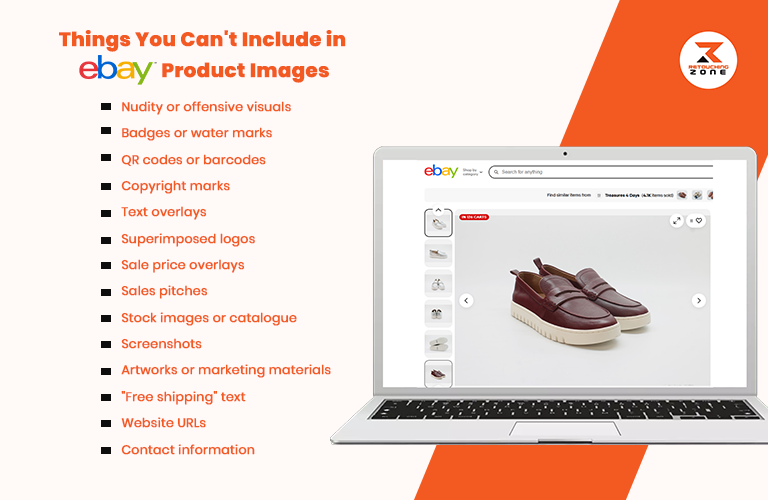
Things You Can’t Include in eBay Product Images
Things You Cannot Include in eBay Product Images
eBay enforces a strict no-tolerance policy on the following. Violating these rules can result in listing removal or account suspension:
-
Watermarks, logos, or seller branding on the main listing image
-
Borders, frames, or decorative overlays that obscure the product
-
Promotional text such as “Free Shipping,” “Best Price,” or sale banners on the main image
-
Placeholder or stock images that don’t represent the actual item being sold
-
Adult content or sexually suggestive imagery
-
Images with poor lighting, extreme blur, or heavy filters that misrepresent the product
-
Unrelated objects or props in the primary image that distract from the product
-
Screenshots from other websites or third-party marketplace images without permission
Image Uploading Tips for eBay Sellers
These practical tips help you get the most out of your image slots and improve overall listing performance:
-
Keep your eBay profile image at 150 × 150 pixels
-
Set your eBay cover photo to 1200 × 700 pixels
-
Use an eBay store banner at 1200 × 270 pixels
-
Target 800–1600 pixels on the longest side for product images
-
Use the secondary image slots for infographic-style photos showing dimensions, features, or use cases
-
Combine multiple angles into a single secondary image to maximize your 12-slot allowance
-
Apply A/B testing on your hero image to determine which visual drives higher click-through rates
-
Ensure all images are mobile-optimized — over 60% of eBay purchases happen on mobile devices
-
Use Canva or VistaCreate templates to maintain consistent branding across your store
Photography Tips for eBay Product Images
Getting the photography right reduces post-production time and ensures your images naturally meet eBay’s standards.
-
Single products: Show only the item being listed — no unrelated variants or accessories
-
Bundle listings: Display all included items clearly within the frame
-
Maintain a front-facing or straight angle for the main hero image
-
Supplement with multi-angle shots (side, back, top, close-up) for secondary image slots
-
Use macro or close-up photography to highlight fine details, textures, or craftsmanship
-
For fashion accessories, use human body parts (wrists, hands, neck) as natural props
-
Apply diffused lighting rather than direct flash to create soft, even illumination without harsh shadows
-
Use a lightbox or white sweep backdrop for small to medium-sized products
-
Shoot with standardized dimensions across all listings to maintain a consistent, professional store appearance
-
Always photograph imperfections honestly — eBay’s Buyer Protection policy requires accurate representation
Image Editing Tips for eBay Product Images
Professional photo editing is the final step in creating listing-ready images that build buyer confidence.
-
Use industry-standard tools such as Adobe Photoshop, Lightroom, or GIMP for full control
-
Canva and similar tools are suitable for quick background removal and resizing
-
Remove cluttered or distracting backgrounds — replace with clean white or neutral tones
-
Adjust brightness, contrast, sharpness, and saturation to restore accurate product color, without over-processing
-
Avoid heavy filters — images must represent the product’s true appearance
-
Crop and resize carefully to preserve product details and meet the 85% frame-coverage rule
-
Use shadow creation techniques (drop shadow or natural shadow) to add depth and realism
-
Build branded templates in Photoshop or Canva for visual consistency across your entire store
-
For reflective products (jewelry, watches, tech), use frequency separation retouching to eliminate unwanted glare
-
Always export as JPEG at quality 90–95 for the optimal balance of file size and image clarity
🔗 Need professional eBay image editing? Retouching Zone’s eBay Photo Editing Service delivers marketplace-ready images with a fast turnaround.
Frequently Asked Questions
What are the minimum and recommended resolutions for eBay photos?
The minimum resolution is 500 × 500 pixels. eBay recommends 1600 × 1600 pixels for optimal zoom functionality and mobile display quality.
How many images can I upload per eBay listing?
Standard listings allow up to 12 free images. Automotive listings are permitted up to 24 images.
What background is required for eBay product images?
A clean white or neutral background is standard. Dark backgrounds are permitted for shiny or reflective items to prevent glare and maintain product clarity.
Which file formats does eBay accept?
eBay supports JPEG, PNG, TIFF, BMP, and GIF formats, with a maximum file size of 12 MB per image.
How much of the image frame must the product fill?
The product must occupy at least 85% of the total image frame to comply with eBay’s listing standards.
Can I use AI-generated images for eBay listings?
eBay currently requires that listing images accurately represent the actual item. AI-generated images that do not depict the real product may violate eBay’s image policy and result in listing removal.
Conclusion
Getting your eBay images right is one of the highest-ROI investments you can make as a seller. Compliant, high-quality images directly improve your search ranking within eBay, increase click-through rates, and build the buyer trust that converts browsers into buyers.
If editing product images at scale feels overwhelming, Retouching Zone specializes in eBay-compliant product photo editing — from background removal and color correction to shadow creation and retouching. Request a free quote or try a free trial today.