
By making photo editing easier than ever, the top AI Photoshop plugins that have surpassed their contemporaries in 2026 are: Retouch4me, Photoshop Neural filters, Topaz Photo AI, Photoshop Generative Fill, DxO PureRAW, Luminar Neo, and Nik Collection.
It’s not surprising that you’re familiar with these names if you’re used to tackling the detailed technical learning process of Photoshop. Thanks to artificial intelligence, this journey of image editing from healing, clipping path, color correction, to high-end retouching is now incredibly smooth.
But which one of these Photoshop AI plugins should you choose in 2026?
Here, we will provide a detailed analysis of the plugins that edit images 5x faster, exploring their features, pricing, and Photoshop compatibility.
Quick Breakdown: Must-Have Artificial Intelligence Photoshop Plugins
| AI Photoshop Plugins | Free Version / Trial | Starting Price | Supported Photoshop Versions |
| Retouch4me | Only Apex, Photoshop Panel, Frequency Separation, and Color Match are free | Lifetime License $99.20 or $20/month subscription | CS6 x64 and newer, but 23.3.0+ for Panel and Frequency Separation |
| Photoshop Neural Filters | Included in the Photoshop 7-day free trial | $22.99/month | Photoshop 22.0 and later |
| Topaz Photo AI | No | $17/month subscription | Photoshop CC and later |
| Photoshop Generative Fill | Included in the Photoshop 7-day free trial | Included in Photoshop plan (no extra charge) | Photoshop 25.0 and later |
| DxO PureRAW 5.5 | 14-day free trial | Lifetime license $129.99 | Creative Cloud |
| Luminar Neo | No | One-time payment $79 | CS5 and newer |
| Nik Collection 8.2 | 30-day free trial | $169.99 | Photoshop 2024 (25) and later |
Retouch4me
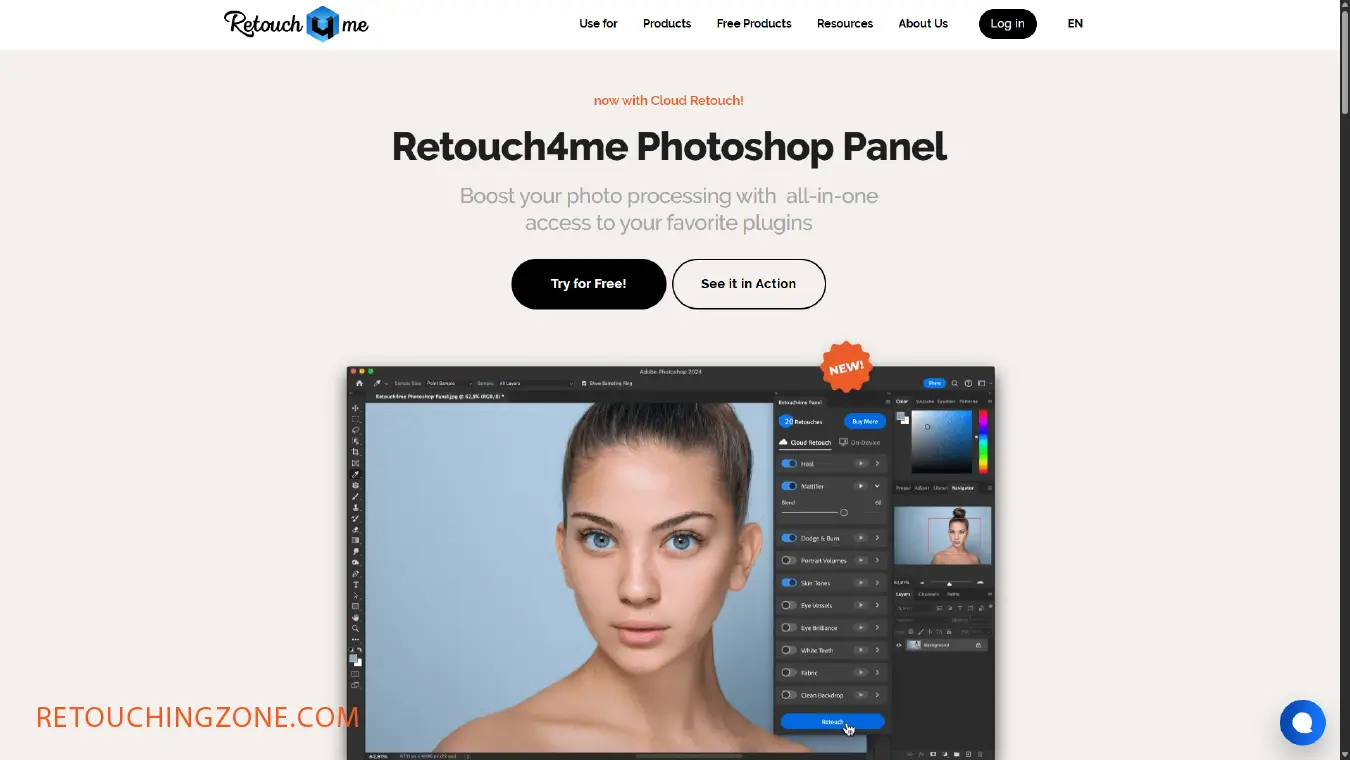
We put Retouch4me at the top of the list because it is a complete app that has a rich set of plugins. The Retouch4me Photoshop plugins are:
| Heal, Dodge & Burn, Portrait Volume, Face Reshaping and Makeup, Skin Toning and Selection Collection, Mattifier, Auto Cropping, Fast Details Enhancement, and Color Correction by Reference. |
Most importantly, it offers product retouching for e-commerce photo editing and a plugin bundle for wedding photography.
When installing retouch plugins for Photoshop, it is important to remember that the location of the plugin folder may vary depending on the version of Photoshop. If you are not using the latest version, you will need to manually move the plugins to the correct folder.
Photoshop Neural filters

This plugin won’t let you leave the Adobe Photoshop platform, at least that’s what users claim. When the Neural Filter Photoshop plugin is active, you’ll find it under the Filters tab inside Photoshop.
The Neural Filter Photoshop plugin is powered by the machine learning engine Adobe Sensei and artificial intelligence, and it uses algorithms to create new pixels in your photo. This Photoshop AI feature lets you quickly experiment with new creative ideas while adding structural edits while keeping the original image intact.
After opening your image in Photoshop, you’ll find five featured filters. Plus, you can experiment with innovative beta filters that save you time editing. Check out the capabilities of the filters in the table below:
| Featured Filters | ✔ Smooth it over with Skin Smoothing
✔ Excavate unwanted items with JPEG ✔ Artifacts Removal ✔ Switch it up with Style Transfer ✔ Super Zoom ✔ Colorize |
| Beta Neural Filters | ✔ Smart Portraits
✔ Makeup Transfer ✔ Depth Blur ✔ Landscape Mixer ✔ Color Transfer ✔ Harmonization |
Topaz Photo AI Photoshop Plugin

Worried about image upscaling? You get one function but not the other?
Then this desktop AI-powered app is definitely the one you’re looking for!
In this artificial intelligence Photoshop plugin called Topaz Photo AI, you’ll get-
- 12 of the best AI tools of the moment, trained on millions of images
- Noise reduction, image sharpening, face enhancement
- Healing Brush, Wonder Model (Upscale), Standard Max Model (Upscale) [Latest added]
Already popular features are-
| Dust and Scratch, Super Focus, Adjust Lighting, Balance Color, Denoise, Recover Face, Sharpen, Preserve Text |
Photoshop Generative Fill

Photoshop Generative Fill is based on the Adobe Firefly image model. It allows users to go from creative ideas to complex edits and refinements, giving them complete control over each creation. This means you can see in advance how the image is going to turn out.
Generative Fill is accompanied by Generative Expand; both are integrated into Photoshop. With them, you can make fast and powerful edits, and thus satisfy your perfectionist hunger with more precise editing tools.
To access Generative Fill, click Help on the Photoshop menu bar, then select System Information from the drop-down menu, and finally select build m.2181.
DxO PureRAW

When it comes to choosing the best free AI plugins for Photoshop, you have to turn to the DxO brand. Its PureRAW plugin is not exactly new, as it is currently in version 5.5.
| Now you can review denoising and demosaicing at any point during editing. |
Those who have already become a pro at it know very well that there is no better alternative to Adobe Camera Raw in the Photoshop workflow.
What’s even better is that-
- it offers the ability to create custom presets to quickly accommodate cameras, specific lenses, and different subjects.
- The new version of DxO PureRAW offers Smart Filter integration that allows for non-destructive editing.
- Plus, the standalone version of DxO PureRAW (in all versions) also allows you to export directly to Photoshop.
Luminar Neo

Few plugins are as good at bringing out the details of your photos as Luminar Neo. Its 24+ AI-based tools are enough to bring your photos out of the digital frame.
Here’s what it can do:
- Slider in full controls: A single AI slide adjusts natural shadows, highlights, contrast, and hundreds of other controls.
- Fix underexposed photos: Adding light to photos, and relighting AI to produce realistic results with full control over exposure.
- Portrait enhancement in a few clicks: Face AI selectively targets a subject’s face, eyes, and makes them vibrant and smooth in a short time.
- Replace sky in one click (Sky AI): High-end sky collection and water reflections.
Nik Collection

Another outstanding product from the DxO brand has come a long way. The Nik Collection, loved by thousands of pro users, is now in version 8.2.
As soon as the well-known Nik Collection panel is activated, a complete suite of seven incredible plugins opens up in front of you. These plugin packs are:
- Nik Color Effects
- Nik Silver Effects
- Nik Analog Effects
- Nik Viveza
- Nik Define
- Nik Sharpener
- Nik HDR Effects
What they can do – Adding pure grain, changing contrast, manipulating tones, color filtering, and preset assets.
Frequently Asked Questions about these AI Photoshop Plugins
What are the best free AI plugins for Photoshop?
There are many AI plugins that all take advantage of Photoshop’s complex learning process. Among them, DxO PureRAW has a 14-day free trial, and Nik Collection has a 30-day free trial.
For those who don’t want to go outside the Photoshop platform, the best ones are Neural Filter and Generative Fill. Both of these plugins are included in the 7-day free trial when you buy a Photoshop plan.
How do I activate the retouch4me plugin in Photoshop?
You need to enter your email and password for your account.
- Download the plugin from your personal account and install it. Launch the plugin and click on the “Activate” button. A window will open, where you will need to enter your email and password for your account on the website.
- After successful authorization, click on the “Activate now” button. The plugin will be registered.
- Reboot your computer. Open photoshop and then you are good to go with using the retouch4me plugin.
What is the best method of output to select for Photoshop neural filters?
The output method really depends on what you want to do with your project. You convert the current layer to a Smart Object, which makes your filters Smart Filters. They are also editable.
You can save this output as a new unmasked or masked layer, or as the current layer. Moreover, you can also output the filter as an entirely new Photoshop document if you want.
Which Photoshop version has Generative Fill?
Photoshop versions 25.0 and later have generative fill. To go back to older versions other than the latest, click Help on the Photoshop menu bar, select System Information from the drop-down menu, and select build m.2181.
Does DxO PureRAW offer any benefits for RAW conversion?
DxO PureRAW version 5.5 offers powerful RAW conversion. Photographers can use RAW conversion tools like DeepPRIME XD3 and DeepPRIME 3 for X-Trans sensors directly inside Photoshop. All credit goes to the free Smart Filter support.
Pilling Up
Any of these top 7 AI Photoshop plugins is ready to speed up your photo retouching workflow.
DxO PureRAW and Nik Collection: If you want to use them for free as a beginner or for testing.
Neural Filters and Generative Fill: When you are already an intermediate Photoshop learner, and you don’t want to go outside the Photoshop platform.
Retouch4me, Topaz Photo AI, and Luminar Neo: If professionalism and the best standalone software are the main parameters, then getting a plugin is a must.
So first, find out what stage you are at in your photo editing project. Good luck in creating some great graphic content!