Ghost mannequin photography lives and dies by its lighting. A poorly lit jacket can look flat and unappealing on screen — no matter how skilled your post-production editor is. This guide breaks down exactly how to build a ghost mannequin lighting setup at every budget level, with the same principles our team at Retouching Zone applies when preparing garments for Amazon, Shopify, and ASOS-level catalogs.
Whether you’re shooting in a spare bedroom or a dedicated studio, the goal is the same: even, shadow-free illumination that shows the garment’s true shape, color, and texture.
Why Lighting Is the Foundation?
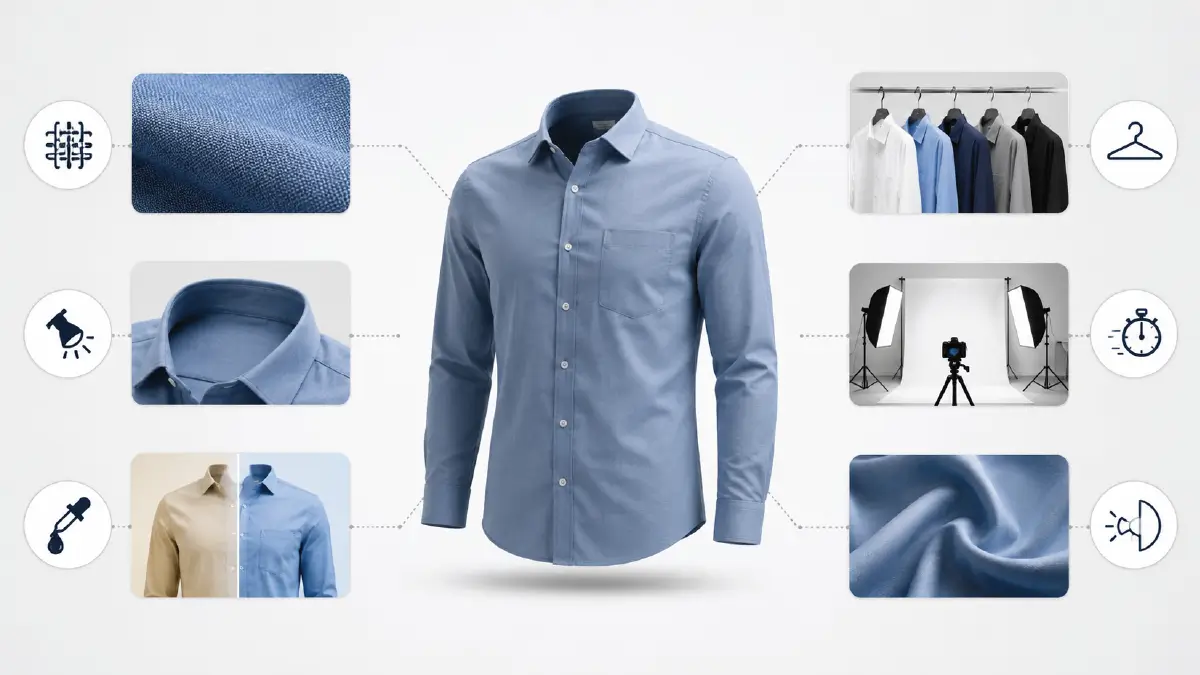
Proper lighting in ghost mannequin photography achieves six critical outcomes:
- Reveals fabric detail — texture, weave, and surface grain become visible under directional soft light
- Reduces shadow artifacts — hard shadows underneath collars or inside sleeves create extra editing work (and cost)
- Preserves accurate color — wrong color temperature (too warm or cool) makes whites appear yellow or blue, requiring color correction
- Ensures listing consistency — matching light ratios across a full catalog means buyers see a uniform, professional brand
- Speeds up post-production — a correctly lit image with a white background can be background-removed in seconds vs. minutes
- Controls fabric reflectivity — satin and silk require diffused, bounced light; cotton and denim can handle harder light
What to Consider For Ghost Mannequin Lighting Setup?
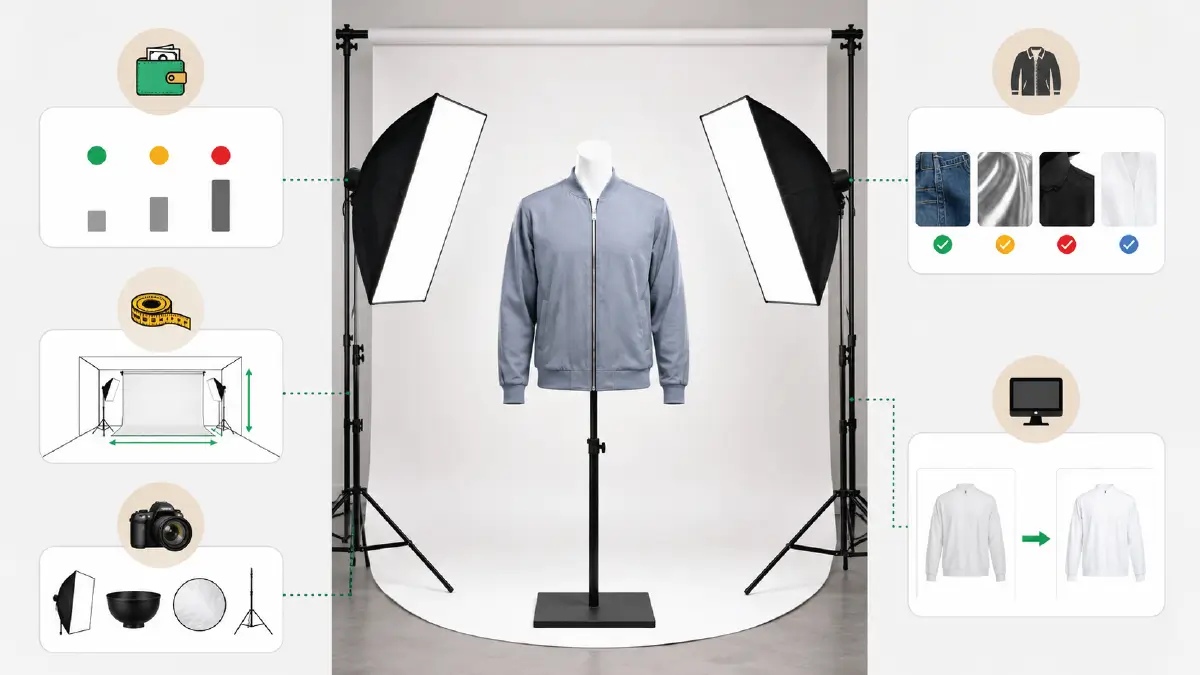
Note down the below-mentioned factors for creating an ideal ghost mannequin lighting setup.
Budget
Your budget determines everything from light type to modifier quality. Plan in three tiers: under $100 (natural + LED), $100–$500 (two-light softbox system), or $500+ (full strobe kit with modifiers).
Studio Space
A minimum 200–250 sq ft is workable, but 500 sq ft is recommended once you factor in a 6-foot mannequin, two light stands at 45° angles, a backdrop stand, and camera-to-subject distance of at least 6 feet for flattening compression distortion.
Lighting Equipment
Different types of light equipment are needed for ghost mannequin photography. Lights, modifiers, reflectors, and other accessories are the primary ones.
Garment Type
-
Woven fabrics (denim, linen, cotton): tolerate direct softbox light at 45°
-
Reflective fabrics (satin, polyester, wet-look): require bounced or feathered light to eliminate hotspots
-
Dark garments: need a hair/rim light behind the mannequin to separate the garment edge from the background
-
White garments: need a slightly underexposed background to prevent blowout
Post-Production Needs
A proper white seamless background (#ffffff) with even exposure reduces clipping path time by up to 60%. If your background is grey or uneven, your editor must manually correct it — adding time and cost.
Essential Equipment for Ghost Mannequin Lighting
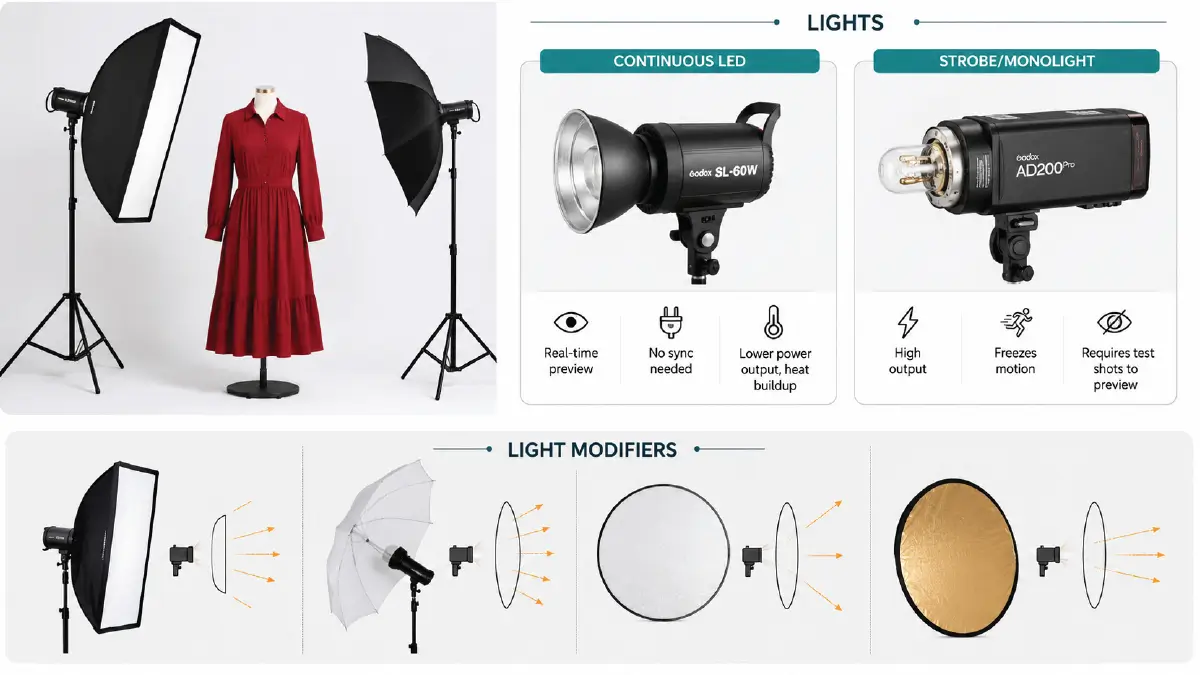
Various types of light equipment are needed for ghost mannequin photography. The following are the most commonly used ones.
Lights
| Light Type | Best For | Price Range | Pros | Cons |
|---|---|---|---|---|
| Continuous LED | Beginners, video hybrid shoots | $300–$1,500 | Real-time preview, no sync needed | Lower power output, heat buildup |
| Strobe/Monolight | Professional studio work | $300–$1,000+ | High output, freezes motion | Requires test shots to preview |
Pro Recommendation: The Godox SL-60W (continuous) or Godox AD200Pro (strobe) are industry favorites at Retouching Zone’s partner studios for consistent apparel output.
Light Modifiers
- Diffusers: A flash or light diffuser helps evenly spread the light source. The device operates effectively even in challenging lighting conditions. It makes the shadows gentle. The price ranges from $50 to $200+.
- Soft boxe: A soft box gives you more control over how the light spreads. It creates a spotlight effect. This modifier illuminates a soft and even lighting atmosphere. It can cost anywhere from $80 to $200+.
- Umbrellas: This light-shaping tool softens and spreads lights evenly. It alters the attributes of light coming from a specific light source. Its price can range from $ 50 to $150+.
- Reflectors: A reflector changes the direction of a light source coming to a subject. It manipulates the light. This modifier works as a fill light. It can cost anywhere from $40 to $ 100 or more.
Rule of thumb: The larger the modifier relative to the subject, the softer the light. A 24-inch softbox is too small for a full-length dress — use at least a 48-inch softbox or a 43-inch umbrella.
Accessories
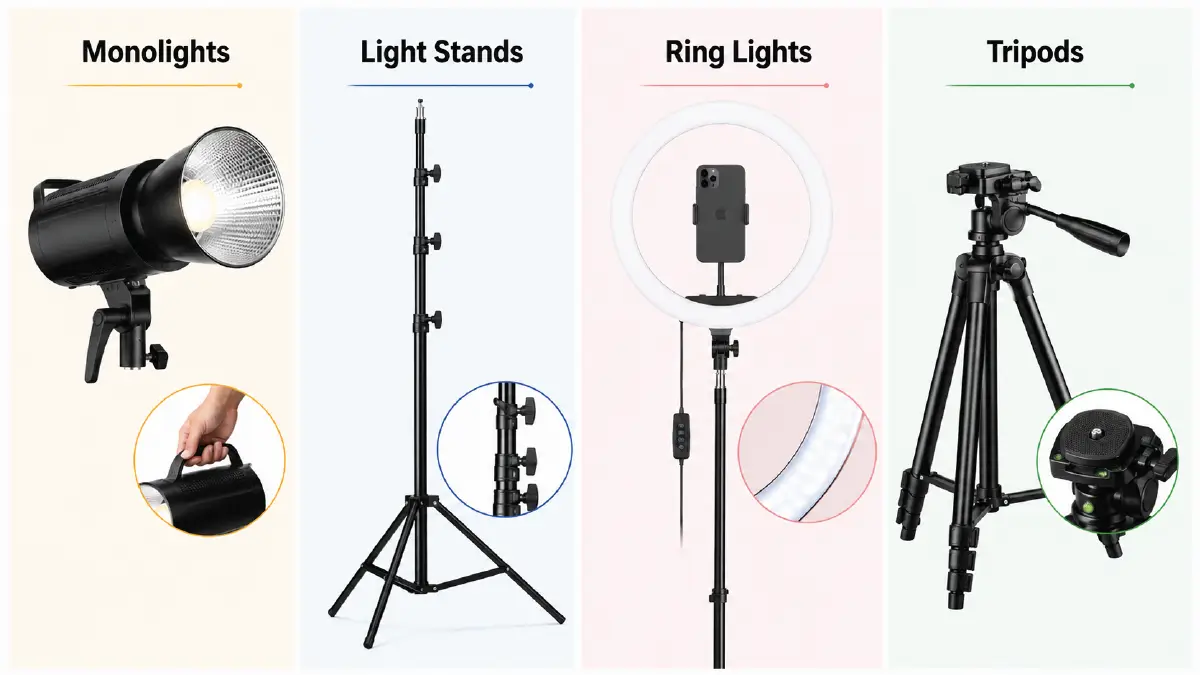
- Monolights: This flashlight unit illuminates a subject explicitly. It is portable to work without any additional power generator. You will get a consistent output for every single shot. Its price is around $100-$500+.
- Light Stands: They serve as the foundation for light equipment, handling their load capacity. This tool also helps mount various types of lighting equipment. It can cost anywhere from $50 to over $ 200.
- Ring Lights: This budget-friendly lighting creates a soft, professional look. It highlights details and textures besides casting high-contrast shadows on the subject. The price ranges from $40 to $300+.
- Tripods: Tripods are not just for holding the camera securely. They are helpful in tilting lights or adding ring lights. It costs anywhere from $30 to $ 200 or more.
Lighting Setup by Budget (Rewritten with Camera Settings)
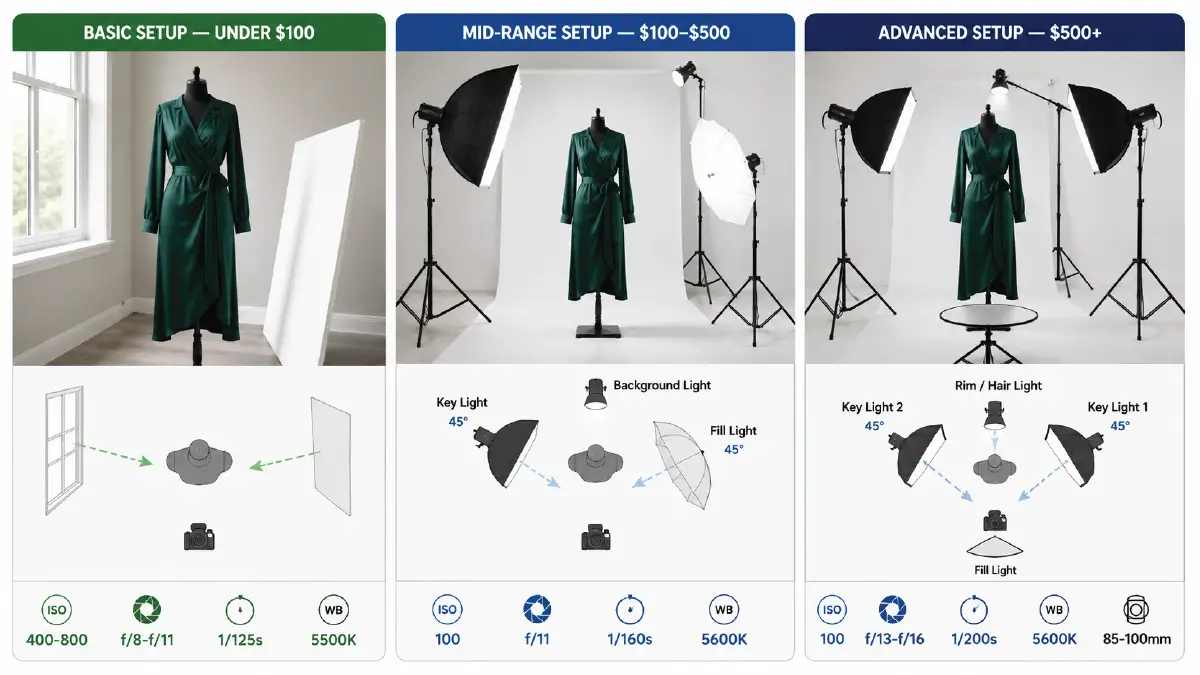
Basic Setup — Under $100
Use window light as your key source. Position the mannequin perpendicular to the window, not facing it. Place a white foam board reflector ($8–$15) on the shadow side to bounce light back.
Camera settings to match:
-
ISO: 400–800
-
Aperture: f/8–f/11
-
Shutter: 1/125s
-
White balance: Daylight (5500K)
⚠️ Avoid shooting midday — the sun is too overhead and creates harsh top shadows on shoulders. Shoot between 9–11 AM or 2–4 PM for the best natural diffusion.
Mid-Range Setup — $100–$500
This is the standard 3-point setup used by most professional product photographers:
-
Key Light — Large softbox at 45° to the left of the mannequin, slightly above eye level
-
Fill Light — Umbrella or reflector at 45° to the right, set to half the power of the key light (1:2 ratio)
-
Background Light — Aim a bare strobe or small LED at your white backdrop, set to 1 stop brighter than your key light to ensure a pure white output
Camera settings:
-
ISO: 100
-
Aperture: f/11
-
Shutter: 1/160s (sync speed)
-
White balance: Custom or Flash (5600K)
Advanced Setup — $500+
The 4-point setup is used for high-volume fashion catalogs and eliminates virtually all manual editing of shadows:
-
Key Light 1 — Front-right softbox (60x90cm) at 45°, 1 stop brighter
-
Key Light 2 — Front-left softbox (60x90cm) at 45°, matched to Key 1 for symmetrical fashion look
-
Fill Light — Reflector or small strobe behind camera, 2 stops lower to open up midtones
-
Rim/Hair Light — Positioned directly behind the mannequin head, aimed at the garment’s top edge — critical for dark garments
Camera settings:
-
ISO: 100
-
Aperture: f/13–f/16
-
Shutter: 1/200s
-
White balance: Custom flash (5600K)
-
Lens: 85mm–100mm at 6+ feet distance to minimize distortion
Pro Tips On Lighting Setup
-
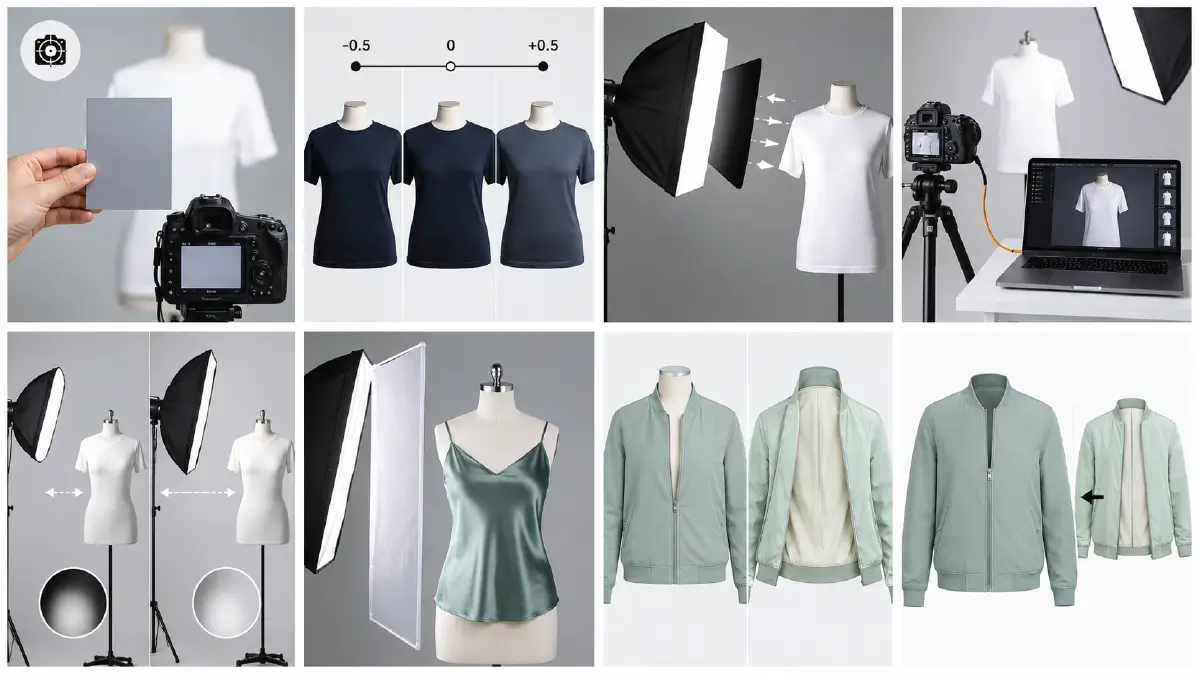
Use a grey card to set a custom white balance before every shoot — color-accurate files reduce editing cost
-
Bracket your exposures by ±0.5 stops to give the editor options without reshooting
-
Flag your lights with black foam board to prevent wall bounce spill from creating unwanted color casts
-
Shoot tethered into Lightroom or Capture One so you can verify sharpness and lighting on a large screen in real time
-
Distance matters: Move your softbox further from the mannequin to create harder light; closer gives softer wrapping light
-
For satin and silk: Use a large scrim (shower curtain or 5-in-1 reflector) between the light and the garment — never aim a softbox directly at reflective fabric
-
Shoot the interior/lining separately (for neck-joint ghost mannequin effect) — the same lighting setup applies but flip the garment inside-out
Frequently Asked Questions about Ghost Mannequin Lighting Setup
What color temperature should I use for ghost mannequin photography?
Use 5500K–5600K (daylight/flash) for accurate white garment reproduction. Warmer temperatures (3200K) cause whites to appear cream or yellow, requiring manual correction.
How do I prevent dark garments from blending into the background?
Add a rim light (also called a hair light or separation light) behind the mannequin, aimed at the garment’s edges. This creates a thin bright outline that separates the fabric from the white background.
Do I need to shoot on a white background?
Yes, for ghost mannequin work specifically. A white (#ffffff) background allows your photo editor to remove the mannequin in a fraction of the time. Grey or colored backgrounds require manual masking.
What’s the minimum setup for a consistent product catalog?
A two-softbox system (key + fill) with a white backdrop and ISO 100 camera settings is the minimum for a professional, consistent catalog. Below that, color and exposure variation between shots becomes a problem at scale.
Conclusion
See? With the right techniques, you can easily set up a perfect ghost mannequin lighting setup in your studio. The recommended budget categories are:
Basic setup: You just need to have a budget under $100.
Mid-range setup: You should plan to spend $100–$500.
Advanced setup: Those who have a $500+ budget.
The key is to master the art of using different lighting and not neglecting natural light sources. Remember, just because you have free sunlight doesn’t mean it qualifies as a full-fledged studio light. You just need to know the proper techniques to use them effectively.