A few pro clicks can give you some great ghost mannequin shots. But as you’ve long been working on building your fashion brand, so you know that it’s not just about pressing the shutter.
To keep the invisible mannequin photography on track, you need to keep the lighting at the right angle in check and see whether the camera is on the right settings. Bringing both these needful to-dos in the same string can lead to some pro captures that any artist’s eye can recognize.
Not only that, the shots this well-planned arrangement gives you yield the result in your subsequent image editing, which fits just your fashion industry needs.
Today’s article is going to take you through those elegant shots in depth, which you will realize are more than half of the way to creating your final product image.
1. Front View Shot
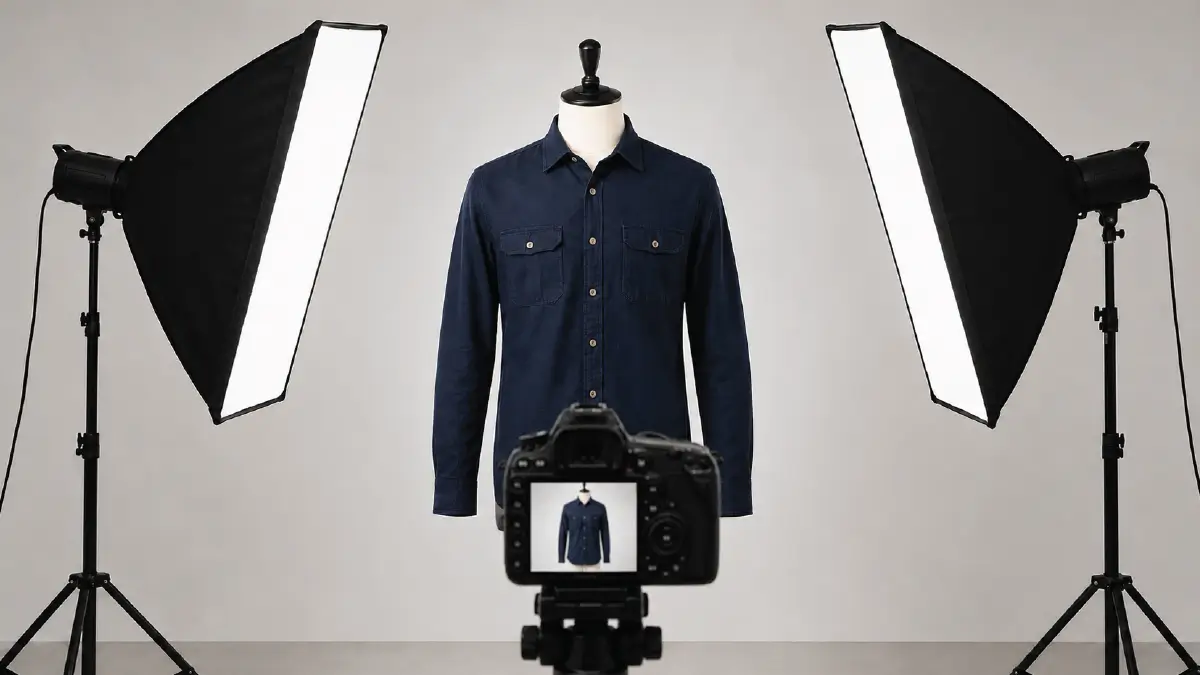
This is the first view that people think of when doing any kind of photography. In the case of clothing items, you have to place the product on a dummy and stand right in front of it to take the shot.
This style is often used for photos that are meant for showrooms; usually it makes buttons visible, the collar, and also chest pockets located at the front section of clothing. When visiting an e-commerce store, visitors notice this look for the every first.
How to get this shot
- Camera on a steady tripod: Set your camera on a tripod and position the tripod at the same height as the mannequin’s chest. Make sure the tripod doesn’t move in any way.
- Give your lens the proper focal length: Set your lens’ focal length to 50mm or higher, which will make your model and the clothes not look unusually large or stretched.
- Rightly position softboxes: When taking a photo, most of the time, the light reflects off of a specific part of the fabric. To counteract this, place two fairly long, softbox lights on either side of you, i.e., the camera, at a 45-degree angle to it.
2. Back View Shot
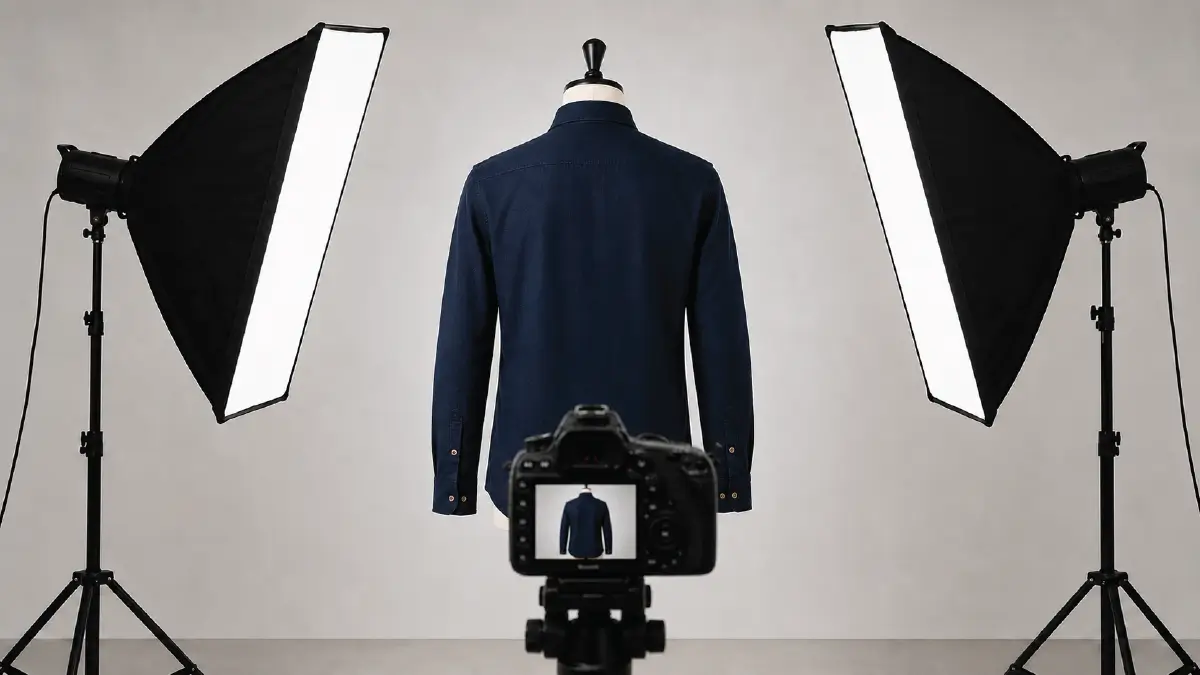
Unlike the front view, this is the view people expect most when viewing a product page. To take a photo from this angle, you need to stand directly opposite the face of the dressed mannequin.
Here, you will inevitably get the backside measurement, where it shows you the back of the collar and how the fabric falls from the edges of both armpits to the waist.
Things to do when taking this shot
- Rotate the mannequin a full 180 degrees: Do not move the tripod or camera in any way; rather, leave them set in their original positions. Just turn the mannequin very carefully 180 degrees; when doing that, don’t change the height and distance between the dummy and the camera even a tiny bit.
- Leave the camera and lighting setup unchanged: Don’t alter the settings of your lens and the position of softboxes from what you left in the front shot. You should do it by all means; otherwise, you may see different colors in the same item in the photo if it moves a little.
3. Interior Shot
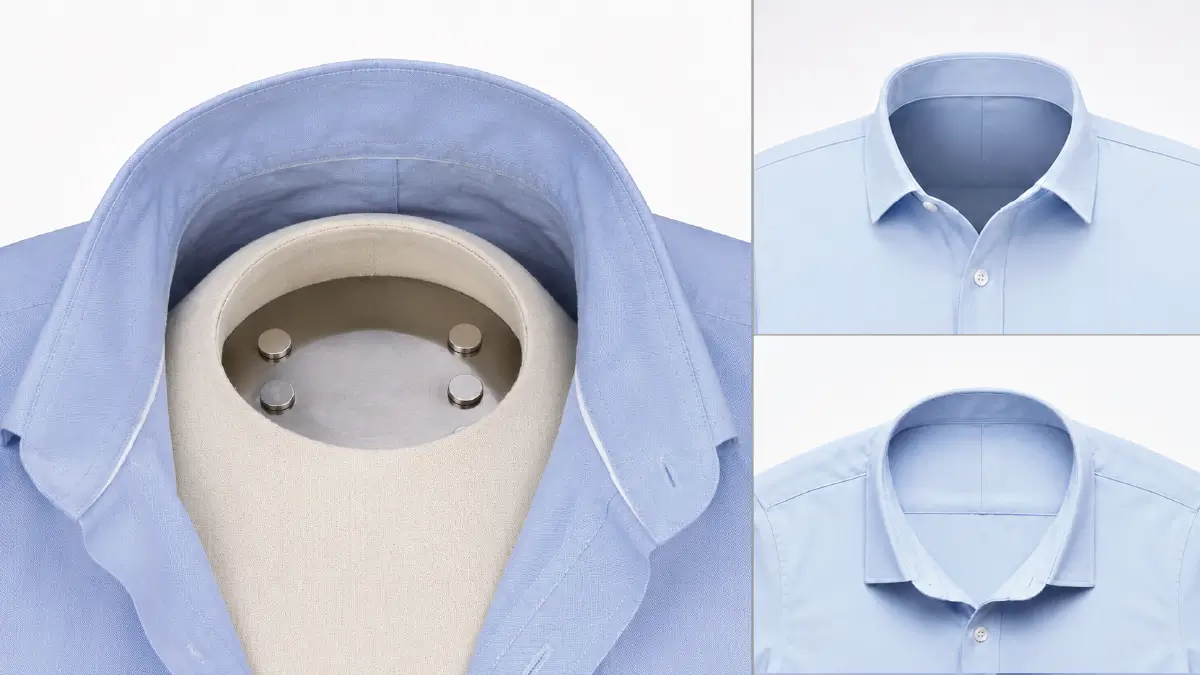
Also known as a neck-joint shot, this is a view you get after removing the neck of the mannequin. You can also get this shot by laying the clothing out on a flat board.
This very important part view of the garment shows you clearly what fabric it is made of, how the stitching is done, especially near the neck.
How to Shoot in Such a View
- Special Dummy Selection: The dummy’d better be modular so that the chest block herein is of magnetic material, and make sure that you can remove it at any time as possible.
Alternative way: You can also get this look, an essential one for developing the ghost mannequin effect, by laying the garment’s open collar on a spotless white surface. - Lighting the collar inside in detail: Use only one light, so that it goes down through the open hole in the collar. The main reason for doing this is to shed light on the dark areas inside the collar.
Precaution: Do this lighting very carefully, as too much light will blur the details of that particular area instead of bringing it from darkness to light.
4. 3/4 Angle Shot
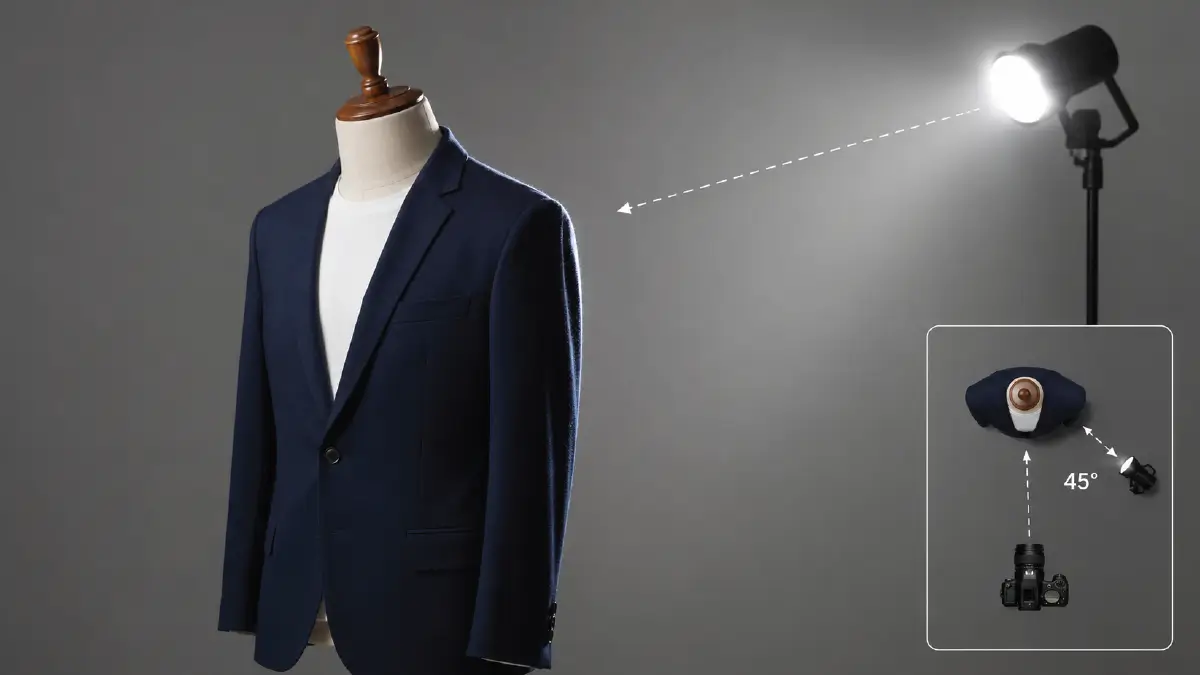
This is a shot taken at an angle where the photographer tries to cover both the side and front of the garment at the same time.
This allows you to see the full structure of the sleeves where they connect to the shoulders, which is a most demanding feature in fashion product photography.
What you need to do for this shot
- Rotate the mannequin about 45 degrees: You can rotate it either way, left or right, but your lighting rig needs to be fairly still.
Precaution: Try to avoid letting this rotating shift so the camera stays always at chest height of the dummy; the camera should not go higher or drop lower in the process.
- Use a rim light: You need to place this light just behind (not too far behind) and to the side of the mannequin with the garment. This is great for clearly showing how far the edge of the garment is from the background.
5. Close-up Shot
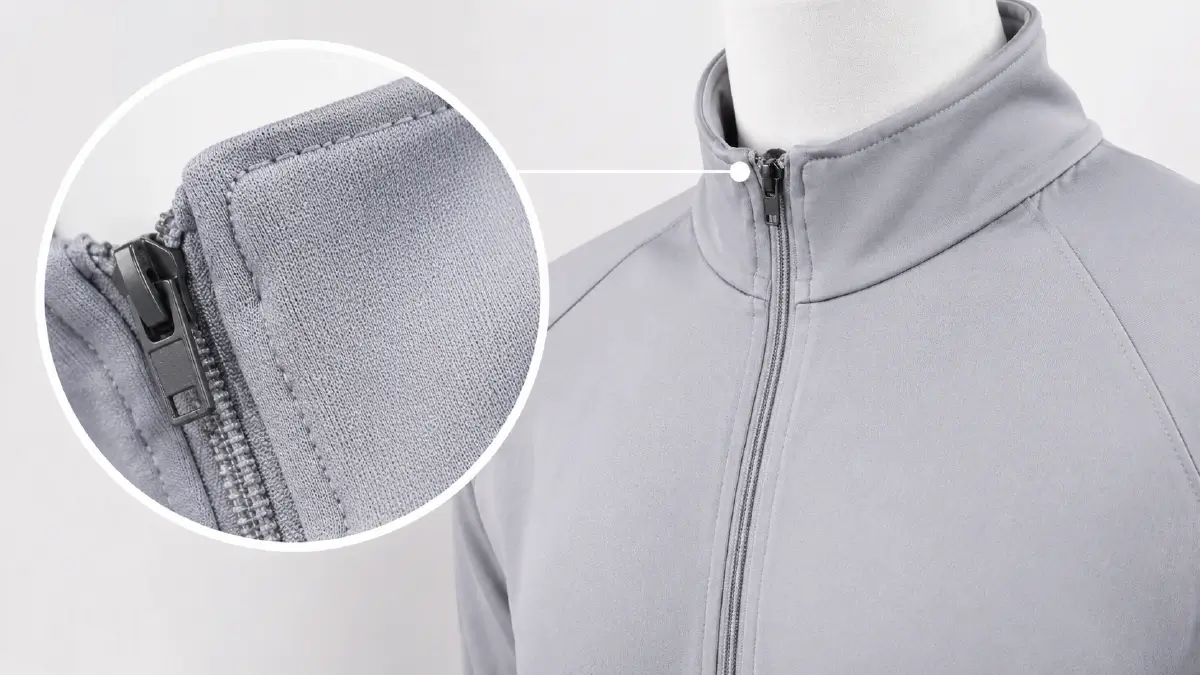
The view comes nearer to a certain area on the subject, and this is the common practice you usually see during any product photoshoots. In ghost mannequin photography, this view is nothing but to give an enlarged look at delicate designs, even small stitches.
Your visitors will at least not complain about having to look at images very close to the eye, if you have attached these shots on your apparel product page.
The best way to take this shot
- Get the most out of a macro lens: A large focal length, say 100mm, has a big advantage, and that is- you don’t have to move the tripod too close to get a close-up shot.
The benefit here is that there is no more fear of losing the height alignment of the camera platform with the dummy.
- Increase the light intensity a little: Since you have to focus on a specific part, you need to deal with the sharpness well here. Otherwise, photos taken from very close up sometimes run the risk of fading due to lens issues.
6. Detail Shot
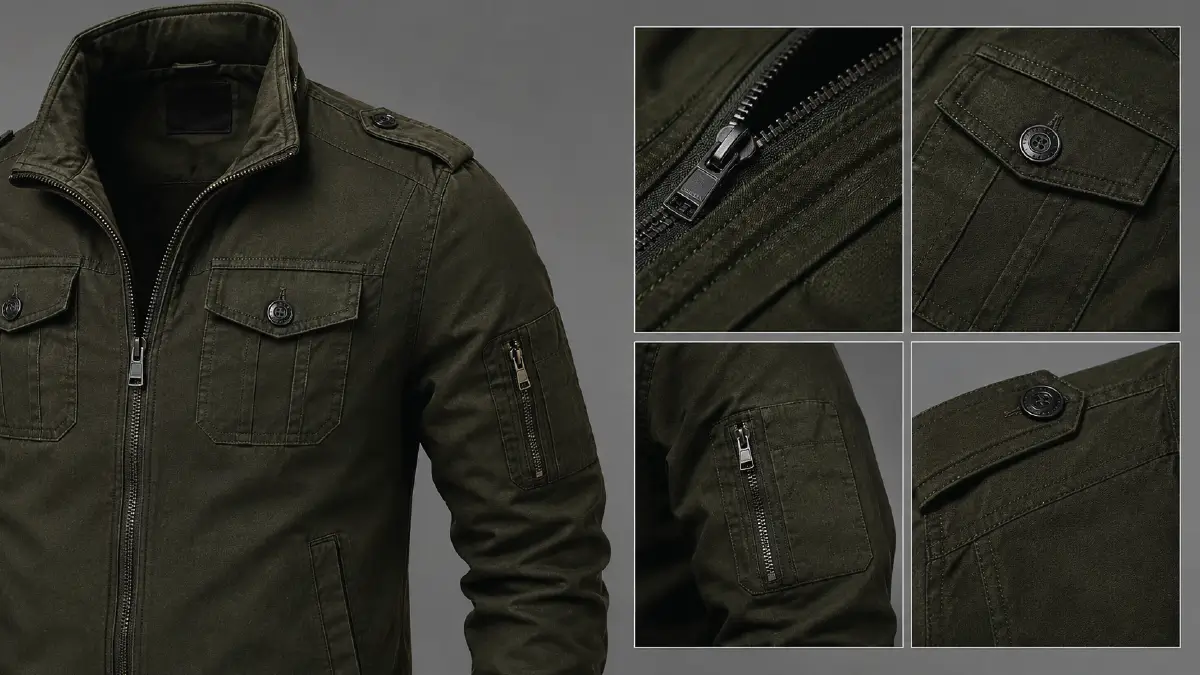
This view aims to show the subtle features present in the clothing, and thus explains why the product differs from all the others. Here, the shot works from various angles, which enter deep into embroidery, zippers, buttons, or pockets.
Not totally the same as close-up shots, this one lets you notice things from distances and also from different sides. What is very significant, this pair of shots actually behaves like a special advantage, and it fills up a big share in the ghost mannequin photo editing that you will probably spend lots of hours doing.
What to do to take this shot right
- Use the raking light technique: Place the light source that was directly falling on the mannequin at an angle from the side so that the light gently touches the fabric’s surface when passing through it.
What does it result in?
The decorative craftsmanship beautifully draws the viewer’s attention as the soft shadows cast on the fabric of the garment. On the contrary, if you had used direct soft light at first in the place of raking, these details would have been lost.
Frequently Asked Questions About Ghost Mannequin Shots
1. Is it possible to avoid shooting pictures and produce the invisible mannequin look only by editing?
Yes, you can, as there is a whole bunch of skilled image editors and premium AI tools out there. But know that it will take a lot of time and money to get the near 3D shape that you want.
On the other hand, photographers take front and interior shots of the mannequin with the clothes on, from which removing the dummy is a very short task. Plus, the physical features are realistically visible here, which is essential for the audience to understand the correct size.
2. What mannequin best works for clothing photography?
You want to use a mannequin that comes in white or gray color, both of which are called neutral types, and its material’d better be matte. It is more suitable if it has parts you can remove from it fast. This later goes well with your editing phase, where you need to work on ghost or hollow effects.
3. Why does too much light blur the dark area instead of brightening it?
This is mainly related to the visual properties of your eyes, where excessive light flashes cause your pupil to contract. Because of this, not more light but less amount is coming through your eyes.
That gives you better focus; that makes your brain do an adjustment to too much light. At this point is where people’s vision has boundaries: your eyes try to adjust, only to experience the dark areas blurry.
4. From how much distance can a 100mm macro lens take close-up shots of a product?
With a macro lens that has a focal length of 100mm, you are able to make close-up photos of your product by going 5 or 6 inches close. This is working distance, calculated from the lens of your camera.
This space is enough so you can manage the studio lights and make sure the product receives the light, so nothing blocks it.
5. Doesn’t raking light ruin the soft lighting the invisible model shots go well with?
No. Raking light is a lighting technique that clearly reveals all the details, including the texture, of the product without disturbing the base lighting. All you need is to place the key lighting source at a specific angle (30 degrees) to the model.
Summing Up
Combining all these 6 significant ghost mannequin shots means your fashion brand is going to have audience engagement for a long time. From the analysis so far, you must have noticed that at the root of all these things is a proper lighting setup.
It can bring stunning views to your traditional front and back shots; you just need to be passionate about the real look. During interior and 3/4 angle shots, be careful to maintain the height sync between the tripod and the model.
You’ll realize the benefits of these more in post-production than when taking close-ups and detail shots; how much your work has been cut short. Of course, even the little that remains can be challenging in some cases, especially if you don’t want to take on the hassle of editing.
You already know that brand value demands skilled work, and you want to leverage that same skill for your business. So get to know Retouching Zone, who have specialized in ghost mannequin image editing since their arrival in the industry.
The best way to get a jump start with them is to check out their free trial, so don’t be late and grab the opportunity right now.