
You’re getting visitors to your store, but they’re not going to make the purchase. One of the very reasons behind this is that everything about your product may not be tidy.
The view they get, in fact, isn’t worth looking at at all, which is why they’re turning their backs and leaving the site. What often goes unnoticed behind such mishaps is that your ecommerce product catalog hasn’t been in the proper look.
Do you know, inconsistent colors in addition to strange backgrounds can even give audiences the impression that they’re about to stumble upon something spammy?
It’s not just about being on the safe side, but consistency in your catalog has a premium feel that instills trust in your visitors.
Keep carrying on with this article; creating a consistent catalog for your digital store will continue to unfold so that you can get the seeds of long-term sales conversions.
Step 1 | Tailor a Style Guide for Your Catalog
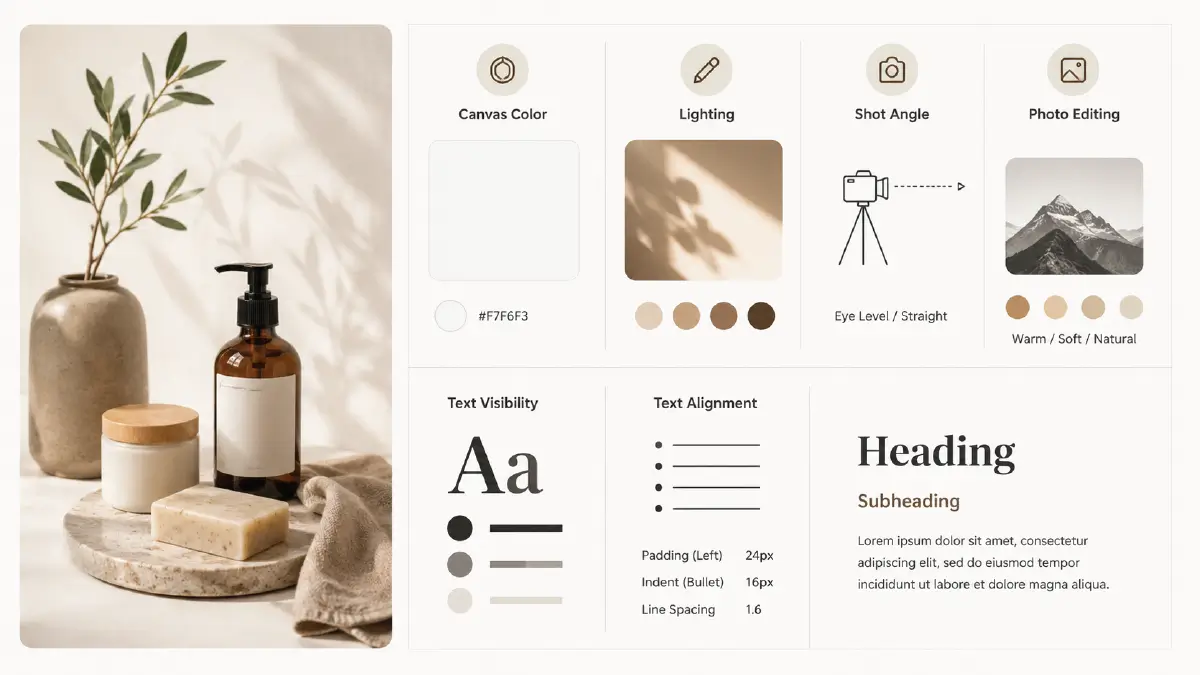
Start by creating a style guide that dedicatedly speaks only to your brand. You definitely have plans to scale in the near future, and for that, there’s no substitute for a written guideline as an efficient step.
Here are some essentials of what you need to include when making your style guide:
- Canvas color: Do you want your background to be a stark white, or a light gray or textured marble? Don’t pick multiple options; rather, it’d be better to stick to just one.
- Nature of lighting: Whether you want your product to look bright, warm, dramatic, or shadowy, it’s best to stick to just one. Picking one rather than harboring multiple options makes your brand unique for that lighting.
- Angle of shots: What angle do you want to take your hero shot, the first image? Is it slightly sideways, or straight at eye level? Go for only one of them, not both, and carry it along for your other products.
- Create a baseline for photo editing: Photoshop or Lightroom; whichever is your best editor, don’t just go for random editing there; rather, create a preset first.
Whether you’re shooting in the winter, summer, or fall, this way won’t make your photos inconsistent when you edit them. - Text visibility: The fonts and colors of headings and normal text should be such that they don’t bother viewers when they’re reading them.
- Text alignment: Specify the padding and indents of bullet points under each section. Even adjust the spacing between lines so that people don’t have trouble reading one another.
Step 2 | Make Your Product Photos Friendly for Every Platform
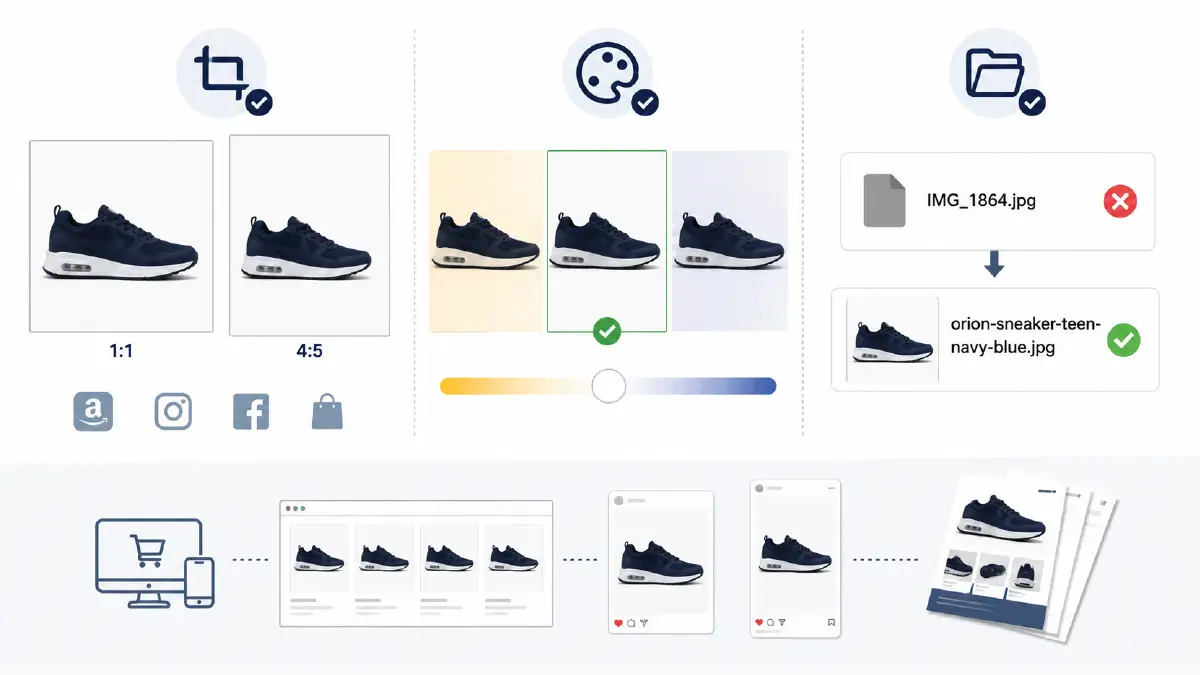
The more channels your product images fit into, the more reach they take your brand to. This simply means that your products are getting exposure in front of more pairs of eyes.
So let’s take a look at what you can do to bring this channel-friendliness:
- Show hero shots in the same cropping ratio: If you keep both square, like 1:1, and vertical, like 4:5 ratio, your pages will look disorganized. But if you keep one of the two, it will give comfort to the eyes at first glance.
- Get white balance and color correction to a consistent point: You definitely don’t want your customer to see one color online and a different color when they actually receive it. This balancing works to prevent this from happening.
- Give your image files proper naming: Don’t just leave it with a random name (like IMG_1864.jpg). Save it with something meaningful that many people search for, like orion-sneaker-teen-navy-blue.jpg.
This will make it easier for users, even targeted ones, to find it on search engines, social media, as well as your ecommerce site.
Tips for time-saving catalog creation: You can find different product catalog templates made for e-commerce or social media. You can modify their framing according to your needs, so that your brand identity remains intact.
Step 3 | Same Style in Headings and Descriptions for Every Product
Text takes up a large portion of the visuals that educate viewers about the product. And keeping it consistent allows audiences to get used to your style.
To carry on this step, you need to act with the following workflow, which will fuel your branding during each subsequent scaling:
Be specific when naming your products
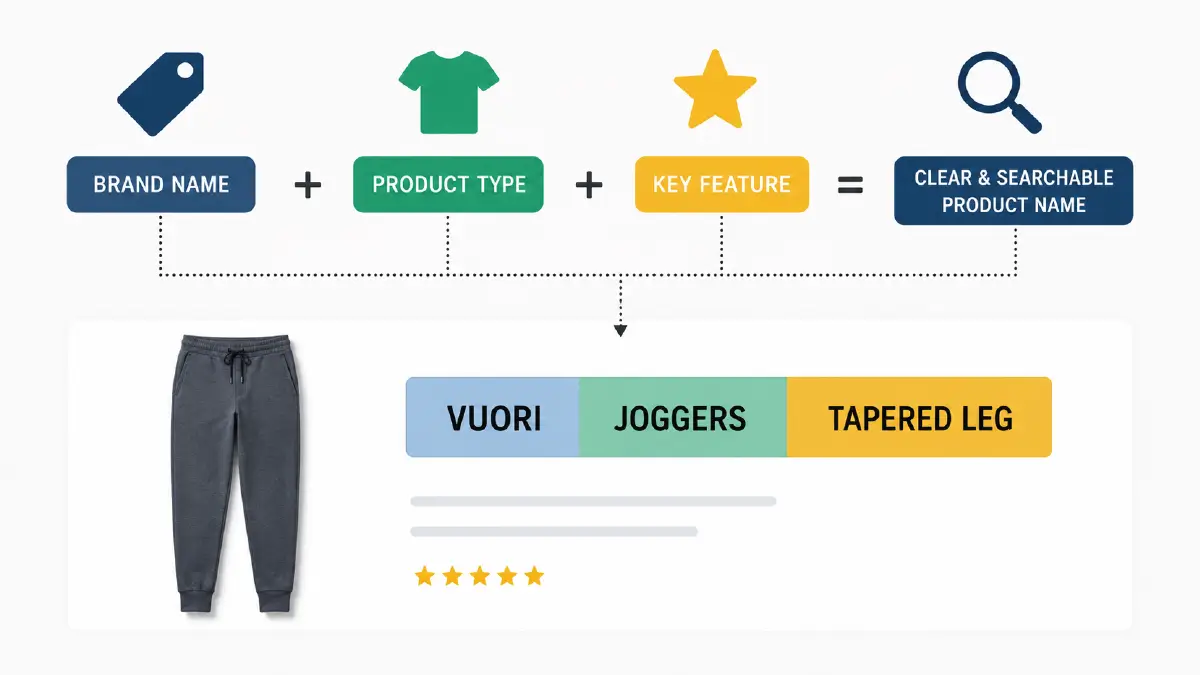
Having different naming styles for each product not only confuses buyers but also hurts the search engine. The naming formula can be like this for your entire catalog:
[brand name] + [product type] + [key feature].
For example: Vuori Joggers Tapered Leg
Be consistent about your product parameters
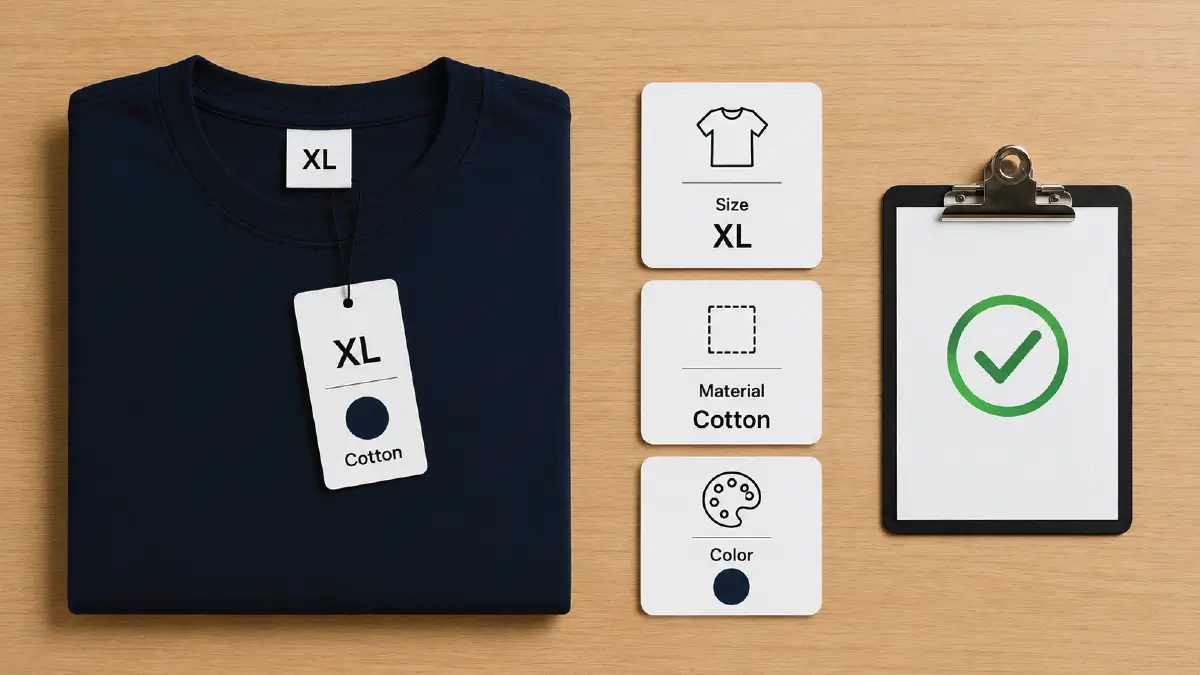
Throughout your product listing, all XL sizes will be either ‘XL’ or ‘Extra Large’; not both. This rule applies to all other aspects of your products, including the material and color.
Write descriptions based on search intent
Creating this type of content is essential for your product to reach your target audience. For good reason, you need to do keyword research for this, then sprinkle it naturally within descriptions of your product.
Step 4 | Base Your Catalog on a Clean Layout
The appeal of a catalog largely depends on the layout it is based on. People expect an experience where they can effortlessly scroll from top to bottom of the webpage while checking out products.
Now you’re going to see what exactly an acceptable layout like this demands in order to win the audience:
Align your catalog horizontally and vertically
Pay attention to the grid where you plan to arrange your products, as it forms the structure of your ecommerce site. Align the product image boxes from top to bottom and from left to right.
Similarly, check if the price tags as well as “Add to Cart” buttons are in proper shape.
Set up a clutter-free visual hierarchy
Just as a funnel moves items in a certain direction, prepare your content exactly like this. This will help visitors move spontaneously from seeing the items they want to checkout.
And most importantly, keep this entire journey far away from clutter so that it doesn’t negatively impact the potential customer’s attention.
Step 5 | Drive This Consistency Forward Through Scaling

This process is not a one-time thing; take it further when you have to handle many things at once. It is quite natural that when the business grows, many things can go beyond your control based on complexity.
And that is when you need decentralization of responsibilities, where your tasks will go to a better level over time.
Improve your product photo editing by all means
If you have your own team, make them work faster than before while maintaining the quality of work. The best way is to outsource, because relying on pro companies for ecommerce photo editing saves both time and money.
Another bright side is that here you can free yourself from the tasks you used to do and brainstorm to add new layers to your catalog consistency.
Set a specific audit cycle
Being free doesn’t mean you don’t need to be in touch with those tasks anymore. Rather, auditing will be one of your most important tasks as a store owner. You can set the cycle to your convenience, such as once every two or three months.
In this audit, you will check thoroughly whether everything is running according to that style guide you created at the very beginning.
Frequently Asked Questions About Consistent eCommerce Product Catalogs
1. Why do my eCommerce product photos look different from what they actually look like?
The main reason for this difference between the screen and the actual look is that you did not set the white balance of your camera correctly when taking the photo. Different product types and background environments demand different white balances to show the true color of the product.
2. What lighting setup should I use for maintaining consistency in product photography in a home studio?
To achieve consistency, you can use a large softbox and a two-light strobe, from which you will get consistent light regardless of the time of day. In this case, LED lights are also a good alternative, which, together with a softbox, give results where you do not have to face any unwanted change in lighting.
3. Can I use different fonts to show nonidentical features of a product in the catalog?
It’s best to use a maximum of 2 fonts in your entire catalog, as multiple fonts can create a chaotic situation. The fewer fonts you limit yourself to, the better for your brand, as your visitors will start to get used to your typeface.
4. Can I create custom eCommerce product catalog templates with AI from scratch?
Yes, of course you can. There are some great AI tools out there that can handle everything from your back-end framework to product descriptions. But what you need to keep in mind here is that the templates go with your brand in every way.
It’s better to tailor them to your own needs rather than blindly taking the auto-generated results.
5. How can I add new products while keeping my catalog’s look consistent?
The surefire way to do this is to maintain a detailed style guide that serves as a repository for all of your camera settings, environment-specific lighting setups, and software-centric editing presets.
Just follow these guidelines exactly when adding a new product, and you’ll see it match the look of your previous products.
Takeaway: Quick Checklist
By now, you have a clear idea that these five steps are essentially a regular process for making your eCommerce product catalog consistent. You can keep the following checklist with you during the audit across the catalog and make sure that each one gets a tick mark:
✅ A single, simple background and text color that doesn’t distract the eye
✅ A uniform nature of the light that makes the product clearly visible
✅ All hero shots taken from the same angle
✅ Same cropping ratio for each image
✅ Specific editing presets ready that work with the most commonly used software
✅ Texts have a maximum of 2 fonts and the same amount of space between their lines
✅ Product naming and display of components have the same format
✅ The images are all metadata-rich
✅ Each element is in proper alignment from top to bottom and left to right.
However, upgrading the quality of your catalog over time is tough enough. You’re already tired of calculating budgets and ROI; the thought of exactly which investment will be fruitful is almost tearing you apart.
If you want to give outsourcing a thought, I would say go for ‘efficient experts’. Why not only ‘experts’? You will understand when you get in touch with Retouching Zone, a group of pros with a decade of experience standing by to tailor your image editing presets.
No need to worry about quotations right now; just take a look at their free trial first and then decide.