Viewing and evaluating a furniture photo from different angles? You couldn’t have imagined it even 10 years ago. And interior parts? You had no way to see but to just guess.
But now all these user experiences exist, and they have given rise to the buzz around 3D views, 360-degree views, digital twins, in short, the very digital staging. Also widely known as virtual staging, this display trend has created a stir throughout the entire furniture visual industry.
As an online retailer, you too are caught up in this new shift, aren’t you? You are already experiencing the associated photo editing for getting equipped to keep up with this pace.
Read this trend analysis; along the way, you’ll know exactly where to focus when displaying your furniture online.
TL;DR:
- Mobile-first images, 360-degree views, and digital twins are enriching the user experience, which collectively proclaim the trends of digital staging for furniture.
- A workflow combining AI and advanced manual photo editing skills is being used for quality images of furniture in virtual staging for online retailers. Focus is on real-life context and originality over unrealistic perfection.
Quick Chart: The Impact of Digital Staging Trends on Furniture Display Online
| Factors Driving the Digital Staging Trend | Impacts on Furniture Display Online |
| Mobile-first image optimization | Encourages vertical layouts and scroll-friendly design for small screens |
| 360-degree view | Makes it easier to view every angle of the furniture |
| Digital Twins | Creates realistic 3D replicas, reducing the need for physical product photography |
| Combined use of AI and advanced manual photo editing | AI generates staging-ready models, while human editors ensure accuracy and quality control |
| Truth shots over perfect imagery | Provides close-up, texture-visible furniture views without heavy filtering |
| Disclaimer for virtual staging | Builds transparency by stating the furniture scene is digitally created, not physically photographed |
Digital Staging Trends in Furniture Visuals
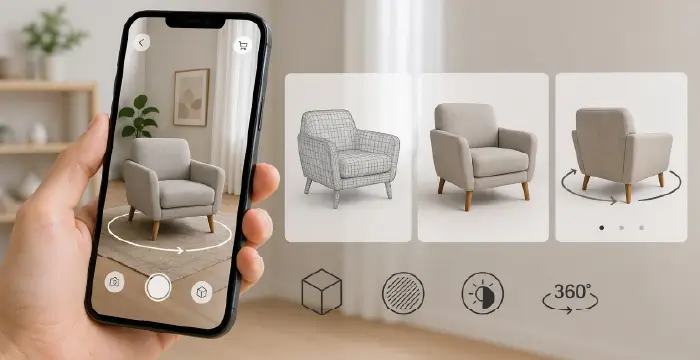
Trying to understand the shape of furniture by just looking at still images ends here. Now, by looking at the 3D models, you can see how accurate the furniture virtual staging appears and how much more aesthetically pleasing it feels.
This benefit has gone so far that now you can get the feelings of almost physically using the furniture right on the screen of your smartphone. And what makes it happen? You can give all the credit to the mobile-first approach.
To make these benefits worthwhile, furniture photo editing services add quality contrast to the textures. And you won’t find the shadows anywhere near exaggerated, but the silhouettes will look clearer than ever.
And when it comes to 360-degree furniture viewing experiences, you won’t find anything more rewarding than this, as automation is moving at full speed towards its full potential.
You can’t help but thank the AR objection-killer; the subtle fitting has never made product browsing so active for you. AR has made it possible by killing the objection, so you no longer have to look at the furniture and wonder, ‘Will it really fit in my room?’
AI Tools in Action for Furniture Photo Editing
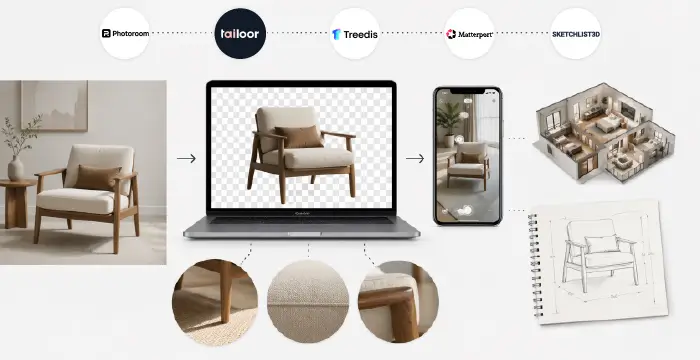
How far can you go in editing speed and quality? AI hasn’t just made a royal entrance here; it’s also constantly evolving. You can count on the following AI image editing tools that have delivered eye-popping results, like digital twins, one-tap feature:
- Photoroom (fast background cleanup and simple catalog visuals)
- Tailoor (best for phygital: physical + digital experience)
- Treedis (interactive 3D and AR product experiences)
- Matterport (immersive spatial capture and 3D walkthroughs)
- Sketchlist (effective for a quick, concrete build plan)
But the thing is, are these looks of furniture created by AI realistic enough?
The answer really depends on how you use the tools. You definitely shouldn’t rely on them blindly, but rather add a careful human touch
There is something called “truth shots”, a close-up view of the furniture, without any filters, that you need to ensure by all means. For this, the factors you need to take into account are:
- Where the furniture’s shadow falls against the incidence of light
- How consistent its color is with real-world furniture
- Is the structure of the furniture way more exaggerated (be careful about the edges)
Above all, check for overly polished or naturality loosing perfect images, because you certainly don’t want to risk distrusting smart customers who can pick up on subtle differences caused by AI.
Manual Photo Retouching with the Latest Skills

Yes, you read that right. Even in this age of AI, manual furniture image retouching is more than relevant. The demand for the best photo editing software of all time, Photoshop, has not become obsolete yet, but the skills of newly developed processes are getting the spotlight in an instant.
You must have already observed how important the following fixer-uppers are:
- Color-grading to fix color mismatch
- Advanced compositing to give natural light reflection and perspective
- Maintaining the quality surface details and material characteristics for the authentic and tactile look
- Calculating light sources and occlusion for the natural sense of depth
- Removing artifacts, noise, or rough transitions around edges for a professional background.
- Preserving the natural micro-patterns of organic materials for maintaining originality.
Why Brands Blend Studio Images With UGC
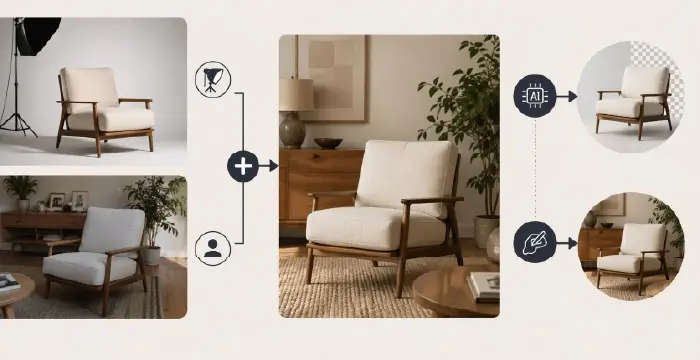
User-generated content (UGC) is not the premium vibe you get in a studio, whereas the studio-built images lack the social resonance that is at the core of UGC. So today’s big brands like IKEA, burrow, West Elm, blend the two approaches, because that’s what their target audience prefers.
This is the perfect way to showcase UGC content in a posh gallery that shows how it’s used in real life.
But where in this hybrid model do AI and human editing share their roles?
- AI takes care of the background adjustment
- Manual editing brings out the truth shots of the furniture
E-commerce Brands Taking a Stand on Transparency
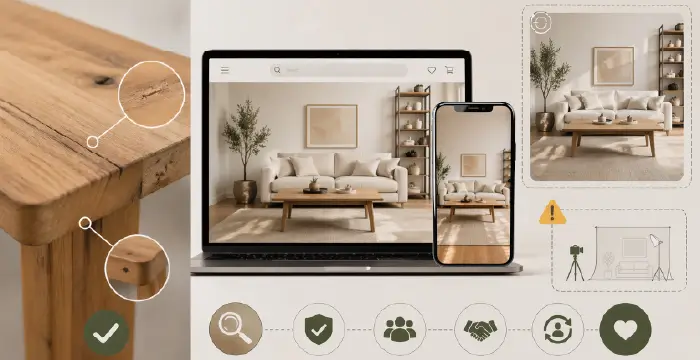
IKEA, BoConcept, and West Elm offer up-close-up views of furniture without any filtering. Online retailers have already been prioritizing natural flaws over made-up perfection, which you’ll find as best practices in the furniture photo editing trends these days.
Not only that, Wayfair and Crate & Barrel, as well as IKEA, label their virtual staged images with disclaimers, which is easy to catch the eye of viewers.
The point is, you can’t treat customers in a way that makes them suspicious, so you’d better let them know in advance.
This trend is quite positive for (CLV) customer lifetime value, which means that when you let your furniture be seen up close, keeping its original flaws as they are is a sign of quality.
Frequently Asked Questions about Digital Staging for Furniture
1. What is Digital Staging of Furniture?
Digital staging of furniture is the process of creating digital images of furniture, where it is positioned in an empty room, just like in the real world. Also known as virtual staging, it can be created from photos, 3D assets, or CAD models.
To perform this virtual staging, you need a computer app or AI, which significantly makes the need to physically photograph the furniture in real life irrelevant.
2. What are Digital Twins?
Digital twins are data-linked virtual replicas of objects we see in the real world, whose characteristics you can change in real time. It means that you can instantly change its cover, color, or other specifications and check it out.
3. What does Truth Shots mean in the perspective of furniture photo display?
Truth Shots are RAW images of furniture that are exactly as they were taken with the camera. No filtering, manipulation, or minimal edits have been applied so far, and the shot was taken very close to the furniture.
4. What are examples of UGC images?
UGC or user-generated content (images) refers to images that are taken by customers/users while using them in their own lives. For example: Images posted on social media (Instagram or Facebook) or unboxing photos.
5. How does the AR objection killer work?
AR (Augmented Reality) Objection Killer is an AR app feature that creates a 3D version of the furniture in the image displayed on your smartphone, in the place you are in. It uses your smartphone’s camera to do this projection, and lets you see whether the furniture fits in that place and looks good.
Final Words
Digital staging has taken furniture display to a new level, where viewers are in the ultimate comfort zone when viewing products. Just imagine your viewers being able to rotate your furniture 360 degrees from their smartphones!
And if they can also look at the digital twins, then you can expect to see your product returns cut short in no time. Furniture photo editing is there for backing these up, but don’t go for heavy edits; rather, stick to truth shots.
There are now plenty of AI image editing software out there to provide this interactive experience. But you still need to give them human control because there is still no substitute for human touch to filter out AI-induced errors.
Finally, not only to keep up with trends, virtual staging is also necessary for the CLV of your furniture.