It’s no secret that you’ve come across the Photoshop vs Lightroom debate, especially when you’re looking for the best photo editing tool.
You must have seen the Statista survey, which was quite impressive, with Photoshop having about 42% market share in global graphics software. Lightroom, on the other hand, was in a negligible position with just 1.23% market share.
While the software duo is in such a financial position, Shotkit’s survey claims that 58% of photographers use Lightroom for photo retouching. Keep scrolling and delve deeper into this blog; you will come across more significant differences between Adobe Photoshop and Lightroom.
Photoshop VS Lightroom: Which One is Better for Professional Product Photo Editing?
When evaluating Lightroom vs Photoshop for photo editing, don’t treat them as rivals; they are teammates. Most professional product retouchers start in Lightroom for basic color work and then move into Photoshop for final, pixel-perfect adjustments.
The following tabular presentation will give you a quick comparison to get a clear idea of the right field at this initial stage.

Even a perfect product shot may fail to tell the story you want to highlight about the important attributes of your product. A few minutes of polishing or retouching can make it as good as you want. But should you use Photoshop or Lightroom for professional product picture editing? Let’s learn what you can do with each of them.
Advanced VS Basic Editing
- Photoshop is mainly used for image polishing, retouching, compositing, and manipulating product images.
- In contrast, Adobe Lightroom was primarily focused on basic picture manipulation, batch image processing, and organizing product images.
Pro Or Beginner
- It takes around 3-4 months to learn the fundamental features of Photoshop. But you need years of practice to get a deeper understanding of every tool.
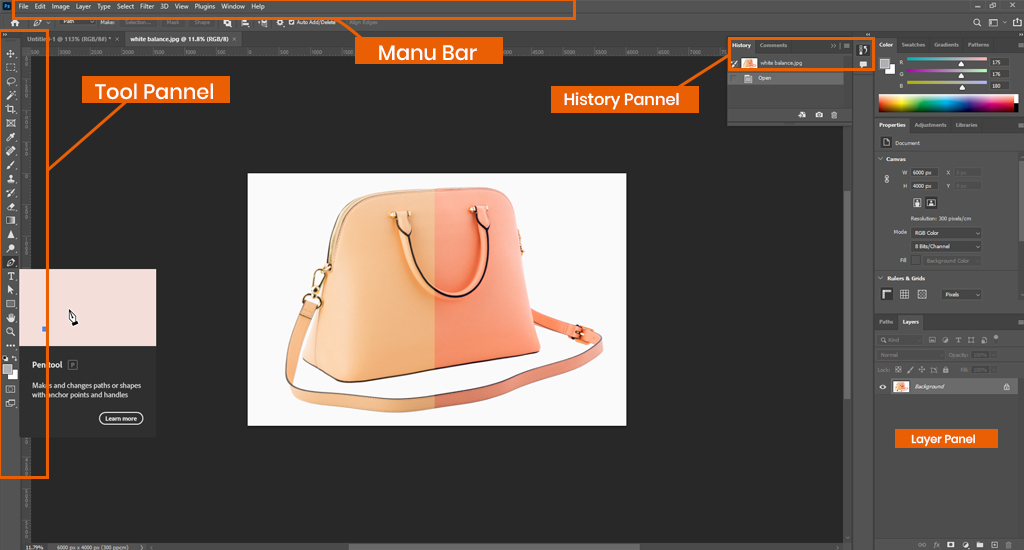
- A person must go through a steep learning curve to learn a wide range of tools, panels, menus, layers, masks, pen functions, etc.
- On the other hand, you can pick up the basic functions of LR within a few hours due to its simple and easy-to-understand interface.
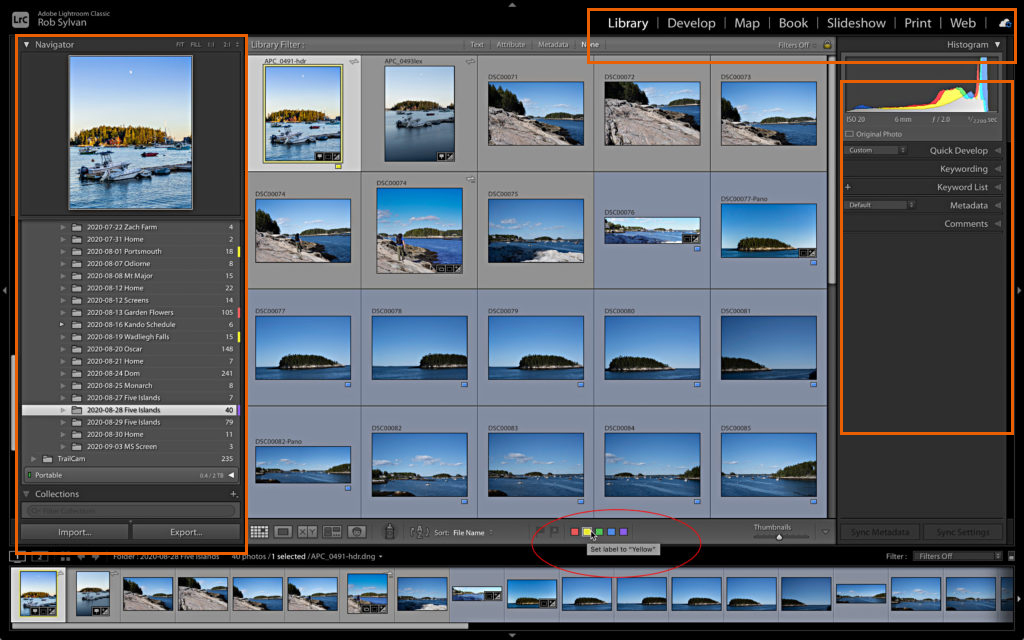
- Users can easily navigate to the Library and Develop panel, right-hand toolbar, and left sidebar.
Professional Editors VS Photographers
- Designers, video editors, advanced editors, marketers, product manufacturers, etc., use PS for product image editing.
- This software allows professionals to correct color, remove backgrounds, and improve image quality.
- On the contrary, LR is mainly used by professional photographers and casual image editors.
- This handy app enables them to process, catalog, and organize a large volume of images quickly.
Layer-based Or Non-destructive Editing
- Layers are one of the most powerful features of PS. You can add various visual elements separately without affecting the original image.
- It gives you better control over selective adjustments and blends well with various modes. This feature is a better choice for an advanced level of product picture retouching.
- On the contrary, Lightroom comes with masking tools to make local corrections. It is perfect for non-destructive adjustments.
- This useful feature allows users to edit specific areas of a product image without adjusting the entire picture.
Single VS Multiple Image Processing
- Most professional visual editors work only on one single product image at a time in PS. But you can compile multiple pictures into one composite picture.
- However, you can’t use the same adjustment in multiple images at a time. You have to do it separately for each one.
- In comparison, LR is the best choice for a huge amount of batch processing.
- You can work on a vast number of images at a time. It enables you to apply the same settings across large sets of pictures. This saves you time and streamlines the workflow.
Creative Or Basic Tools
- Photoshop comes with various creative tools, such as a brush tool, pen tool, cloth stamp, content-aware fill, healing brush, gradient tool, etc. These powerful features enable users to fine-tune details in-depth.
- Conversely, Lightroom has many basic tools, like library tools, basic editing panels, tone curves, HSL panels, lens corrections, presets, etc.
Conclusion
If you want a definitive verdict on Photoshop vs Lightroom, then both have their own areas of expertise. When the questions are raised for product photo retouching skills and high-quality results, Photoshop is the better choice.
However, if it comes to the volume of images where basic polish is more than enough, then you can go with Lightroom. Its beginner-friendliness overcomes the barrier of pro-editing.