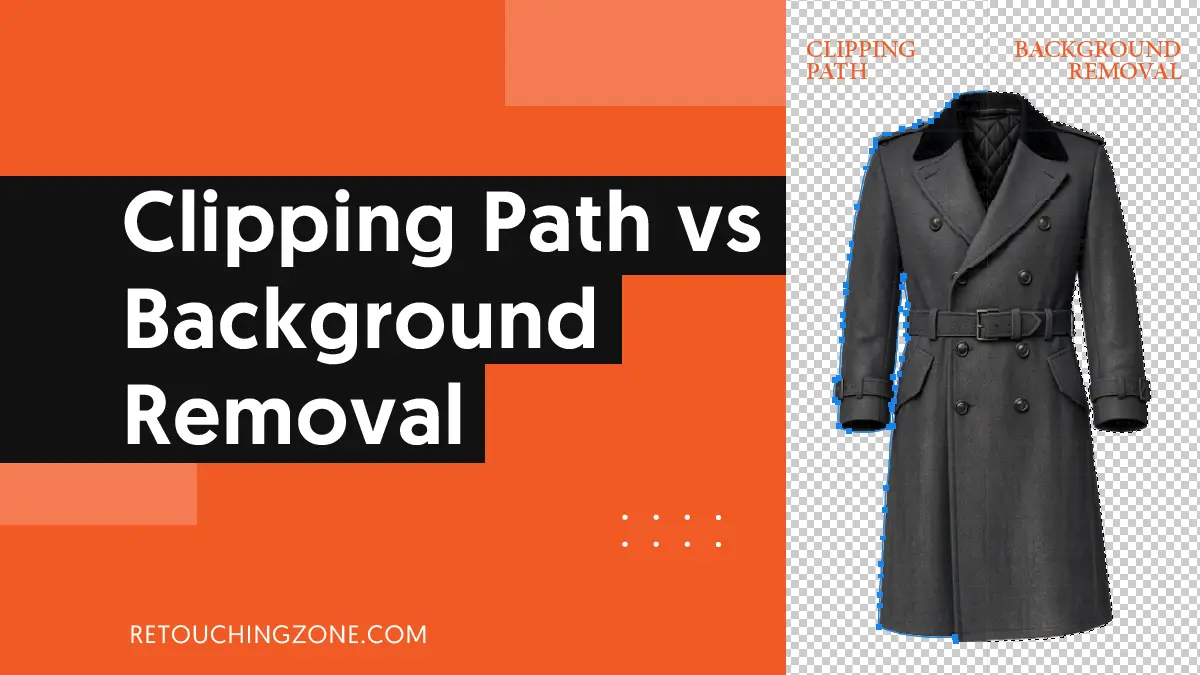
Clipping paths create outlines along the sharp edges of an object to separate it from its surroundings. Meanwhile, Background removal is the outcome of the clipping path method, where editors focus on the background, either to remove or replace it.
But the understanding of clipping path vs background removal goes even further when you look at how these photo editing techniques are put into practice.
Check out the table below, you’ll get a jumpstart on what you really need to take into more detail when you go about applying the methods.
Clipping Path vs Background Removal: Quick Comparison
You need to keep in mind that background removal is the outcome. Clipping path and masking are the two main techniques used to achieve it. So, the question is not ‘which one,’ but ‘which method fits this image?
| Criteria | Clipping Path | Background Removal | |
| Objective | Clean cut an object out of its background | Removing background, making it white or transparent | |
| Technique | Vector-based Bezier curves drawn by hand | Raster-based pixel selection (manually or automated) | |
| Used tools/ procedure | Pen Tool; typically of Adobe Photoshop | Manual: Image Masking or Refine Edge tools Automated: AI extraction |
|
| Edge Precision | Razor-sharp edges | Soft, feathered, or translucent transitions | |
| Complexity factor | Number of anchor points | Subject edges, foreground and background colors | |
| Scalability | Resolution-independent | Resolution-dependent | |
| Output File Format | JPEG, EPS | PNG, PSD, TIFF | |
| Best Use Cases | Hard-edged products (i.e., jewelry, furniture, shoes) | Complex objects like apparel, pets, plants, etc. | |
What is Clipping Path?

In simple terms, a clipping path is a method of creating a vector-based boundary around an object, which image editors typically draw by hand. For this non-destructive technique, which involves very precise measurements, they usually use the Pen Tool of Adobe Photoshop.
After editing, only the part inside the path is visible in the final image, thus achieving the goal of isolating the object from its background.
Pros
- Retaining sharpness of solid objects: The silhouettes retain their razor-sharpness, even when zoomed in deeply.
- Vector-based process: Thanks to its vector-based nature, you can change the anchor points later.
- Quality file size: The path you clip remains as metadata, so you get a smaller image file size without losing that much of the professional look.
Cons
- Can’t handle organic objects: It has a hard time handling soft or blurry-edged objects like hair, fur, fine mesh, or smoke. At maximum effort, it often produces artificial looks rather than natural finishes.
- Limitation of proceeding manually: It is obvious that since it is a manual process, the turnaround time is considerably longer.
What is Background Removal?

Background removal is a process of raster-based pixel selection where photo editors can use AI extraction in addition to manual methods such as color range selection and channel masking.
They work on alpha channels and pixel transparency to separate the foreground from the background.
Pros
- Works for organic subjects: It effectively brings out the natural fine details of organic subjects like hair, fur, or thin fabrics.
- Good color decontamination: It excels at color decontamination, so no color casts from the cutout background remain on the object.
- Layered PSD compatibility: Due to this PSD, editors can add soft drop shadows and reflections to give visual depth to the image.
Cons
- Resolution dependency: Since the process is resolution-dependent, the edges become blurred when you enlarge the image beyond its original size.
- Technical complexity: It is relatively more complex, especially requiring editing expertise to control fringing or halos and artifacts.
- Consequences of going manual: Masking is more complex than standard vector paths, so if you go for a manual process, it takes more time. Accordingly, it is often more expensive.
Key Differences Between Clipping Path and Background Removal
Let’s now delve deeper into these two essential ecommerce photo editing methods and do a comparative analysis from a few specific perspectives. This will allow you to see very closely which one performs well in which areas.
Type of Techniques Used
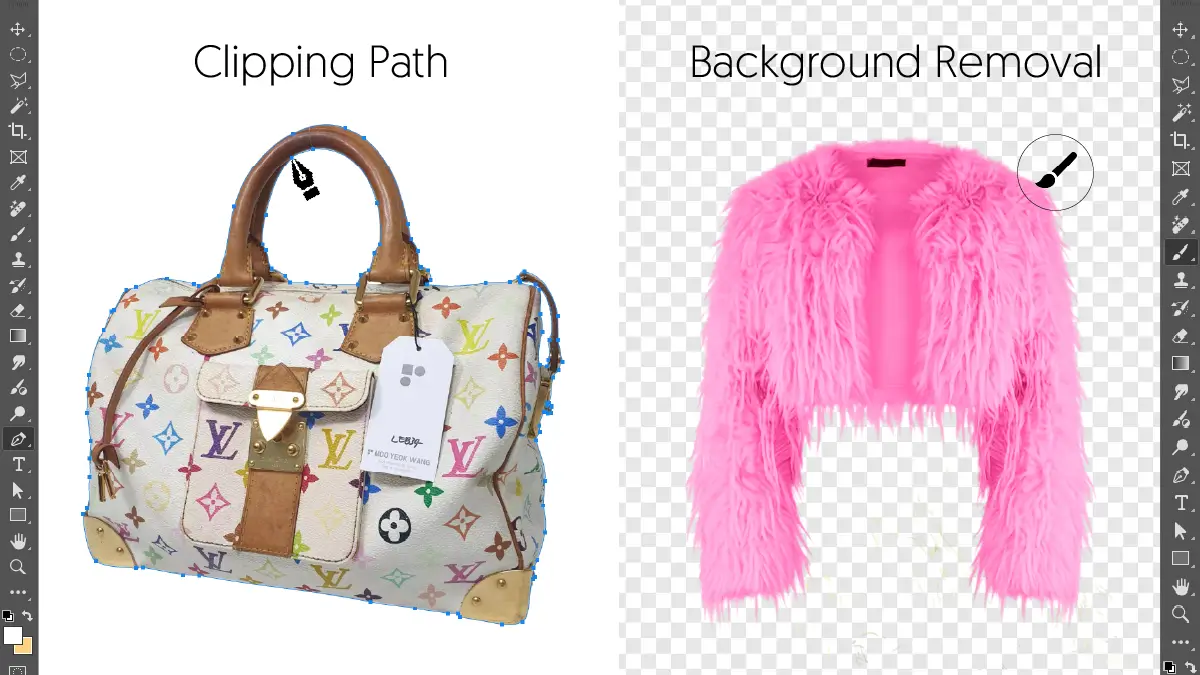
When doing a clipping path, the solid boundary that photo editors manually draw is essentially a vector-based Bezier curve. They pay close attention to the fine precision when editing anchor points using Adobe Photoshop’s Pen Tool.
On the other hand, in background removal, editors use the Refine Edge Tool to do pixel selection and masking, which are raster-based. In addition to these manual methods, they can also complete these edits using AI-powered refinements.
How Much Precision the Edges Get
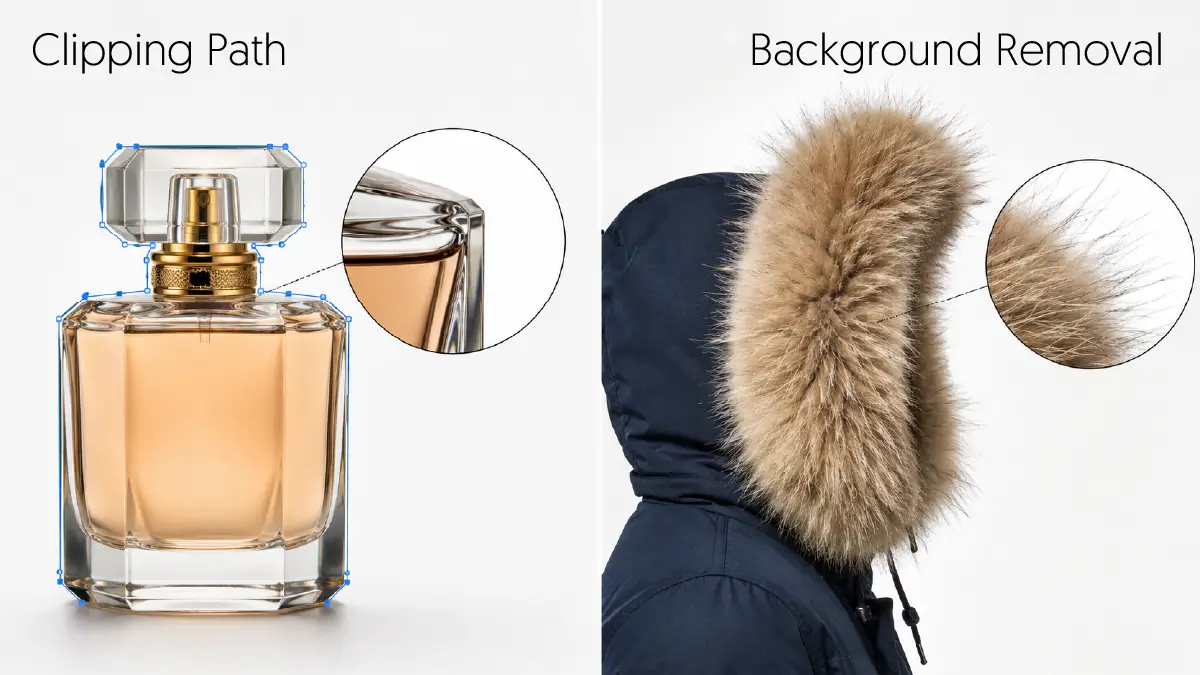
Clipping paths work very well for products with solid, clear, and very sharp edges, and these sharpnesses remain intact even when zoomed in very deeply.
However, background removal flourishes in the case of organic textures like fur, thread, or hair, where you get a smooth, feathered finish.
Level of Complexity
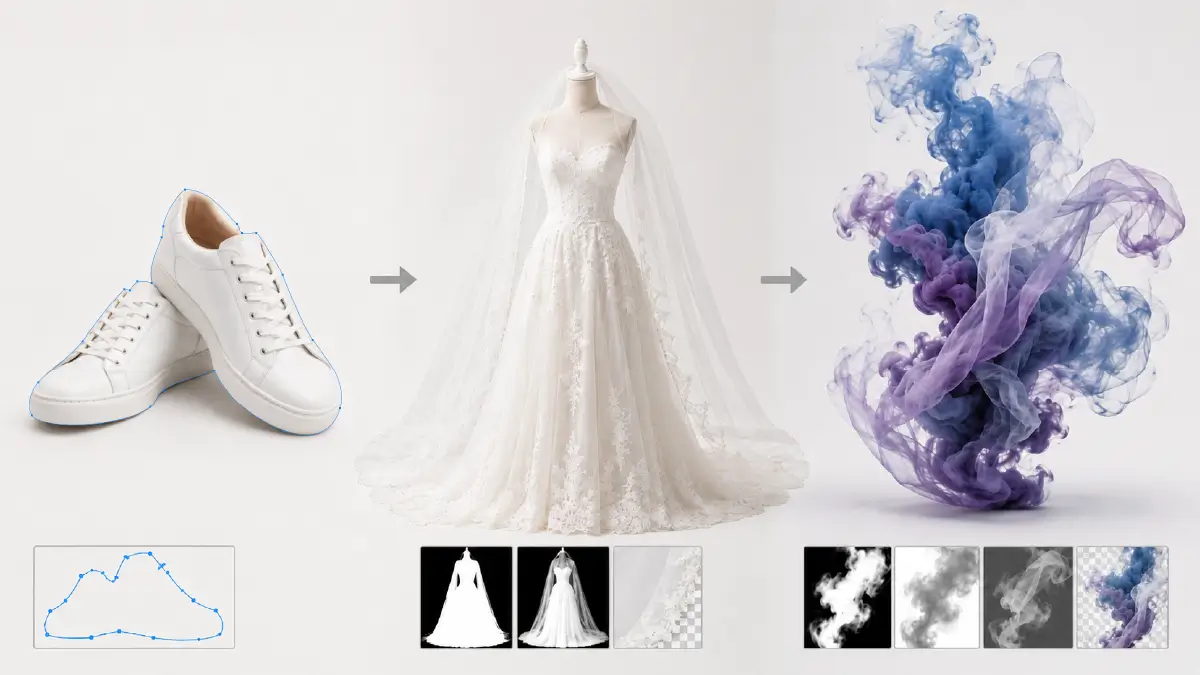
As the number of anchor points increases, the complexity of the clipping path increases. Plus, because the method is manual, it becomes much harder to edit when complex silhouettes, fringes, or halos appear.
For example, you can handle a pair of 12-curve shoes with just a simple clipping path, but for a wedding dress with a veil, you’ll need image masking.
Background removal becomes more complex as the complexity of fine detail and transparency increases, such as smoke or mesh in an image. This is a situation where simple outlining is not enough, but rather requires moving on to alpha matting and tonal separation to tackle.
This is where you’ll want to resort to skilled high-end color blending and color decontamination.
Formats of Output Files
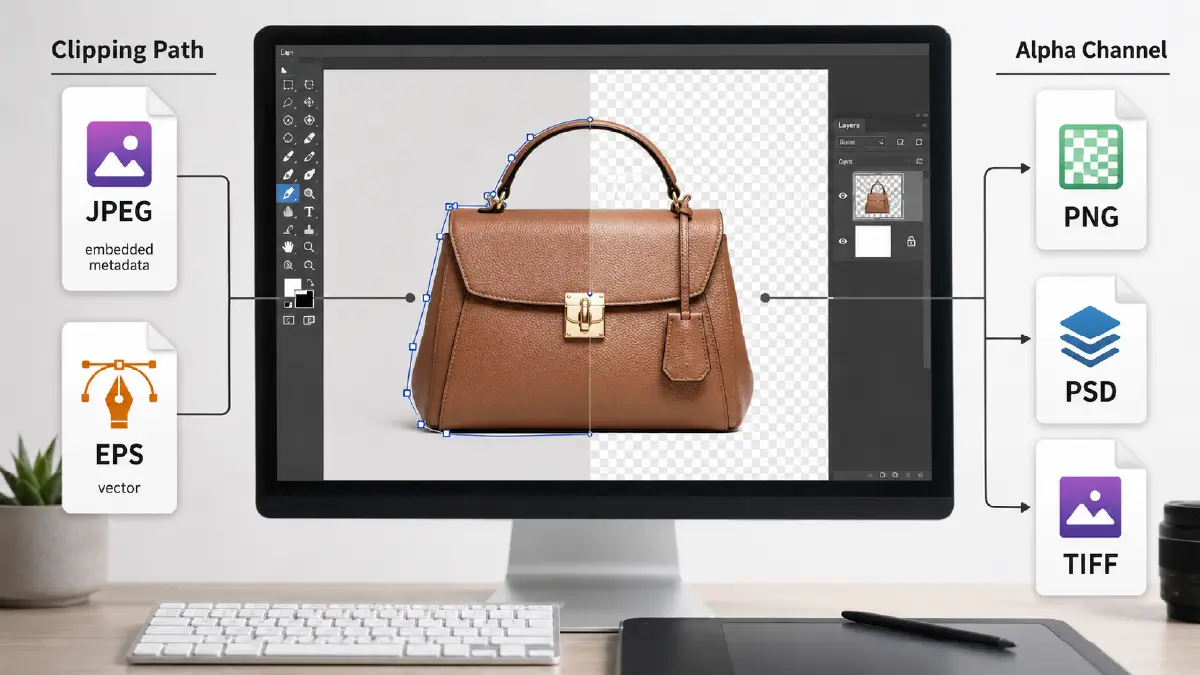
The clipping path that editors create is editable later, with the original pixels remaining unchanged. This is because the path remains essentially preserved in one of two ways:
- As embedded metadata within a JPEG file
- As a vector EPS file
And the need for an alpha channel for background removal demands the following output formats:
- Transparent PNG
- Layered PSD
- TIFF
Scalability of Edited Photos
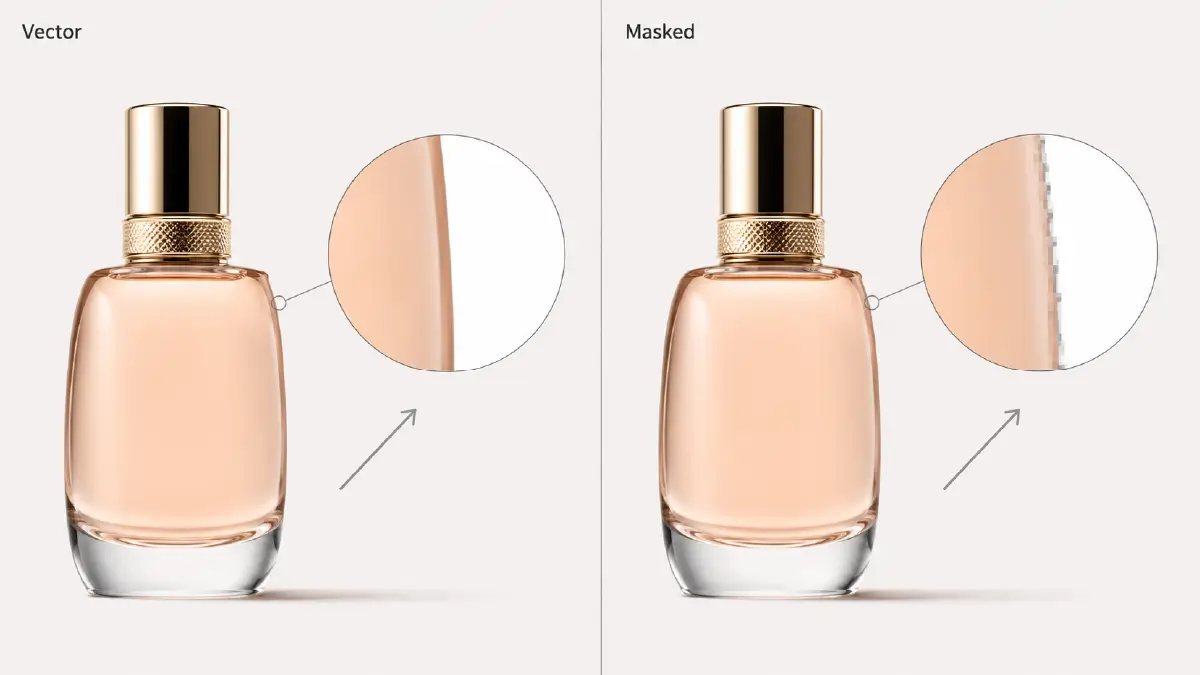
The advantage of being vector-based is that the edges are sharp enough that you can scale or enlarge the image as you like without pixelation.
In contrast, when you upscale a masked image during background removal, you will often see jagged or rough edges. The reason behind this is that pixel selection is entirely raster-based, meaning that if you change the resolution of the image, the edges will also change in appearance.
Best Use Cases

It is undeniable that you will find both as significant ecommerce photo editing services in various industries.
Particularly in the jewelry, furniture, and electronics industries, products mostly have sharp edges. Therefore, creating such product-rich catalogs requires clear lines, which is what clipping paths do.
In contrast, you’ll see extensive use of background removal in clothing, plants, and model visuals. In these cases, it’s important to take into account the realism of things like flowing hair, sheer fabrics, and soft shadows.
Frequently Asked Questions About Clipping Path and Background Removal
1. Clipping path or background removal, in which case the sharpness of the edges remains intact despite upscaling?
This is clipping path, in which process, the image doesn’t lose its sharpness even if you upscale it. The reason behind this is that it is vector-based photo editing, which results in sufficient mathematical precision in the outline of the edges.
2. What is the effect of color decontamination on background removal?
When using color decontamination, the color hue of the removed background does not fall on the foreground object. This removes all fringes, spills, and unwanted reflections.
3. What is the Refine Edge Tool in Photoshop used for?
The Refine Edge Tool is a popular tool in Photoshop that you can use to remove backgrounds in complex cases. The tool allows pixel selection and masking of complex subjects like hair, fur, plants, or translucent objects.
4. What is the difference between clipping path and image masking?
Clipping paths use vector-based paths to create smooth, sharp-edged objects with Photoshop’s Pen tool, while image masking uses pixel-based, grayscale techniques to handle complex edits like hair, fur, or feathered edges.
5. How does the complexity of the clipping path increase?
The complexity of the clipping path increases mainly with the number of anchor points. Added to this manual labor, which makes editing any complex fringe, silhouette, or halo a struggle.
Final Verdict: Which to Choose?
By now, you should have a good idea of where you stand after going through this clipping path vs background removal analysis. First, decide what kind of product you’re working with.
- Choose clipping paths when you want precision and magnificence on products with sharp edges, like furniture or electronics.
- Background removal is best when you want soft edges and clarity on complex textures in fashion and organic products.
Ultimately, this is not a binary choice but a conditional one. Your choice comes down to the complexity of the edges of the image, where you have to answer: do you want sharpness or naturalness?
But if you still find this technicality too daunting, you can turn to the professionals. Introducing Retouching Zone, who have been providing manual clipping path and background removal services for over a decade.
No need to rush, take their free trial, check out their service quality, and then make an informed decision.