In 1987, a PhD student named Thomas Knoll sat in front of a Macintosh Plus at the University of Michigan, writing graphics subroutines to show grayscale images on a monochrome screen. It wasn’t a product. It wasn’t even a plan. It was just a utility called “Display” to get pixels on a primitive monitor.
His brother, John Knoll, working at Industrial Light & Magic (ILM), immediately saw something more. ILM was at the cutting edge of visual effects, and here was a nascent tool that could manipulate digital images at a time when “digital imaging” was almost science fiction for most photographers and designers.
By 1988, the code evolved into a more polished program called ImagePro, and then — because that name was already taken — it was renamed Photoshop. The name sounded small and unassuming then: just a “photo workshop.” It would become a cultural verb.
Before Adobe entered the picture, the brothers struck a short‑term licensing deal with Barneyscan, a slide‑scanner manufacturer. Around 200 copies of Photoshop shipped bundled with Barneyscan scanners: a tiny number, but it put the software in the hands of early adopters working in prepress and scanning labs.
John Knoll began shopping the software around Silicon Valley, demoing it at Apple and to Russell Preston Brown, the charismatic art director at Adobe. Brown instantly recognized its potential for the print and graphics world, pushing internally for Adobe to license it. That evangelism mattered — without someone who understood CMYK workflows, halftones, and prepress, Photoshop could have remained a niche ILM tool instead of the backbone of digital imaging.
In 1988–1989, Adobe licensed Photoshop from the Knolls, and the team began adapting it for professional publishing. The focus shifted from “cool demo” to serious production software: color separations, channels, and compatibility with the PostScript printing ecosystem Adobe was already dominating.
Photoshop’s origin story is important for one reason: it wasn’t built as “consumer photo software.” It was born directly out of the needs of visual effects, print, and imaging professionals at a time when most of the world still lived in the darkroom.
2. The Formative Years (Photoshop 1.0–7.0): Building the Digital Darkroom
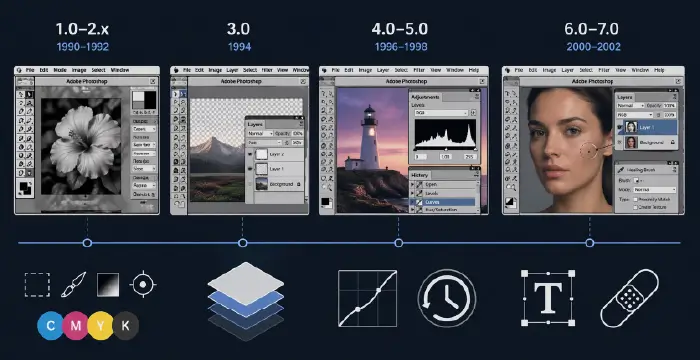
2.1 Photoshop 1.0–2.x (1990–1992): The Professional Foot in the Door
Photoshop 1.0 arrived on the Macintosh in 1990 under Adobe’s banner. It already had the core concepts we take for granted: selection tools, painting tools, filters, and color correction. But in those early days, the true magic was that it could integrate into a CMYK print workflow, outputting color separations that traditional prepress operations could use to burn plates.
For photographers and designers used to dye transfer, masking, and airbrushing, Photoshop 1.x and 2.0 didn’t just replace tools — they compressed entire rooms of equipment into a single computer workstation. Version 2.0 introduced Paths and Bezier curves, which meant designers could create clean vector‑based outlines and clipping paths, critical for isolating products in catalogs and ads with far more precision than magnetic lasso hacks.
Why it mattered then:
- Print shops could finally do digital color correction and compositing without drum scanners plus proprietary software.
- Paths allowed clean, precise cutouts for product catalogs, fashion layouts, and editorial spreads — essential for professional design.
2.2 Photoshop 3.0 (1994): Layers — The Big Bang
If you ask anyone who lived through early Photoshop, version 3.0 is where the world changed.
Layers arrived in 1994. Until then, every edit was effectively “baked” into a single canvas. Yes, you had channels and Undo, but compositing multiple elements meant living in fear: one bad transform and you’d lose hours.
Layers transformed Photoshop from a destructive pixel editor into a non‑linear composition environment. Designers could stack elements, move them, hide them, test variations, and keep text and images separate. Photographers could build complex retouching workflows with duplicate layers for dodging, burning, and localized color corrections.
Suddenly:
- You could iterate.
- You could keep client options alive.
- You could change your mind without starting over.
Layers also paved the way for Layer Styles, Adjustment Layers, and Smart Objects later on — the entire philosophy of non‑destructive editing starts here.
2.3 Photoshop 4.0–5.0 (1996–1998): Adjustment Layers & the History Palette
Photoshop 4.0 introduced Adjustment Layers, letting you apply tonal and color corrections (Levels, Curves, Hue/Saturation, etc.) without touching the underlying pixels. This was a second major step toward non‑destructive editing: you could tweak a curve days later without rebuilding the entire file.
Then Photoshop 5.0 (1998) brought the History Palette. Previously, you had a single Undo that toggled between your last change and the previous state — awkward at best. The History Palette gave users a timeline of states with multiple undos, letting them jump backward and sometimes branch out into different correction paths.
For working pros, this wasn’t just a convenience:
- It allowed experimental workflows — try wild color grades, then roll back without fear.
- It reduced the need for endless “safety” saves of different versions.
This era also refined color management and support for ICC profiles, which mattered deeply to photographers printing on high‑end inkjets and to agencies delivering consistent brand colors across devices.
2.4 Photoshop 6.0–7.0 (2000–2002): Type, Web, and the Healing Brush
By Photoshop 6.0, web design had exploded, and Photoshop responded with better type handling and more robust Layer Styles, making it easier to design UI elements, buttons, and early web layouts. Designers leaned heavily on Layer Effects for drop shadows, bevels, strokes, and glows — the visual language of early‑2000s interfaces.
Then Photoshop 7.0 (2002) delivered a landmark tool: the Healing Brush. Up to that point, professional retouching leaned on the Clone Stamp, which copied pixels from one area to another — effective, but often mechanical‑looking.
The Healing Brush analyzed surrounding texture, luminosity, and color, blending retouched pixels seamlessly into the original surface. For portrait retouchers, this was a revelation:
- Skin cleanup became faster and more natural.
- Subtle texture preservation meant less “plastic” looking faces.
- Complex repairs — wrinkles, scratches, dust — could be done with a few strokes.
Photoshop 7.0 also improved text, effectively treating it as resolution‑independent (vector) text, making it easier to resize type without quality loss — vital for web and print designers juggling multiple output sizes.
By the end of the 1.0–7.0 era, Photoshop had firmly replaced the darkroom and airbrush studio for a huge percentage of professionals. It wasn’t just a raster editor anymore; it was the central hub of digital imaging, sitting between cameras, scanners, and print.
3. The Creative Suite (CS) Era (2003–2012): Integration, RAW, and Smart Workflows
3.1 From Standalone Photoshop to Adobe Creative Suite
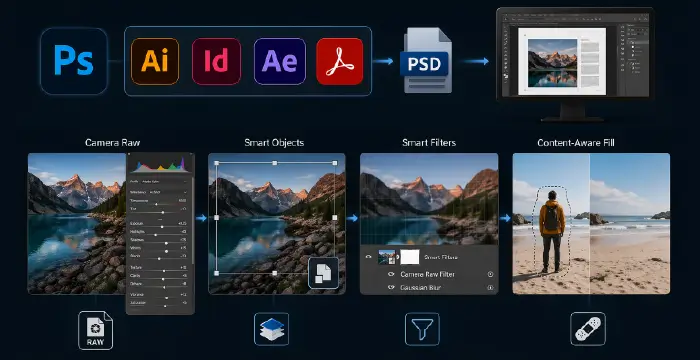
In 2003, Adobe rebranded its flagship apps into Adobe Creative Suite (CS) — bundling Photoshop, Illustrator, InDesign, After Effects, and others into integrated packages. That shift signaled something: Photoshop was no longer just “one product”; it was part of a broader ecosystem of creative tools.
For professionals, this meant:
- Closer file format integration (PSD to InDesign, etc.).
- Shared color settings and consistent PDF output.
- A more unified workflow from layout to imaging to delivery.
The CS branding ran from Photoshop CS (8.0) through CS6, each version layering new paradigms on top of that original Knoll foundation.
3.2 Camera Raw: Respecting the Sensor
One of the most important developments of this era was Adobe Camera Raw (ACR), introduced around Photoshop 7 / CS and rapidly becoming essential to digital photography.
Instead of baking your choices into in‑camera JPEGs, RAW files preserved sensor data, and ACR let you interpret that data with fine control over exposure, white balance, highlight recovery, and tone curves before committing pixels.
This changed photography workflows fundamentally:
- Photographers treated RAW processing as a digital equivalent of the film darkroom, adjusting exposure and color globally before retouching.
- It separated technical correction (in ACR) from creative manipulation (in Photoshop proper).
- A non‑destructive pipeline emerged: RAW → parametric edits → PSD/TIFF for creative work.
ACR also set the stage for Lightroom, but within Photoshop, it meant the app was no longer just about “editing an image” — it started earlier in the chain, at the sensor data level.
3.3 Smart Objects and Non‑Destructive Compositing
Smart Objects arrived in the mid‑CS era (Photoshop CS2/CS3 timeframe) and were quietly revolutionary. Instead of transforming raw pixels destructively, you could embed a source (a raster layer, a vector object from Illustrator, or later even a RAW object) inside a Smart Object.
Every scale, rotate, warp, or filter you applied became non‑destructive, referencing the original source. For designers building complex layouts and for retouchers repeatedly resizing elements, this was a lifesaver:
- No more softening from repeated transforms.
- Filters became Smart Filters, editable long after they were applied.
- Linked Smart Objects enabled responsive, modular design workflows.
In many ways, Smart Objects turned Photoshop into a hybrid between a raster editor and a parametric compositor, inching it closer to node‑like behavior without exposing a node graph.
3.4 Content-Aware Fill: The Machine Learns to Guess
Near the end of the CS era (Photoshop CS5, 2010), Adobe introduced Content‑Aware Fill. Leveraging advanced analysis of surrounding pixels, Photoshop could remove objects and fill the gap with plausible content.
Previously, removing a person from a beach scene might take tedious cloning and healing. Now, you could:
- Roughly select the subject.
- Invoke Content‑Aware Fill.
- Let the algorithm synthesize sky, sand, and water where the subject used to be.
For photographers, retouchers, and designers, this was one of the first mainstream glimpses of AI‑like behavior inside Photoshop — the software wasn’t just obediently following instructions; it was making informed guesses about texture and structure.
This feature foreshadowed the Generative AI revolution years later. It was still fundamentally pixel‑based and statistical, not a neural generative model, but conceptually it told creatives:
You don’t always have to paint every pixel. The machine can help.
By the end of the CS era, Photoshop had become deeply integrated into a full Adobe pipeline, supported RAW‑first workflows, and embraced non‑destructive, smart, and semi‑automated tools like Smart Objects and Content‑Aware Fill.
4. The Creative Cloud (CC) Revolution (2013–2022): Subscription, Mobility, and Sensei
4.1 2013: The Subscription Shock
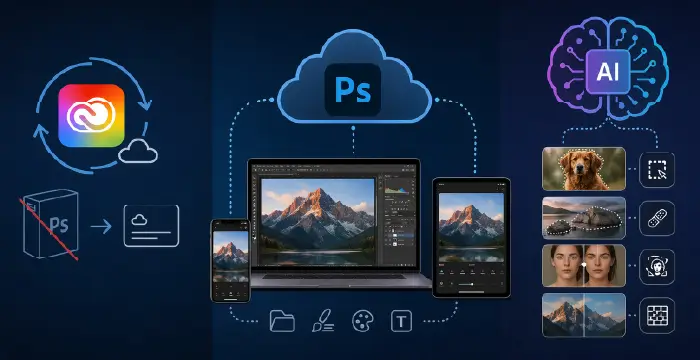
In 2013, Adobe ended perpetual licensing for new major versions and shifted its primary model to Adobe Creative Cloud (CC) — a subscription service. CS6 became the final boxed / perpetual version; everything new would require a monthly or yearly subscription.
The reaction was intense:
- Many professionals resented the “rent your tools” model, fearing lock‑in and long‑term cost.
- Others appreciated continuous updates and the ability to access a broad suite of apps without massive upfront costs.
For Photoshop itself, CC meant:
- More frequent feature drops instead of long cycles between versions.
- Tighter integration with cloud storage and libraries.
- A push towards device‑agnostic workflows, where assets could live in the cloud and be accessed from multiple machines and, eventually, mobile devices.
4.2 Photoshop Beyond the Desktop: Mobile & Cloud Integration
During the CC years, Adobe began releasing Photoshop‑adjacent mobile apps — from basic editors to Photoshop Fix, Photoshop Mix, and later Photoshop on the iPad — all designed to connect to the same Creative Cloud ecosystem.
For working pros, mobile wasn’t about doing full‑blown retouching on a phone; it was about:
- Reviewing and marking up comps on the go.
- Quick edits and crops for social delivery.
- Tapping into cloud libraries for brand assets and templates.
Files started to move between desktop and mobile environments more fluidly, aided by Creative Cloud Libraries, which synced brushes, color swatches, styles, and graphics.
4.3 Adobe Sensei: The Rise of AI‑Assisted Editing
Adobe’s AI and machine learning framework, Adobe Sensei, began to permeate Photoshop during the CC era. Sensei powered features like:
- Select Subject, which could identify the main subject in an image automatically.
- Enhanced Content‑Aware tools and Object Selection tools.
- Early Neural Filters experiments and smart upscaling.
This period normalized the idea that certain tedious tasks — isolating hair, cleaning up distractions, minor retouching — could be automated or at least accelerated by AI assistance.
Crucially, Sensei in this era was still mostly assistive rather than generative. It made better selections, better fills, better upscales. It didn’t yet invent entirely new content from a text prompt. That leap would come with Firefly.
5. The Generative AI & Firefly Era (2023–2026): Photoshop as Co‑Pilot
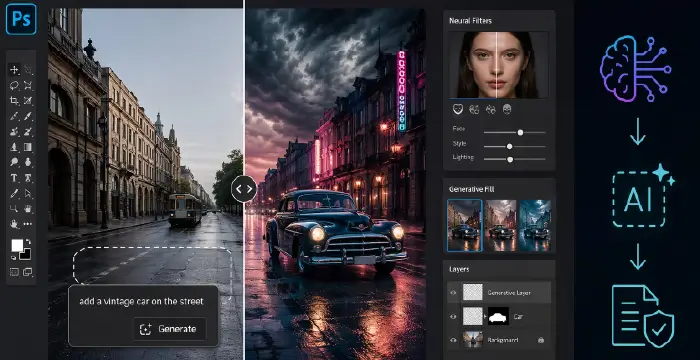
5.1 2023: Firefly and Generative Fill Arrive
In 2023, Adobe announced Firefly, a family of generative AI models trained on licensed content (like Adobe Stock) and public‑domain imagery. Firefly’s goal was explicit: integrate generative AI directly into existing Creative Cloud workflows as a “creative co‑pilot”.
Shortly after, Generative Fill was integrated directly into Photoshop. Now, instead of just Content‑Aware Fill guessing what pixels should replace a removed object, creators could:
- Select an area.
- Type a text prompt (“add a vintage car on the street,” “extend the canvas with stormy clouds,” “replace the background with a neon city”).
- Let Firefly synthesize entirely new content that matched lighting, perspective, and context.
Adobe described this as “the world’s first co‑pilot in creative and design workflows,” emphasizing that Generative Fill combines generative AI with the precision and control of Photoshop.
For photographers and designers, this was a fundamental shift:
- Comping and ideation went from hours to minutes.
- Background replacement, scene extension, and complex surreal compositions became approachable for non‑experts.
- The boundary between “photo” and “synthetic image” blurred dramatically.
5.2 Neural Filters and AI‑Driven Retouching
The Neural Filters panel — powered by Sensei and later Firefly‑adjacent technologies — brought one‑click transformations to faces, lighting, and stylistic effects. Users could:
- Adjust age, expression, or gaze on a portrait.
- Apply style transfers reminiscent of particular artistic looks.
- Perform relighting, harmonization, and other context‑aware edits.
For portrait retouchers, this raised both productivity and ethical questions:
- It became trivial to alter someone’s expression or apparent age.
- The line between “retouching” and “manipulation” became thinner.
Professionally, many used these tools for rough comps and ideation, then refined manually; others leaned on them heavily for production. Photoshop was no longer just a precision scalpel; it also offered AI‑powered macros for complex aesthetic changes.
5.3 2024–2026: Ethical Shifts, Restrictions, and Co‑Pilot Workflows
By 2024–2026, the broader world had become acutely aware of the implications of AI‑generated content: misinformation, deepfakes, authorship disputes, and copyright concerns. Adobe’s response with Firefly and Photoshop’s generative features underscored a few key positions:
- Firefly models were trained on licensed and public‑domain content, aiming to avoid infringing others’ IP.
- Adobe promoted Content Credentials and transparency markers to distinguish or tag AI‑generated elements.
- At various points, Adobe clarified that certain generative outputs may have usage or commercial restrictions, especially in early phases of Firefly’s integration.
The ethical narrative shifted from “Look what AI can do” to “How do we use this responsibly in professional workflows?” Creators, agencies, and brands had to consider:
- Disclosure: When do you tell clients or audiences that an image is partially or wholly AI‑generated?
- Representation: How do you avoid biased or harmful outputs baked into datasets and models?
- Authorship: Who is the “author” when the prompt is human but the pixels are machine‑synthesized?
From a workflow perspective, by 2026, Photoshop is effectively a co‑pilot:
- You use Generative Fill for rapid ideation, layout exploration, and background extension.
- You rely on Neural Filters for exploratory looks, quick client variations, and rough face tweaks.
- You still return to layers, masks, blend modes, and manual retouching for final control and polish — the classic toolset hasn’t vanished; it’s been amplified.
This hybrid approach — human judgment plus AI assistance — is the defining characteristic of the modern Photoshop era.
6. Timeline of Key Versions & Milestones (1987–2026)
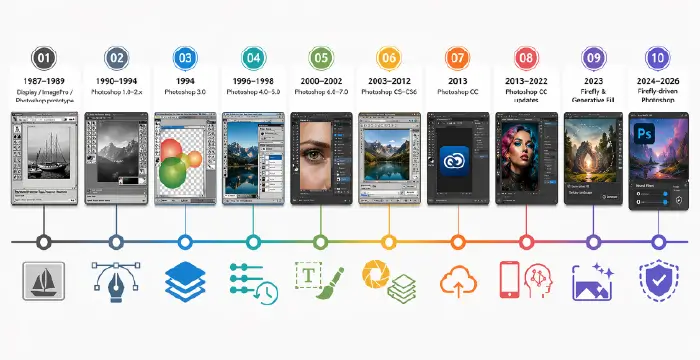
Below is a high-level chronological snapshot of key phases and innovations:
| Period | Milestone / Version | Key Innovations & Impact |
| 1987–1989 | Display / ImagePro / Photoshop Prototype | Thomas and John Knoll develop grayscale image tools; licensed to Barneyscan with around 200 bundled copies; later licensed and commercialized by Adobe. |
| 1990–1994 | Photoshop 1.0–2.x | Professional imaging enters the Mac ecosystem; Paths and Bézier curves enable precise clipping for print workflows. |
| 1994 | Photoshop 3.0 | Layers introduced, revolutionizing non-destructive compositing workflows. |
| 1996–1998 | Photoshop 4.0–5.0 | Adjustment Layers and the History Palette introduce reversible editing and multi-step experimentation. |
| 2000–2002 | Photoshop 6.0–7.0 | Web-focused features, improved typography, Layer Styles, and the Healing Brush expand retouching and UI design workflows. |
| 2003–2012 | Photoshop CS–CS6 | Photoshop becomes a core Creative Suite tool; Camera Raw, Smart Objects, and Content-Aware Fill enable RAW-first, non-destructive, and AI-assisted workflows. |
| 2013 | Photoshop CC | Shift to subscription-based Creative Cloud with continuous updates, cloud storage, and mobile integration. |
| 2013–2022 | Photoshop CC Updates | Mobile apps, Creative Cloud libraries, and Adobe Sensei AI (Select Subject, enhanced Content-Aware, early Neural Filters) expand automation. |
| 2023 | Firefly & Generative Fill | Adobe Firefly generative AI integrates into Photoshop; Generative Fill connects text prompts with realistic image synthesis. |
| 2024–2026 | Firefly-driven Photoshop | Expanded Generative Fill and Neural Filters with stronger ethical frameworks, licensed training data, and Content Credentials support. |
7. Legacy and the Future: “Photoshop” as a Verb
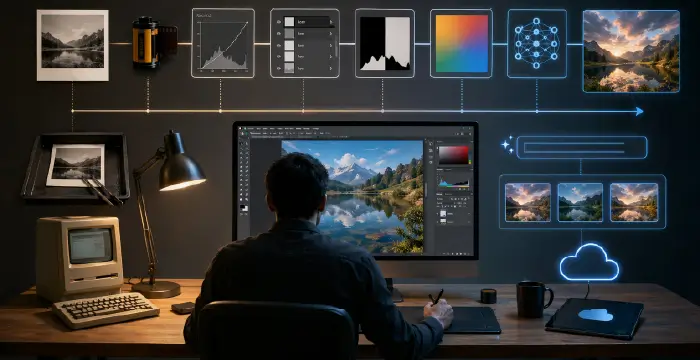
By 2026, “Photoshop” is more than a product name. It’s a verb, a shorthand for manipulated images — sometimes affectionately, sometimes critically. Journalists refer to “Photoshopped” images when they mean altered, retouched, or fabricated visuals, regardless of the actual software used.
That cultural ubiquity comes from decades of quietly reshaping how images are captured, corrected, composited, and now generated:
- The darkroom became a panel of sliders and a histogram.
- The airbrush became layers, masks, and a pressure‑sensitive stylus.
- The set and props are increasingly optional when Generative Fill can conjure scenes from text prompts.
Yet, despite all the automation and AI, the core truths from the early 1990s still hold:
- You still need to understand tone, color, and composition.
- You still need to know when an edit is too much, when a composite breaks reality, or when a portrait stops looking human.
- You still rely on the foundational concepts — layers, masks, channels, blend modes, rasterization, vector paths, and alpha channels — even as AI suggests content on top.
Looking ahead, Photoshop’s evolution suggests an even deeper blend of manual craft and machine intelligence. We can expect:
- More context‑aware tools that understand scene semantics (sky vs. ground vs. subject).
- Better provenance tracking — embedded metadata and content credentials that clarify what’s AI‑generated, what’s captured, and what’s retouched.
- Tighter integration with real‑time collaboration, where designers, photographers, and art directors work in shared cloud documents while AI assists in the background.
But the heart of it all remains the same as in 1987: a person in front of a screen, making aesthetic decisions about pixels. The tools have grown from Display on a Macintosh Plus to Firefly‑powered Generative Fill on cloud‑connected workstations, yet the central question hasn’t changed:
How do we use these pixels to tell the story we want to tell?
Key Takeaways
- 1987–1989: Thomas and John Knoll turn a grayscale display utility into Photoshop, licensed first to Barneyscan and then to Adobe, seeding the professional digital imaging revolution.
- 1990–2002 (1.0–7.0): Core concepts like Layers, Adjustment Layers, the History Palette, and the Healing Brush transform Photoshop into a true digital darkroom and compositing powerhouse.
- CS Era (2003–2012): Camera Raw, Smart Objects, and Content‑Aware Fill introduce RAW‑first, non‑destructive, and AI‑assisted editing, tightly integrated into Adobe Creative Suite.
- CC Era (2013–2022): The move to subscription‑based Creative Cloud sparks controversy but enables continuous updates, cloud workflows, mobile integration, and the deeper arrival of Adobe Sensei AI.
- Firefly Era (2023–2026): Generative Fill and Neural Filters reposition Photoshop as a creative co‑pilot, while Adobe emphasizes licensed training data and ethical frameworks for AI‑generated content.
- The Photoshop brand has become a global verb, symbolizing both creative power and the responsibility that comes with manipulating — or now generating — photographic reality.