Taking a solid stand on exactly how big is a 2×3 photo size is next to a necessity. From photo resizing to printing, multiple unit conversions are nothing new these days.
A single image requires nothing but low concentration, but when the number rises to the hundreds, things get messier and critical. Nuisances follow every tiny space each photo covers.
With that said, a 2×3 photo draws attention as a small format. Necessarily it drives almost all professionals in the worldwide photo editing industry. Knowing how it appears as an exception among all the other image sizes prevents unnecessary repetitions.
Not only for graphic designers, photo sizing/resizing tactics must be a first priority for all who are related to image editing businesses.
So, let’s get on with the business, as we are going to unwrap everything about the 2×3 photo size. By the end of this blog, you will have all the know-how materials to edit and print without fumbling.
What is a 2×3 Photo Size? What Lies Behind the 2×3 Figure
If you want to get the cut to the chase answer, the figure actually stands on the unit- Inch. You can call it a 2×3 inch photo, meaning 2 inches along the width and 3 inches in length.
You may find it fancy, which it isn’t, but rather it’s one of the generally used product prints. The dimension follows an aspect ratio similar to the figure 2:3. It’s quite easy to see the photo’s longer side, which is 1.5 times the shorter one.
The interesting thing is, the proportion didn’t appear by chance; it originates from the classic 35 millimetre (mm) film frames. The ratio has even been a bigger part in sensors that modern cameras often use.
You can find many photos taken nowadays aligning this proportion, but the problem is- the matching doesn’t always follow. Especially, the results of image cropping don’t often come with pleasant experiences.
How Big is a 2×3 Photo Size: Dissecting in Multiple Units

To the naked eye, a 2×3 photo is easily spotted as tiny, but the numbers change when you put it into different units. It’s somewhere not less than confusing when you need the 2×3 photo size in cm exactly, but don’t get the direct answer.
So, here’s a list of expressions in several units where you will get a plain and clear view:
- 2×3 Size in Centimeter: 5.08 cm × 7.62 cm
- 2×3 Size in Millimeter: 50.8 mm × 76.2 mm
- 2×3 Size in Feet: 0.167 ft x 0.25 ft
These numbers don’t change, whatever the condition is. But, in the case of a digital photo, the answer is not quite solid. Here, the crucial aspect is resolution, which keeps pace with a unit pixel.
And, that’s where your answer to the very question about the 2×3 photo size in pixels lies. Because technically, printers don’t understand a 5 by 5 picture size in cm. It’s pixels and DPI (Dots per Inch) that they can process.
See the following pixel count per DPI that a standard print often works on:

- 144 px x 216 px at 72 DPI
- 300 px x 450 px at 150 DPI
- 600 px x 900 px at 300 DPI
As you see, the higher the DPIs, the more pixels there are, and that means sharper prints. On the contrary, the lower the DPI, the more softness or blur you get.
How 2×3 Differs from the Other Common Photo Sizes
First of all, a 2×3 image is the youngest member of the photo group that features the dimensions of short in width and long in length. When you carefully look into its characteristics, like looks and uses, the varieties get exposed in several ways.
Most Used Sizes to 2×3 Photo Size Comparison Chart
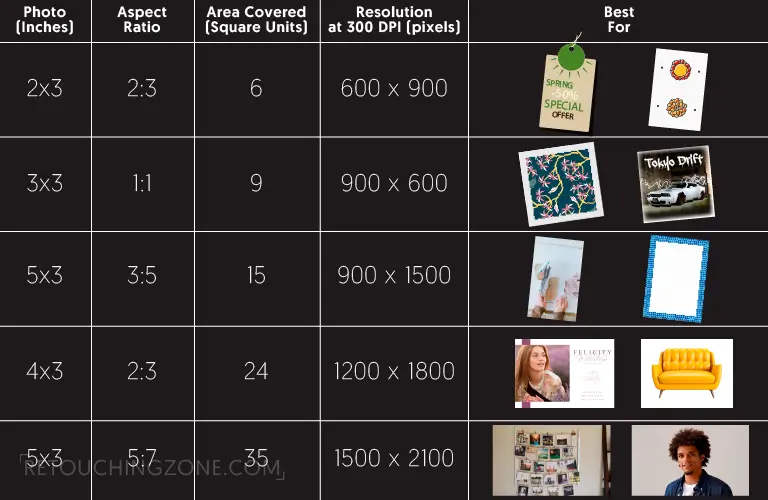
| Photo (Inches) | Aspect Ratio | Area Covered (Square Units) | Resolution
at 300 DPI (pixels) |
Best For |
| 2×3 | 2:3 | 6 | 600 x 900 | Product tags, Tiny prints, Crafts |
| 3×3 | 1:1 | 9 | 900 x 900 | Square paper prints, Instagram |
| 3×5 | 3:5 | 15 | 900 x 1500 | Journals, Small frames |
| 4×6 | 2:3 | 24 | 1200 x 1800 | Standard papers for print, Product shots, Photo cards |
| 5×7 | 5:7 | 35 | 1500 x 2100 | Display photos, Portraits |
As you see in the chart, a comparative picture of how big is a 2×3 area is presented. 2×3 images, covered the area quite less than 3×5, 4×6, and 5×7, come with limitations like quick squeezing and clearly showing nitty-grity mistakes.
Unlike others, 4×6 photo shows the proportion similar to the one with 2×3 dimension. Yet it has a identical resolution when sticking at the 300 DPI. You can find a correlation of the 2×3 size with 4×6, but it is not one of standard photo sizes in cm or any other units, even not in pixels.
Most importantly, neither of them offers that worse resize, whereas the object has unavoidable blank zones.
Bigger in the above tabular lineup is 5×7, which stands next to formal with the resolution of 1500 x 2100 pixels. Last but not least, the 3×3 print shines as the only square format with 9 square-inch lacking enough flexibility to stretch.
Also read related articles
- How Big is a 4×6 Photo Size
- How Big is a 3×5 Photo Size
- How Big is a 5×7 Photo Size
- How Big is a 4×4 Photo Size
- How Big is a 8×10 Photo Size
- How Big Is an 11×14 Photo
- How Big Is a 16×20 Photo
- How Big is 8×12 Photo
- What Is deferent : 4×6 vs 5×7 vs 8×10 Photo Size
What the 2×3 Size Offers That Others Don’t
- Printing cost is quite low, thanks to the tiny size, but you have to worry about detailing
- You don’t want to choose it if the framing is compulsory, but the size is pretty package-friendly
- If your priority is to make compositions wider, then this size won’t be a good choice, but it works quite well in the case of collages
- 2×3 easily holds the drift when it comes to the 4×6 ratio, but it doesn’t align with the 5×7 ratio at all
- The size appears effective for your portable cases. If your target is to set a display professionally, then know that it lacks the necessary specs.
Real World Use Cases of 2×3 Size Photos: Where They Suit Best
You might be worried about 2×3 prints’ tiny look, but they have a wide range of applications. Starting from physical crafts to digital visuals, this size easily makes its way in various commercial and creative domains. Let’s have a look at the following use cases:

Wallet Images
Not only perfect but also fancy for pocket wallets and small ID holders. Their compact shape, budget-friendly production make them ideal for a quick and tangible image for people.
Journals, Crafts, and Scrapbooks
They have their own way to blend into layouts without hampering the page. You can use them as date tags, accents, or even layered elements in projects with versatile media.
- Polaroid Photo Card: You can give a quick Polaroid look, almost retro, in a 2×3 size photo by cropping with just a white border. Want to display in your point-of-sales or bring a tactile and nostalgic feel to your packaging? This 2×3 image size is your tool.
- Vibe throughout Online Media: Tiny shaped photos are often printed across several social media platforms – be it for takeaways, or public relations tools. In this area, 2×3 always intrigues regardless whether it is image-based or not.
- Identity Card: Whether you need cards or badges, these prints have a solution for each one of them. They cover all sorts of visitor passes in places where you are not asked to show your portrait photo.
- Vertically or Horizontally, Side-by-Side Photos: When you put together multiple 2×3s in a cascaded background, they can generate a strong graphical tweak. Their visuals cope with artistry in papers that can hold many product photos.
- Corporate Giveaways: Corporate brands are not excluded from the bounty of this 2×3 category. And, this is quite convenient for personalised benefits like stickers, invitation cards, brochures, and leaflets. Plus, you don’t have to overthink with spare budget and resources.
How to Choose 2×3 Photos: Most Important Factors You Should Consider
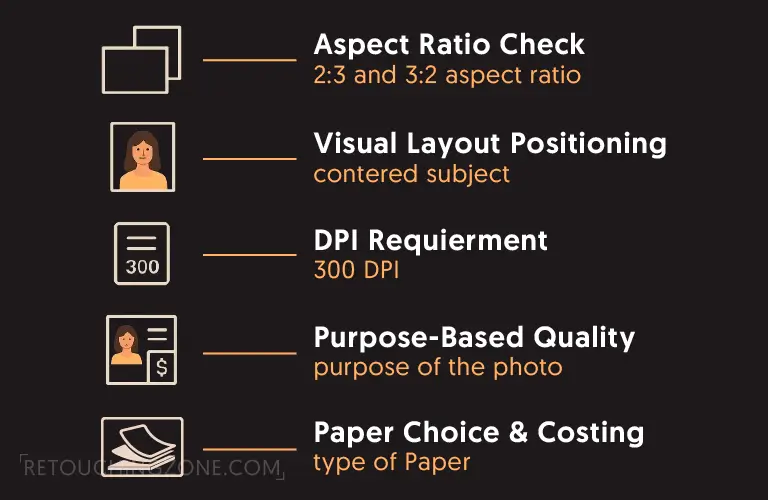
When you are up for working with a 2×3 photo format, you should give some factors a proper check. In fact, there are some influential issues that determine the real action of this miniature-sized photo. Let’s explore them as they save you a lot of trouble further.
Image to Aspect Ratio Configuration
You need to blend the main photo with the 2:3 aspect ratio by all means. No need to worry about the situation where the ratio is already 2:3, because no cropping is required.
On the other hand, when dealing with sharpness and surrounding behaviour, just ensure the frame has enough space during the shot.
Visual Layout to Resizing Problems
In most cases, detailing related to human, animal or even lifeless product becomes victims of careless edits. The solution here is reposition that ensures the focal point to centralize the photo. It saves tons of layout, cropping, and composit flaws.
Resolution Requirements for Printing
To be precise, 300 DPI is the best for sharp 2×3 prints where the resolution is 600 px ×900 px. If you lower it down to 150 or even 72, it may be seen ok on screen, but later gets pixelated when taking the prints.
What the Photos Aim For
You need to realise first what purpose the photo is going to serve. Hobby scrapbooks typically digest lower pixels while commercial catalogues demand high resolution. Hence, the quality bar should be set based on the photo requirement.
How Far can Images be Seen from
Smaller prints are always used for close views, so that it’s every element can be seen clearly. On the contrary, larger photos are good for long distances. So, choose 2×3 only when you need something to bring it very close to your eyes.
Photo Paper Choice and Costing
The 2×3 photo papers don’t have tonal depth, but they are far cheaper than others. Semi-gloss and lustre are ideal for this type of tiny-sized photos. If you want a premium feel, Matte should be your choice.
How to Resize a Photo to 2×3: Best Methodical Approach
Know that unaware preparation always gets poor results, so there is no other way than starting sharp. Crop wrong and you lose product detail. Upscale wrong and you get mush. Now you will get a good grasp on what it means to start sharp with a proper method.
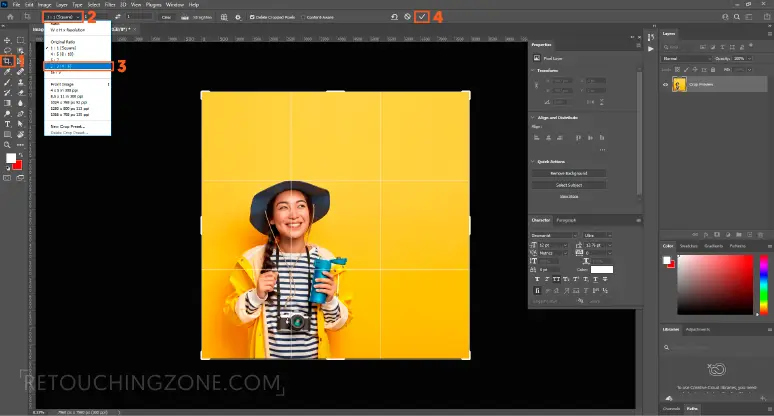
Cropping Method
The process starts with checking the subject position. Carefully watch margins, headroom, seam or label edges.
Then go on adjusting the photo canvas, and the cropping tool is here for you to convert the original photo to a 2:3 aspect ratio.
When confirming the resolution, if you plan to print at 300 DPI, then don’t crop the image down.
Upscaling Method
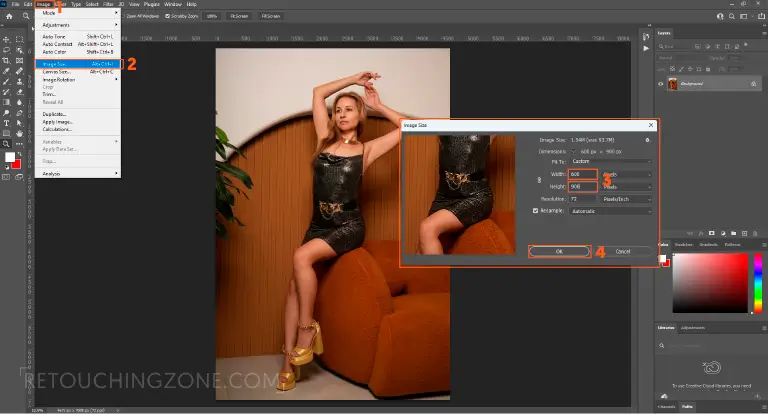
When your original photo has too low pixels than your targeted DPI, you should go with upscaling. Suppose you want to print at 300 DPI, but your photo resolution is below 600×900 pixels. Then, whether it is a 2×3 photo in cm or mm, you must concentrate on upgrading the resolution to 600 px x 900 px.
In the beginning of the process, you need to start editing the main image file, which lets you prevent all sorts of low-res issues. Next is noise removal, followed by upscale, and sharpening.
When going through the process, give texture and unnatural edge glow a proper check through minimal configurations.
At the final touch, watch first if the image sticks to the 300 DPI, and then press ‘print’. During the export, you can choose the traditional JPG file. This is a must-follow if you are up for the top-notch quality in your prints.
How to Print 2×3 Photos: From Canvas Setting to Printing
This is the crucial time because printing tiny, simple photos wrong can bring havoc on colour and details, especially edges. The following step-by-step procedure puts an end to all those intricacies and even lets you know how to print 2×3 photos at home.
Setting up Print Size in Editing Software
Like earlier in the photo resizing method, first configure your canvas to 2×3 inches before exporting. After all, if this is your first time, you don’t know how big are 2×3 prints yet. Most importantly, it is safe to work on the canvas, which is already preset in your desired settings.
Don’t hurry when giving the final command for printing. Always do a thorough check out with print preview, as it comes in handy for tiny formats.
An ‘Export’ or ‘Print’ panel is there for you to lock both width and length dimensions. Usually, the interface is more or less similar for both Photoshop and Lightroom.
Picking the Best Resolution
Professional, crisp results appear at 300 DPI. You can pin down at 150 DPI which is pretty much ok for occasional reasons. But don’t go any lower, or you have to deal with pixel loss.
Printer Configuring: Practical Tips
- Going without Lines: It lets you overlook extreme bright edges that often make the outputs bothersome.
- Proper Upgradation: You don’t want to compress your canvas, or it results in scattered and distorted behaviour. The ruler must be set up to full; that is hundred percent.
- Paper Selection: Ink load must be accurate, and to ensure, fix the paper in the exact type.
Standard Practice: Avoiding Common Mistakes
- Wrong Colour: Using the sRGB (Standard Red Green Blue) option and screen calibration helps to get out of the colour mismatch tendency.
- Trimming Flaws: The photo often falls into such a situation that goes full to the edge. Leaving a small bleed is enough to get over this problem.
- Shadow/Dark Prints: Before the very final export, brightening midtones always removes the unwanted darkness.
How Should You Choose the Right Paper for Printing 2×3 Photos

Small prints have it’s own way to give naked exposure; be it the texture, the shine, or even the tiny spots. Considering how big is a 2×3 area, a photo paper requires meeting some necessary criteria to be picture perfect.
Photo Paper Types
- Glossy: Always works for product shots thanks to its reflective, sharp, and vibrant nature. The only drawback is- if you touch it, the prints don’t want to come off once they stick.
- Standard Matte: This paper goes with reputation of anit-reflective materials which is quite good for scratch concealing. The severe con is its post-print colours that often appear washed out.
- Lustre: Neither Glossy nor Matte, it falls into the middle ground with balanced shine and smooth texture, almost close to professional.
Paper Weight and Thickness
Papers with higher GSM, like 230-300, don’t bend and often give a premium look.
On the other hand, the weightless papers work well with larger scale. Want to incorporate them for marketing? Not a good idea, because they look insignificant in this business activities.
Smudge and Water Sensitiveness
- Choose coated papers for their anti-ink bleeding behaviour, regardless of the 2×3 frame size in cm or pixels.
- Smudge-proof and water-proof papers are suitable for inserts which come in a heavy exposure to moisture most of the time.
Frequently Asked Questions
Is a 2×3 picture a wallet size?
To be prices, 2×3 is not the wallet size. Wallet photos usually are in dimensions of approximately 2.5×3.5 inches, which covers a little bit more area than the 2×3 picture.
What is the resolution of a 2×3 photo?
2×3 image’s resolution varies with what DPIs you aim for printing it. At 300 DPI, the resolution is 600p×900p, while at 150 DPI, it slips down to 300px450p. In a word, the higher you set DPIs, the more the print will have the quality output.
Can I use a standard printer to print 2×3 photos at home?
Yes. A standard printer is enough for you to print 2×3 photos at home with no hurdles. All you need to do is resize the photo to 2×3 if it isn’t, and use the glossy, matte, or lustre (that suits your need best) paper.
Does cropping to 2×3 cut off part of the image?
When the original photo doesn’t already have the 2:3 aspect ratio, it might cut off some parts, even if it is tiny. So, checking layout arrangement and finness right before resizing is always recommended.
Does 2×3 fall into standard frame sizes?
To put it precisely, the size doesn’t go even near the renowned standardized frame. The 2×3 ratio correlates with the one of 4×6, which itself is a model format by far. You often find them within a tailored gradation or scrapbook-grade type.
Can smartphone photos be printed as 2×3?
Yes, nowadays many smartphones shoot at a 2:3 and near ratios. You can convert the bigger ones right into the 2×3 size.
Is a passport-size photo 2×3?
No, passport size varies by country. 1.37 x 1.77 inches are the dimensions that is followed by passports in the UK. On the contrary, the USA passport usually stays within the square frame.
Pilling Up
The crucial aspect of exploring how big is a 2×3 photo size is taking the informed decision for image editing and printing. And, it applies for computerized and paper canvas, as the main goal is to stick to 2:3 aspect ratio.
Add to this the high resolution, at least rated at 300 DPI, and you get the top-notch print quality. Starting from packaging inserts, to mini product visuals and crafts, the 2×3 size fits easily into versatile business domains.
In the final step, keep in mind to pick the right paper matched with your ultimate goal. Get these basics well sorted, then you don’t have to worry about technical flaws and unnecessary repetitions.