Photo printing can get chaotic without the proper understanding of dimensions and resolution. Whether you intend to print family portraits or post on a digital platform, only the right photo size can turn a picture balanced, crisp, and perfectly framed. You can click the best picture, yet size can cost you a fortune if you don’t have the right frame for it. And that leaves us with the question- How big is a 4×4 photo size?
4×4 photo dimension naturally is preferred for its square and clean shape, which automatically syncs versatility and aesthetics, as well as perfectly fits social media. Besides, it’s picked universally for the art collage, gifts, passports, ID, and many more purposes.
But before using it, you need to know the size totally by comparing it to the other sizes based on the print quality, standard size, etc., to make the best output. In this article, we’ll guide you from the precise measurement, printing technique, to the aspect ratio, and everything that is fundamental to know about the 4×4 photo size.
4×4 Size: How Big is A 4×4 photo?

A 4×4 photo size is generally known as the photo frame, which has a 4×4-inch height and width. In short, you can call it perfectly square-shaped, suited for both modern display and digital platforms.
Photo Dimension of 4:4 Photo
- Inches: 4″ x 4″
- Centimeters: 10.16 cm x 10.16 cm
- Millimeters: 101.6 mm x 101.6 mm
- Feet: Approximately 0.33′ x 0.33′
Though some suggest 4x4cm as the 4×4 photo size. But honestly, this size is much smaller than the 4×4 inches. Generally, it’s used for official purposes in some countries, like Argentina.
Photo Size & Resolution for Digital Images
Planning on printing the digital images? In this case, you’ll need to match the perfect resolution by calculating the DPI (dots per inch). Here you go.
Pixel Measurement for 4×4 Inch Prints
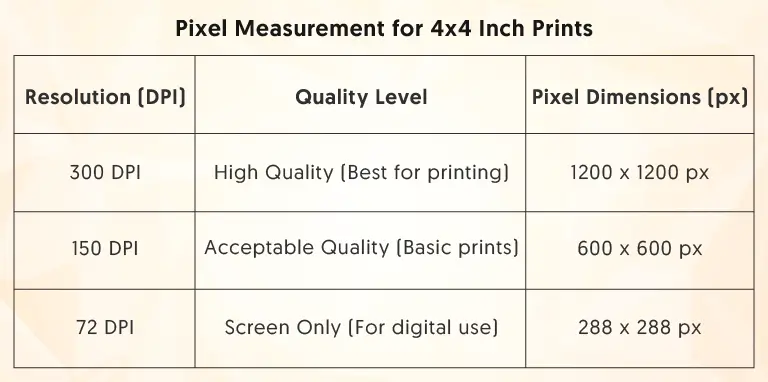
| Resolution (DPI) | Quality Level | Pixel Dimensions (px) |
| 300 DPI | High Quality (Best for printing) | 1200 × 1200 px |
| 150 DPI | Acceptable Quality (Basic prints) | 600 × 600 px |
| 72 DPI | Screen Only (For digital use) | 288 × 288 px |
Pixel Measurement for 4×4 cm Prints (Official Purpose)

| Resolution (DPI) | Quality Level | Pixel Dimensions (px) |
| 600 DPI | Highest Quality (Professional standard) | 945 × 945 px |
| 300 DPI | Standard Quality (Everyday printing) | 472 × 472 px |
| 100 DPI | Low Quality (Web or draft use) | 157 × 157 px |
How 4×4 Size Photo Compares to Other Common Photo Sizes
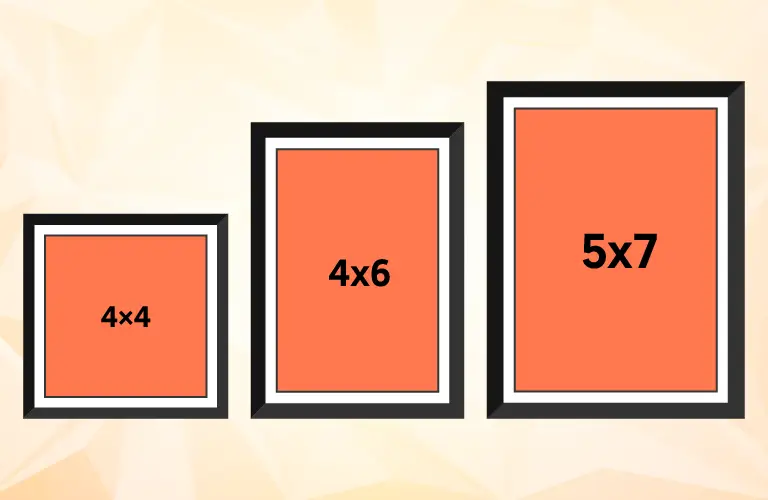
To understand how a 4×4 photo size works, you need to know the other photo sizes first. Let’s take a look:
| Feature | 4×4 Photo | 4×6 Photo | 5×7 Photo |
| Dimensions | 4 × 4 in | 4 × 6 in | 5 × 7 in |
| Shape | Square | Rectangle | Rectangle |
| Aspect Ratio | 1:1 | 2:3 | 5:7 |
| Best For | Instagram, wall displays, scrapbooking | Traditional prints, albums | Portraits, family photos |
| Cropping | Trimming is required for rectangular images | Matches most camera formats | Standard portrait framing |
Always keep in mind that trimming a rectangular photo into a 4×4 may crop out your key elements. And that’s why try composing for a 1:1 ratio to get better output.
Also read related articles
- How Big is a 4×6 Photo Size
- How Big is a 5×7 Photo Size
- How Big is a 5×5 Photo Size
- How Big is a 8×10 Photo Size
- How Big Is an 11×14 Photo
- How Big Is a 16×20 Photo
- How Big is 8×12 Photo
- What Is deferent : 4×6 vs 5×7 vs 8×10 Photo Size
Usage of 4×4 Size Photos

1. Social Media Prints
As mentioned earlier, a 4×4 photo size is totally perfect for social media usage. This size provides the perfect size for an Instagram layout. But to get better output, try to keep 1200 x 1200 pixels for the original image. In this way, your original photo won’t get cropped at all.
2. Scrapbooking
Printing photos for a scrapbook requires multiple-sized pictures. 4×4 photo size makes arranging the photo by maintaining the scrapbook grids much easier. It helps to use multiple 4×4 photos and improve the aesthetics, too.
3. DIY Projects
Even if you want to create a DIY project, 4×4 will provide the best result. You can use it to make:
- Photo coasters and magnets
- Handmade cards
- Personalized gifts, & many more
4. Official Documents
Due to its size, a 4×4 photo is considered the perfect one for official usage. In some countries, this size is used for general ID. Based on their requirements, some countries accept this size photo for a passport or visa too (It can differ based on which country you are in). But to ensure the official usage of a 4×4-inch photo size, you need to maintain the following requirements:
- Head height: 70% of photo (28 mm minimum)
- Top spacing: 8% from head to edge (≈3.2 mm)
- Background: White
- Face position: Centered, looking straight ahead
- Resolution: 600 DPI (945 x 945 pixels)
Printing 4×4-inch Photos: Online and Home Options

Online Printing
Service |
Price per 4×4 Print |
Bulk Pricing |
Special Features |
Sharp Prints |
$0.49 (1–9 prints) |
$0.39 (1000+) |
Quantity discounts |
Max Photo UK |
£0.09+ |
Volume discounts |
20-min pickup |
Walmart |
$0.30–$0.75 |
Available |
In-store pickup |
Full Color |
$1.05–$1.18 |
$0.89–$0.94 (11+) |
Metallic paper options |
Remember that the printing price of 4×4 photos can differ from place to place. And, if you don’t want to take any risk and print them at home, that’s totally easy. Just keep the following tips in mind.
Print-at-Home Tips
- Pick the specific paper from the glossy, matte, and other textures.
- Go for the high/best quality mode and set it before starting to print
- Choose a borderless paper with a 4×4 photo size
- To get the best output, pick 300 DPI as the minimum resolution
Normally, online labs provide better pricing while printing 4×4 photo sizes, especially if you are going to print in bulk. So, before doing it on your own, take the pricing and compare it with the available options.
How to Choose the Right Photo Paper
Based on your specific requirement, the texture and pattern of the photo paper may change. All of them have some advantages, along with some disadvantages. Let’s take a look at some options:
Glossy Paper
- Pros: This will give you vibrant colors, a professional look, and sharp details.
- Cons: They are too susceptible to fingerprints. Plus, their glossiness makes the paper glare in bright light.
- Best for: Handheld prints or an album.

Matte Paper
- Pros: Unlike the glossy paper, matte has no glare issue. It provides an elegant look. You won’t need to worry about the fingerprints, either.
- Cons: You may find slightly muted tones and less saturated colors with this paper.
- Best For: Framed photos or hanging pictures on displays.
Resizing and Cropping Tips
A single error in the editing panel may destroy your picture for good. To crop and resize any picture into a 4×4, follow the tips below:
- Human error can happen anytime. To be on the safe side, use tools like Croppola, Resize Panda, Photoshop, or Canva.
- Whether size can vary from country to country, it’s better to set dimensions to 4×4 inches (10.16×10.16 cm)
- The wrong aspect ratio sometimes distorts the whole picture. To avoid any distortion, maintain a 1:1 aspect ratio.
- If your photo subject is on one side of the picture, before cropping, center the subject to prevent unwanted cuts.
- 300 or higher DPI ensures better resolution. To maintain high picture quality, set the DPI as high as possible.
- Picture gets a better outlook and usage if you export them in JPEG or PNG format. Try to choose this format before exporting.
Creative Display Ideas for 4×4 Photo Size
Here are some of the best display ideas that can be used for a 4×4 photo size. You can use them for:
- Frames: Vintage, modern, wooden, or metal 4×4 frames
- Clip displays: Binder clips, clothespins, or photo clips on strings
- Photo ledges: Line up multiple prints on shelves
- Magnetic boards: Display on fridges or magnetic surfaces
- Easel/tabletop displays: Small freestanding arrangements
For Gallery Wall Arrangements, it’s better to go for:
- Symmetrical grids and place 15–30 photos
- Layered collages, mixing a combined range of sizes
- Triptych photo arrangements (three 4×4 photo prints placed side by side)
For DIY / No Frame options, try to pick:
- Directly place the photo on the wall by using Washi tape.
- Canvas-based prints with pins included
- Photo strings and clips to create rotating displays
Tools & Software To Resize 4×4 Photo
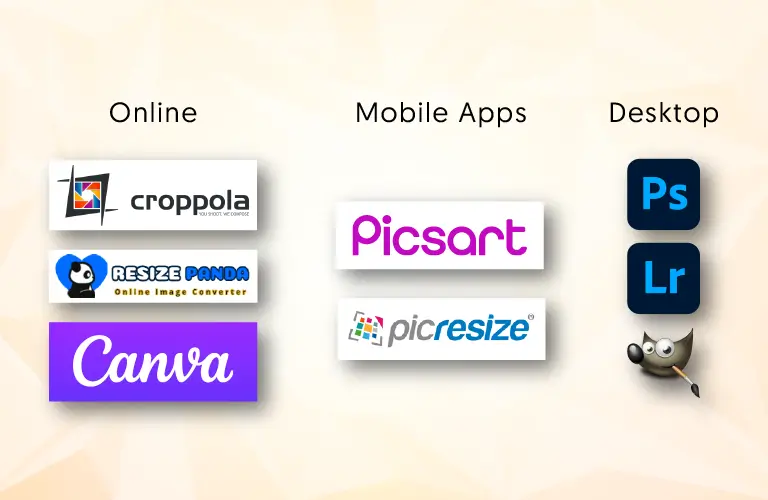
Before starting to resize or crop your 4×4 photos, try to pick the right tool and software. This single endeavor will make the rest of the process easier for you.
- Online: To edit online, you can pick tools like Croppola, Resize Panda, and Canva. They’ll help you to get the best automatically-balanced size for your picture.
- Mobile Apps: Craving for some mobile tools that will make your size comparison easier, as well as ensure the creative input, too? Go for the Image Size, Picsart, Photo Resizer, etc., to manage the best output.
- Desktop: Whether you want to get a bulk output, perfect color correction, or a professional touch, go for tools like Photoshop, Lightroom, and GIMP. They will ensure the finest result.
Common Printing Mistakes to Avoid
Do your photos look perfect on screen? After printing, they may not look the same. To ensure the best output while printing a 4×4 photo size, avoid these mistakes:
- Using small images in most cases results in pixelated or blurry prints. To ensure sharper output, use 1200 × 1200 pixels (300 DPI).
- Over-cropping can cut off all the important details and even the subject of your picture. To make it perfect, maintain a 1:1 ratio, and place your subject in the middle.
- Poor lighting makes the printed pictures dull and washed out. To remove the dark shadow, brighten the picture 10-15% before printing.
- The wrong color profile can destroy your printed image, as printing and screen use different color modes. To avoid the issue, try to use sRGB.
Frequently Asked Questions
-
Can you tell me the 4×4 photo measurement in centimeters?
For both digital and printing usage, you should go for 10.16 x 10.16 centimeters to get a 4×4 photo size. It’ll provide you with a perfect square-shaped frame.
-
Which pixel should I use for the 4×4 photo size?
The best option to get the finest result out of 4×4 is choosing 300 DPI. This will give the photo 1200 x 1200 pixels, which will make it look sharp and professional simultaneously. You won’t have to worry about the pixelation, either.
-
Can a 4×4 be used as a passport photo?
Yes, but only if the requirement is 4×4 centimeters. Always confirm the size standards for your specific country first.
-
Which paper is the best option to print 4×4 photos?
It actually depends on the purpose. The Glossy paper has vibrant color and depth. On the other hand, matte paper provides a non-reflective and elegant aura to place on displays.
-
Can Instagram pictures be printed as 4×4 prints?
Of course, you can. Instagram grid uses a 1:1 ratio. And that’s the perfect size for a 4×4 photo. Just before printing, ensure the resolution is a minimum of 300 DPI.
Should You Choose 4×4-inch Photo Size?
The more important question about 4×4 photo size revolves around more than just knowing how big a 4×4 photo is. 4×4 is a versatile photo frame that can be used both for personal and professional use. To use it to its best capacity, you should understand the dimensions, aspect ratio, creative application, printing options, and so many little things.
The primary knowledge that you should always harbor while using a 4×4 photo size is to go for 300 DPI, use the glossy or matte paper based on your requirements, ensuring a 1:1 aspect ratio, and plan the printing process as well as the editing options thoughtfully.
Because, whether it’s about the wall display, or Instagram grid- by only ensuring all of these processes, you’ll be able to use these single-sized photos for multiple functions.