Maintaining perfect product image consistency standards for ecommerce platforms is a must, no doubt, whatever the products you are selling online.
You always find visual consistency to come first regarding the best quality of great ecommerce product images. Apart from standing out from the crowd, product image consistency creates strong brand recognition and builds trust.
Variations in product visuals make customers confused. They feel less confident about purchasing the product from a particular brand. So, let’s learn how to achieve consistent product visuals across all ecommerce listings from photoshoot to post-production.
Why Product Image Consistency is Important for Ecommerce Businesses?
An ecommerce business can’t beat its competitors with inconsistent product images. Here is why visual consistency is crucial for online businesses.
- Maintains a cohesive look across all product listings
- Improves brand recognition and a high level of professionalism
- Builds trust and credibility with customers
- Better shopping experience
- Creates a unified message and set of values
- Better conversation rates and sales growth
How to Maintain Product Image Consistency Standards for Ecommerce?
Lighting Setup
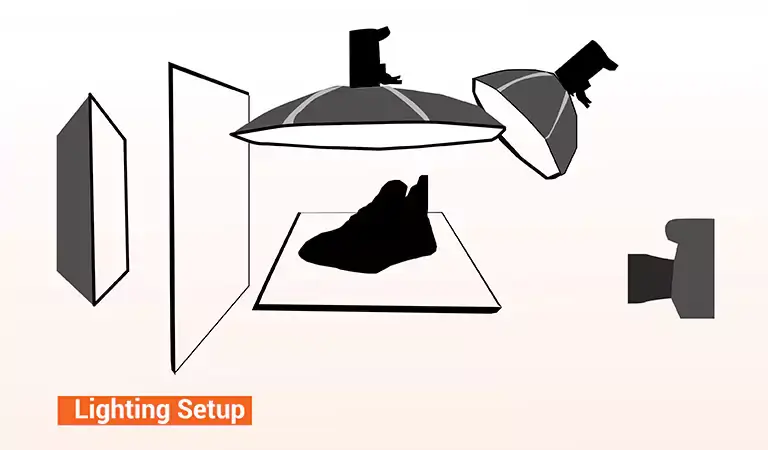
An inappropriate lighting setup causes inconsistency. The overall product presentation looks unprofessional.
- Position the primary light source at a 45-degree angle to the product
- Invest in fill or accent lights to better control shadows and reflections
- Use similar color temperature bulbs (5000K-6500K) to create consistent listings
- Cross-check the lighting setup before starting the product photography
- Note down the same lighting setups and measurements to use for other projects
- Use a light meter to maintain consistent exposure and lighting for all shots
- Invest in a color checker to create standard color reproduction for all images
Shadow Management
Product shadows create true-to-life visuals. Here is the right way to manage product shadows to maintain a uniform look.

- The position of the shadow must be directly below the product from the left or right side in the same direction.
- Use either a natural-looking shadow or a realistic drop shadow to maintain consistency.
- Follow standardized shadow adjustment techniques during the post-production.
Background Uniformity
A product background plays a key role in creating a professional presentation. It creates a strong first impression. Use a systematic approach to set up the exact same environment.
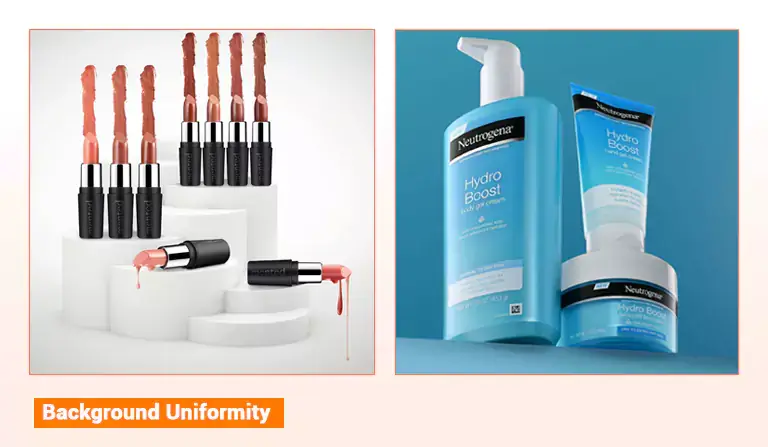
- Use a pure white or any neutral color to create a uniform look
- For any textured background, like wood, marble, or floral cloths, keep the background material, size, and distance exactly the same for all shots
- Adjust the background setups for completely different product categories to achieve a similar presentation
Props and Styling Elements
Various types of functional, context, and complementary props and styling materials are used in product photography. Use the same physical elements for product listings to foster consistency. Note down the items, their placement, and angles to maintain the core standards.
Image Dimensions, Resolution, and Aspect Ratio

Use identical image dimensions, resolution, and aspect ratio for all product images. However, they must meet specific ecommerce website requirements and ensure optimized loading speed.
Product Positioning and Angle
Use the same product placement technique based on the ecommerce site requirements. An identical percentage of frame space should be applied for all product listings. You can’t also ignore the camera’s height and distance ratios.
Product Composition
Are you selling a single-based product or multiple products as a package? What type of product do you sell? You can use balanced or dynamic compositions across catalogs depending on the product type. Don’t neglect the product arrangements, too. The following are the most standard photography styles for various products.
| Product Type | Photography Type |
| Fashion Items | Flat lay or catalog photography |
| Jewelry | Macro and lifestyle shots |
| Electronics | Full-frame or detailed close-up shots |
| Home Goods | Lifestyle photography |
Use the Same Camera and Settings
Use the same camera model, lens, and tripod height to avoid variations across all product listings. It also speeds up your editing task.
A fixed aperture, ISO, shutter speed, and white balance can help you achieve a more uniform look.
Apply standardized autofocus modes, like AF-S, AF-C, AF-A, AF-F, etc. Note down all camera configurations to use identical settings in the future.
Effective Post-production Practices to Maintain Consistency in Ecommerce Listings

Make sure to examine and prepare your products carefully before starting the shoot. The following are effective image editing practices to avoid variations in ecommerce product listings.
- Use the same computer software like Adobe Photoshop, Lightroom, or GIMP to maintain similar brightness, sharpness, contrast, saturation, and other effects.
- RAW file formats are better for adjusting color, exposure, and white balance consistently.
- Save the previous presets and other post-processing effects as references to use them for the rest of the product images.
- Set a standard cropping ratio depending on the specific ecommerce requirements for uniform cropping and resizing.
- For bulk product images, use batch processing software to apply the same edits to multiple images to save time and maintain consistency.
- For smartphone app editing, use Adobe Lightroom Mobile, Snapseed, or Picsart and their identical filters and adjustments.
Bonus Tips To Avoid Variations in Ecommerce Listings
- Opt for a plan to develop a standard template across your products.
- For multiple lines of products, create a detailed style guide for each one.
- Use functional lightboxes to achieve uniform product shots.
- Research meticulously to create a theme color that aligns well with your brand’s messaging.
Frequently Asked Questions for Product Shot Consistency Standards for Ecommerce
1. Why is it important to follow product image consistency standards for ecommerce?
Maintaining these standards creates a cohesive look across listings, which builds customer trust, improves brand recognition, and leads to higher conversion rates and sales growth.
2. What color temperature is recommended for consistent product lighting?
To achieve a uniform look, you should use light bulbs with a consistent color temperature between 5000K and 6500K for all product photos.
3. How should shadows be positioned to maintain a uniform look?
Shadows should be positioned consistently, either directly below the product or from the left or right side in the same direction, using natural-looking or realistic drop shadows.
4. What camera settings help avoid variations across product listings?
Using a fixed aperture, ISO, shutter speed, and white balance, along with standardized autofocus modes (like AF-S or AF-C), ensures all shots remain uniform.
5. How can software help maintain consistency during post-production?
Using identical software like Adobe Photoshop or Lightroom allows you to apply saved presets and batch processing to ensure similar brightness, contrast, and saturation across all images.
Conclusion
These proven techniques will get you up to speed on product image consistency standards for ecommerce. Before uploading product images to any e-commerce platform, be sure to review and compare the product visuals.
The steps from lighting setup to using the same camera and settings help you manage your photoshoot, while the activities from using any software to following specific ecommerce requirements perfect your post-production.
This way, you can proceed according to your product photography pre- and post-production best practices, which will lead to an increase in your conversion rate.